How to delete ChatGPT history, and what each button erases
· Written and maintained by Nonimo
To delete ChatGPT history one chat at a time, open your chat history, select the more options menu (•••) next to the chat, choose Delete and confirm. On iPhone or Android, press and hold the chat title and tap Delete. To delete all of it at once, open Settings, then Data controls, then Delete all chats. The chats leave your account right away, and OpenAI says it schedules them for permanent deletion from its systems within 30 days, with exceptions.
That covers the conversations. It does not cover everything ChatGPT kept from them. A saved memory made from a chat survives the chat, a file you uploaded can live on in Library, and archiving a chat, which looks like tidying up, deletes nothing at all. This guide goes button by button: what each one removes, what it leaves, and where the 30 days come from.
Every step and every deadline here comes from OpenAI’s help center and privacy policy as we read them on October 4, 2026, and from Google, Anthropic and Microsoft for the sections on Gemini, Claude and Copilot. What OpenAI does with your data while it holds it, from training to sharing, is a separate question, answered in our guide to whether ChatGPT shares or sells your data.
How to delete ChatGPT history, one chat at a time
The single chat is where most people start, usually because of one conversation they would rather not keep. OpenAI’s help center gives four steps for the web.
- Open your ChatGPT chat history in the sidebar.
- Select the more options menu (•••) for the chat you want to delete. On a computer it appears when you hover over the title.
- Select Delete.
- Confirm the deletion.
Deletion is permanent. OpenAI states that you cannot restore a deleted chat, in ChatGPT or through OpenAI support. If you might want the conversation later, export your data first, as described further down.
On iPhone and Android
In the mobile apps the menu opens with a press rather than a click. On iPhone, tap the menu icon (≡) in the top left corner to open your conversation history, press and hold the conversation title, and tap Delete, which is shown in red. On Android the history opens from the two lines in the top left corner, and the same press and hold brings up a menu with Delete in red at the bottom.
Both help pages warn that the deletion is permanent. There is no undo after you confirm, on either platform.
On the Mac and Windows apps
OpenAI does not publish separate delete steps for its desktop apps, so the general steps above are the official ones. Its macOS help article adds that conversations, screenshots and files in the Mac app follow the same data retention policies as the web version.
If you are deleting because something went into a chat that should not have, such as a client file, deletion is the second step, not the first. Whether that paste was itself a breach, and whose notification clock it starts, is worked through in our breach analysis for client data in ChatGPT.
Delete all your ChatGPT chats at once
Clearing the whole history is one setting, and it sits in Data controls rather than in General, which is where people tend to look first.
- Open Settings from your profile menu.
- Select Data controls.
- Select Delete all chats.
- Review the confirmation message, then continue.
OpenAI’s help center attaches two warnings to those steps. The action can affect chats in your current account or workspace, including chats inside projects. And Delete all chats cannot be undone.
On a personal account that is usually what you want. On a work account the timing may not be yours to set: in ChatGPT Business and Enterprise, workspace admins control how long data is retained, and OpenAI states that authorized compliance tools may still access eligible workspace data under your organization’s retention policy.
In a city or county office, check before you clear anything. A prompt about public business can be a public record whatever account it was typed into, as our guide on AI and public records explains with the state archives’ own answers.
Archive is not delete: what each ChatGPT button erases
The Archive option sits right next to Delete in the same menu, and it causes more confusion than anything else here. Archiving removes a chat from the regular sidebar but does not delete it. OpenAI’s help center is explicit: archived chats remain searchable, archiving does not change the retention period, and it does not change whether the chat can be used to train OpenAI’s models. No confirmation is required, which is why it happens by accident.
To find archived chats again, open Settings, then Data controls, then Archived chats or View archived chats, depending on your device, and select Manage if it appears. From there you can unarchive a chat or delete it for real. Archive all chats sits next to Delete all chats on that same screen, so read the label twice.
| Button | What goes | What stays |
|---|---|---|
| Delete, one chat | The chat, from your view at once, and its shared link | Saved memories made from it, files saved in Library |
| Delete all chats | Every chat in the account or workspace, projects included | Saved memories, Library files |
| Archive | Nothing: the chat only leaves the sidebar | The whole chat, still searchable |
| Delete shared link | Future access through that link | The chat, and copies others already saved |
| Delete a saved memory | That memory | Mentions of it in past chats |
| Delete account | Chats, shared links and access | A limited set the law requires or permits OpenAI to keep |
| Temporary Chat | Never enters history or memory | A copy for up to 30 days, for safety |
OpenAI help center pages on deleting, memory, sharing, projects and accounts, checked October 4, 2026.
The table is the short version. The rest of this guide takes the rows that surprise people, starting with what a deleted chat leaves behind. For a medical practice the archive row deserves attention first, since an archived chat with a patient in it is still a stored chat, and which plans OpenAI will sign a business associate agreement for is set out in our guide to HIPAA compliant AI.
What deleting a chat leaves behind: memory, files and links
A chat is not the only place ChatGPT keeps what you told it. Three other stores sit beside your history, and each one has its own delete button.
Saved memories
OpenAI’s memory page says it plainly: saved memories are stored separately from chat history, and deleting the original chat does not automatically delete a separate saved memory created from it. If you told ChatGPT a client’s name and it remembered the name, deleting the chat leaves the memory.
- Open Settings.
- Select Personalization.
- Select Memory, then delete the saved memories you want gone.
Depending on your plan, that screen may show Memory, Reference saved memories, Reference chat history, Memory summary, Manage or Saved memories. Since June 12, 2026, the memory summary has a ••• menu with Delete and turn off memory, which deletes the remembered information in the summary and switches memory off without deleting past chats.
Two more details from the same page. Turning off Reference chat history schedules what was remembered from past chats for deletion from OpenAI’s systems within 30 days, and leaves saved memories alone. And OpenAI may keep logs of deleted saved memories for up to 30 days for safety and debugging. To remove something completely, OpenAI’s advice is to delete the saved memory and the chat where you first shared it.
Files in Library and in projects
Since March 2026, ChatGPT saves the files you upload or create in Library, and the help center is direct about the consequence: deleting a chat does not delete files saved separately in Library. You delete them there, by selecting the file and choosing Delete or the trash icon. If your Library shows a Recently deleted section, you can restore files from it or choose Delete forever, and once deleted they leave OpenAI’s systems within 30 days.
This is the row that catches people who uploaded a contract or a scanned ID: the chat is gone and the PDF is not. A file that leaves the office should be clean before it is uploaded, and what an AI reads inside a PDF is usually more than the page shows.
Projects work the other way round. Choosing Delete project from its ••• menu permanently removes the project’s chats and instructions, along with files stored only in the project, while files saved separately in Library stay. Images you generated are tied to their chat: OpenAI says that to remove an image from My images, you delete the conversation where it was created.
Shared links
Deleting a conversation removes its shared link, OpenAI states, with one exception: if the conversation has a scheduled task, the task pauses and its shared task link stays available until you delete it separately. Deleting only the link works in the opposite direction, stopping future access while the conversation stays in your history.
- Go to Settings, then Data controls.
- For Shared links, select Manage.
- Choose Delete shared link for one, or More actions, then Delete all shared links.
A deleted link does not reach copies other people already saved by continuing the conversation. OpenAI also notes that shared pages are not intended for search engine indexing, and that this does not make a link private: anyone who can open it can forward it.
Export your ChatGPT history before you delete it
Deletion is final, and an export cannot bring back chats that are already gone, so the order matters. Export first if there is anything you may need again.
- Open Settings, then Data controls.
- Under Export data, select Export.
- Select Confirm export.
- Open the email, select Download data export and save the ZIP file.
OpenAI says exports can take up to 7 days to arrive, and the download link expires 24 hours after you receive it, so download the file the day it lands. You have to be signed in to the same account. The ZIP holds your chat history and other account data, with your shared links listed in a file called shared_conversations.json; scheduled tasks are not included.
If you cannot sign in, the Privacy Portal does the same job: choose Make a Privacy Request, then I have a consumer ChatGPT account, then Download my data. Export is available on Free, Go, Plus, Pro and eligible Edu accounts. Business, Enterprise and ChatGPT for Healthcare workspaces have no export of your own to run.
The ZIP is one file holding every conversation you kept, so treat it like a client record. Store it where your firm keeps those, not in a downloads folder, and settle in your written AI policy who may export and where the file goes.
What OpenAI keeps after you delete ChatGPT history
Here is the sequence OpenAI describes. When you delete a chat, ChatGPT removes it from your account view immediately. OpenAI then schedules it for permanent deletion from its systems within 30 days.
Two exceptions are written into that same sentence. The 30 days do not apply to content that was already deidentified and disassociated from your account, and OpenAI can keep data longer when it must for security or legal obligations. Its US privacy policy, updated September 10, 2026, describes that second category as data kept for legitimate security, safety or legal reasons, even after you delete it.
Read the first exception slowly. If you allowed your content to be used to improve the models, the deletion does not reach material that had already been deidentified and disassociated from your account. Separately, OpenAI states that once you turn off Improve the model for everyone, it won’t use your new conversations to improve its models. Put those two sentences side by side and draw your own conclusion about the order in which to do things.
Turning training off, and the feedback buttons
The switch is in Settings, then Data controls: select Improve the model for everyone, turn it off and select Done. In the mobile apps it sits under the profile icon, in Data controls. When you are signed in, the setting follows the account across devices. The Privacy Portal offers a second route, Do not train on my content, and OpenAI says either one is enough.
One habit reopens the door. If you rate a response with a thumbs up or down after opting out, OpenAI states that the entire conversation associated with that feedback may be used to train its models. And turning training off deletes and hides nothing: your saved chats stay exactly where they were.
Agent chats, and the court order that ended
Not every clock runs to 30 days. Chats with ChatGPT agent, along with its browsing history and screenshots, stay until you delete them, and OpenAI states that deleted agent chats and their screenshots are deleted from its systems within 90 days. Deleting the chat deletes the screenshots taken during it.
The legal exception has been used. In the New York Times copyright case, a court order required OpenAI to retain consumer ChatGPT and API content indefinitely. OpenAI’s update of October 22, 2025, says its obligations under that order ended on September 26, 2025, and that deleted chats and Temporary Chats are again deleted automatically within 30 days. It adds that it keeps limited user data from April to September 2025, accessible only to a small, audited legal and security team.
A provider’s policy on keeping data has already mattered in a US courtroom. In the Heppner ruling on a defendant’s exchanges with Claude, the policy’s statement that the provider collects inputs and may disclose them was one of the reasons the court found no reasonable expectation of confidentiality.
Temporary Chat: the history that never starts
If the aim is to keep a conversation out of your history from the outset, Temporary Chat is the tool. Open a new chat, select Temporary, and choose Personalized or Unpersonalized before you send your first message, because the choice is locked once the conversation starts. By default, temporary chats are not personalized.
While it stays temporary, the chat does not appear in your history, does not create or update memories and is not used to improve OpenAI’s models. OpenAI may keep it for up to 30 days for safety purposes. A personalized temporary chat can draw on the memories and custom instructions you already have, and since August 27, 2026, you can save one, at which point it becomes a regular chat under the normal rules.
Files follow the same logic: uploaded in a temporary chat, they are not saved to your account or Library unless you save the chat. What Temporary Chat changes is what is kept afterward, not where the text went: it still traveled to OpenAI and was processed there, which is the side of the question our guide to what OpenAI does with your data covers from the policy.
Delete your ChatGPT account, the last step
Deleting the account takes everything with it, and it is the only way to do that in a single move.
- Sign in and open Settings from the account menu.
- Select Account.
- Next to Delete account, select Delete.
- Enter your email or phone number and type DELETE.
- Select Permanently delete my account.
Cancel any subscription bought through the Apple App Store or Google Play first, because deleting the account does not cancel it. OpenAI states it deletes your data within 30 days, except for a limited set it may keep longer where required or permitted by law, and that deleted accounts cannot be reactivated. Shared links go with the account, while shared scheduled task links have to be deleted beforehand.
The account also closes your access to the API. You can create a new account with the same email after 30 days, provided the old one was fully deleted. If you cannot sign in, the Privacy Portal has the same route: Make a Privacy Request, then I have a consumer ChatGPT account, then Delete my ChatGPT account.
On a work account
Business, Enterprise, Edu and Healthcare workspaces do not let you delete the account yourself. There the workspace admins control retention, and OpenAI states that deleted conversations are removed from its systems within 30 days unless it is legally required to keep them.
Whoever does the deleting, write down what was deleted and when. A dated note is the kind of record your cyber insurer’s renewal form is after when it asks what controls you have in place.
Your right to delete in the US: CCPA and state privacy laws
Everything above is a product feature. In the United States there is no federal law that gives you a general right to have a company delete your personal data, and no federal data protection authority to complain to. Where the right exists, it comes from state law.
California’s is the best known. Section 1798.105 of the Civil Code gives a consumer the right to request that a business delete personal information it collected from them. A business that receives a verifiable request has to delete it and tell its service providers and contractors to do the same. The statute then lists exceptions, among them security and integrity and compliance with a legal obligation, which line up with the reasons OpenAI gives for keeping data longer.
OpenAI’s US privacy policy, updated September 10, 2026, lists the right to request deletion among the rights you may have depending on where you live. You can use the account tools above, submit a request through privacy.openai.com, or email dsar@openai.com. The policy accepts requests through an authorized agent with signed permission, and appeals of a decision go to the same address.
When the button is not enough
For your own chats the button is faster than a legal request. The request route earns its place when you cannot sign in, when the data sits outside your chats, or when ChatGPT’s answers say something about you. The Privacy Portal offers Remove my personal data from ChatGPT responses, and the US policy says it considers correction or removal requests about its output under applicable law and the technical capabilities of its models.
California also protects some categories more tightly as sensitive personal information, and our guide to PHI and PII in HR files shows where an employee’s medical note lands on that list before anyone pastes it.
How to delete Gemini, Claude and Copilot history
The other three assistants follow the same pattern with different buttons: one chat from a menu, everything from a settings page, and a store or two that outlives the delete. Each has its own data guide on this site, so this section sticks to the procedure.
| Assistant | Delete everything | What to check afterward |
|---|---|---|
| Gemini | Activity, then Delete, then All time | Chats a human reviewed, kept up to 3 years |
| Claude | Chats and tasks, Select all, then Delete | Memories from deleted chats, in Settings |
| Copilot | Privacy dashboard, Delete all activity history | Saved memories, deleted separately |
Google Gemini Apps Privacy Hub and help pages, Anthropic help center, Microsoft Support, checked October 4, 2026.
Delete Gemini history
On the web, hover over the chat in the side panel, click More, then Delete. In the mobile app, tap Menu, touch and hold the chat under Recent, and tap Delete. For everything, go to gemini.google.com, click Activity and choose Delete, then All time; the same page offers the last hour, the last day or a custom range. Google deletes activity older than 18 months by default, and you can change that to 3 or 36 months.
Two things outlast the delete. Even with Keep Activity off, Google keeps conversations with your account for up to 72 hours. And chats reviewed by human reviewers are not deleted when you delete your activity: Google retains them for up to 3 years, disconnected from your account. Delete public links yourself under Settings & help, then Your public links. The rest is in what Gemini does with your data.
Delete Claude chat history
In Claude on the web, find the conversation in the left sidebar or under Chats and tasks, hover over it, click the ⋮ button, then Delete, and confirm. To clear several or all, open Chats and tasks, click ⋮, then Select, tick the boxes or choose Select all, and delete. On iPhone, touch and hold the conversation; on Android, use the ⋮ menu inside a chat or the checklist icon in your chat list.
Anthropic states that a deleted conversation leaves your history immediately and its back end within 30 days, and that a deleted chat will not be used to train future models. Memory is separate: entries generated from a deleted chat stay, so open Settings, then Memory, and delete those topics as well. The training side is covered in does Claude train on your data.
Delete Copilot history
Microsoft released a new consumer Copilot app on August 18, 2026, and its help pages are split by version. In the new app, select the conversation in the Chats list, then More, then Delete. To clear everything, open the Microsoft privacy dashboard, go to Copilot, then Your Copilot app activity history, choose Delete all activity history and confirm with Clear.
Memory is a separate switch. In Settings, then Personalization, select Manage next to Saved memories to delete memories one by one or all at once; Microsoft notes that turning memory off does not delete what is already saved. To stop a shared link, go to Settings, Data controls, Shared links and choose Stop sharing. The pages for the older app state 18 months of retention. The rest is in does Microsoft Copilot train on your data.
Delete afterward, or cover before you send
Everything in this guide works after the fact. By the time you press Delete, the text has already reached OpenAI’s servers, may have been reviewed, may have gone into training if that was switched on, and stays in its systems for up to 30 days, or longer under a legal hold. The step that decides what OpenAI receives comes before you press Send.
Nonimo, an app for Mac and Windows, covers names and identifiers on your computer before the text reaches the AI. Each one becomes a label such as [PERSON_1], and when the answer comes back, Nonimo puts the real values back on the same machine. The original names and numbers stay on your computer, where the app keeps each conversation encrypted, as our security page sets out.
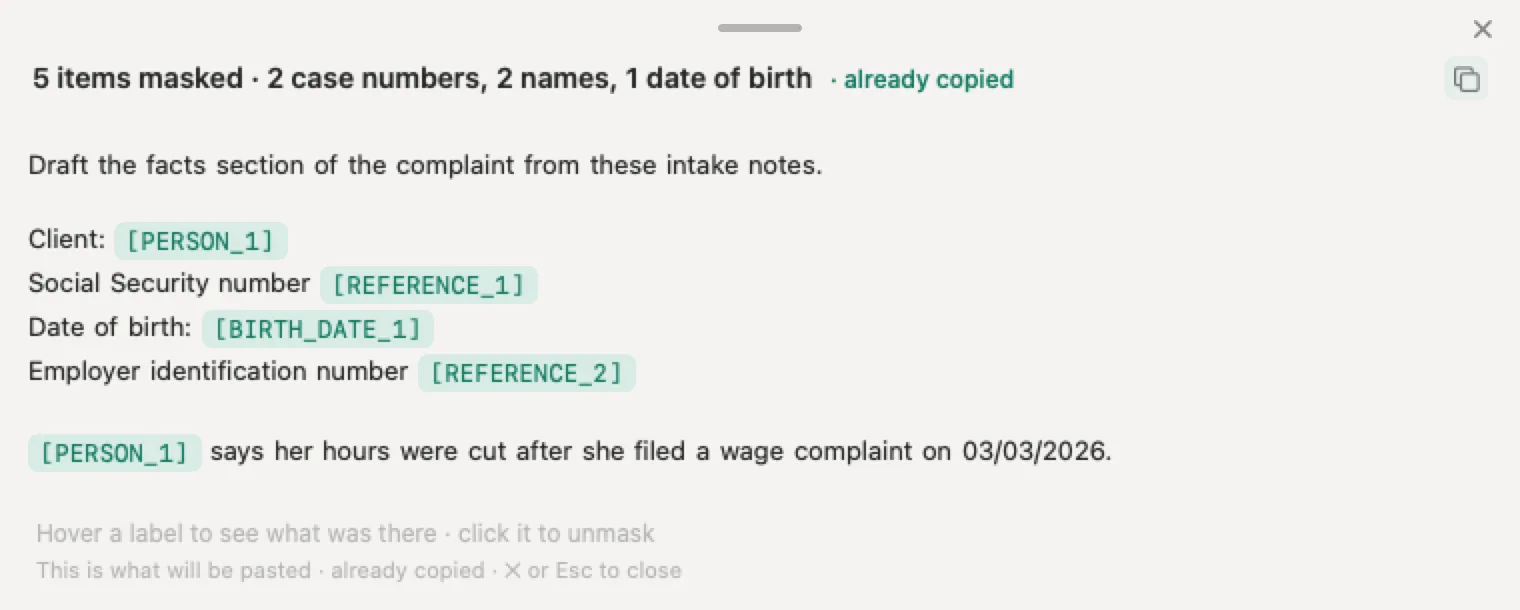
For a single document there are two browser tools. The tool in our guide to what personal information to remove before AI masks your text, gives it back to you to copy, and discards it as soon as you have the result, as its privacy notice describes. For a driver’s license, the redaction tool in our license guide reads and covers the photo in your browser, so the photo never leaves your computer.
Sources
Checked October 4, 2026. OpenAI’s help center shows only relative dates, so the approximate date of each page is given as read that day.
- OpenAI, Deleting and archiving chats in ChatGPT, updated about September 20, 2026. Web steps for one chat, Delete all chats in Data controls, archive versus delete, no restore, removal from view at once and from OpenAI’s systems within 30 days with its exceptions, workspace compliance tools, Library files untouched by chat deletion.
- OpenAI, How can I delete a conversation in the ChatGPT iOS app and the Android equivalent. Press and hold, Delete in red, deletion irreversible.
- OpenAI, How is data retained in the macOS app. Mac conversations, screenshots and files follow the web version’s retention policies.
- OpenAI, Chat and file retention in ChatGPT, updated about September 23, 2026. Archived chats keep their retention period; deleted chats and files within 30 days.
- OpenAI, Data controls in ChatGPT, updated about September 29, 2026. Improve the model for everyone, archiving does not change training, turning training off does not delete chats, the feedback exception.
- OpenAI, How your data is used to improve model performance. New conversations after opting out, and either opt out route is enough.
- OpenAI, Memory in ChatGPT, updated about September 20, 2026. Saved memories stored apart from chats, the memory path, Delete and turn off memory, Reference chat history, logs of deleted memories for up to 30 days.
- OpenAI, Using Library to manage files in ChatGPT, updated October 4, 2026. Files kept until you delete them, Recently deleted, Temporary Chat uploads.
- OpenAI, Projects in ChatGPT and Images in ChatGPT. Delete project, and deleting the conversation to remove a generated image.
- OpenAI, Sharing conversations and scheduled tasks in ChatGPT, updated about September 20, 2026. Links removed with the chat, the scheduled task exception, Manage and Delete all shared links, copies others saved, not intended for search engine indexing, links deleted with the account.
- OpenAI, Exporting your ChatGPT history and data, updated in September 2026. Export steps, up to 7 days, link valid 24 hours, contents, no export of deleted chats, plans where it is offered.
- OpenAI, Temporary chat in ChatGPT, updated about September 20, 2026, with the release note of August 27, 2026. How to start one, what it skips, up to 30 days for safety, personalized and saved temporary chats.
- OpenAI, ChatGPT agent, updated about September 15, 2026. Agent chats and screenshots deleted within 90 days.
- OpenAI, Deleting your ChatGPT account, updated about September 28, 2026. Account deletion steps, 30 days, subscriptions, API access, email reuse, no reactivation, the Privacy Portal route, work workspaces.
- OpenAI, Privacy Portal, last updated April 29, 2026. Download my data, Delete my ChatGPT account, Do not train on my content, Remove my personal data from ChatGPT responses.
- OpenAI, US privacy policy, updated September 10, 2026. Deletion within 30 days and its exceptions, data kept longer for security, safety or legal reasons, the right to request deletion, privacy.openai.com and dsar@openai.com, authorized agents and appeals.
- OpenAI, Enterprise privacy at OpenAI, updated January 8, 2026. Admins control retention on Business, Enterprise, Edu and Healthcare; deleted conversations removed within 30 days unless legally required.
- OpenAI, response to The New York Times’ data demands, update of October 22, 2025. The retention order, its end on September 26, 2025, and the limited data kept from April to September 2025.
- California Civil Code § 1798.105. The consumer’s right to request deletion, the duty to notify service providers and contractors, and the exceptions.
- Google, Manage and delete your activity in Gemini Apps, Find and manage your recent chats and Share your chats. Delete steps, time ranges, auto delete at 18 months with 3 or 36 as options, 72 hours with Keep Activity off, public links.
- Google, Gemini Apps Privacy Hub, last updated September 24, 2026. Chats reviewed by humans retained for up to 3 years, disconnected from the account.
- Anthropic, Delete or rename a conversation, August 10, 2026, and How long do you store my data, July 1, 2026. Delete steps on web, iPhone and Android, removal from the back end within 30 days, deleted chats kept out of future training.
- Anthropic, Use Claude’s chat search and memory. Memory entries survive a deleted chat; Settings, then Memory.
- Microsoft, Copilot for individuals: your privacy controls and choices, September 17, 2026, and Manage your Copilot activity history in the privacy dashboard, August 21, 2026. Deleting one chat in the new app, Delete all activity history, saved memories, turning memory off.
- Microsoft, Share conversations and responses in Microsoft Copilot, September 8, 2026, and Conversation history in Microsoft Copilot. Stop sharing, and the 18 months stated for the older app.
Nonimo is the software that does this on your own computer: it masks client names and IDs before your text reaches ChatGPT. No account needed, and the app does it without your files leaving your machine.
Common questions
How do I delete my ChatGPT history?
To delete ChatGPT history one chat at a time, open the ••• menu next to the chat, select Delete and confirm; in the iPhone and Android apps, press and hold the chat title and tap Delete. To delete everything, open Settings, then Data controls, then Delete all chats. OpenAI says deleted chats leave your account view at once and its systems within 30 days, with exceptions for legal and security reasons.
Is a deleted ChatGPT chat gone for good?
From your account, yes, and right away. OpenAI states you cannot restore a deleted chat, in ChatGPT or through its support team. From OpenAI's systems it is scheduled for permanent deletion within 30 days, unless it was already deidentified and disassociated from your account, or OpenAI has to keep it longer for security or legal obligations. If you may need the conversation again, export your data before you delete.
Is archiving a ChatGPT chat the same as deleting it?
No. Archiving only removes the chat from the regular sidebar. OpenAI's help center says archived chats remain searchable, keep the same retention period and stay subject to the same training setting. To delete an archived chat, open Settings, then Data controls, then Archived chats, and select Delete. Archive all chats sits next to Delete all chats on the same screen, so read the button before you press it.
Does deleting a chat delete what ChatGPT remembers about me?
Not automatically. OpenAI states that saved memories are stored separately from chat history, and deleting the original chat does not delete a saved memory created from it. Open Settings, then Personalization, then Memory, and delete the memory too. To remove something completely, OpenAI's advice is to delete both the saved memory and the chat where you first shared the information.
Does deleting my ChatGPT history remove it from training?
OpenAI does not put it in those words. Its privacy policy says the 30 day deletion does not reach content already deidentified and disassociated from your account when you allowed it to be used to improve the models. And switching off Improve the model for everyone applies to your new conversations. Read together, the sensible order is to switch training off before you use ChatGPT for work, not after.
What happens to shared links when I delete a ChatGPT chat?
OpenAI states that deleting a conversation removes its shared link, except for a scheduled task link, which you delete separately. Deleting only the link stops future access but keeps the chat in your history, and it does not reach copies other people already saved by continuing the conversation. You manage every link in Settings, then Data controls, then Shared links, then Manage.
Can I get my ChatGPT history back after deleting it?
No. OpenAI states that a deleted chat cannot be restored in ChatGPT or through support, and that an export cannot bring back chats that are already gone. So export first: Settings, then Data controls, then Export data. The file arrives by email, can take up to 7 days, and its download link expires 24 hours after you receive it.
Does deleting my ChatGPT account delete all my chats?
Yes. OpenAI states it deletes your data within 30 days of account deletion, apart from a limited set it may keep longer where the law requires or permits, and your shared links go with the account. Cancel any App Store or Google Play subscription first, because deleting the account does not cancel it. Deleted accounts cannot be reactivated.
How do I keep client details out of ChatGPT history in the first place?
Cover them before you send. Deleting history works after the text has reached OpenAI, while masking works before. Nonimo, an app for Mac and Windows, replaces names and identifiers with labels such as [PERSON_1] on your computer, so the chat, and any history built from it, holds the labels instead of the names. When the answer comes back, Nonimo restores the real values on the same machine.