AI for councils: what a customer request carries
In a council, what ends up in ChatGPT is rarely a whole file. It is the reply to a customer request about a barking dog, a summary of objections to a planning permit, or a letter on a rates hardship application that has to go out by Friday.
Nearly all of them carry the same things: the resident’s name, the property address, a mobile and an email, the rates assessment number and the case number. A hardship application often adds a Centrelink CRN, an infringement adds a rego and sometimes a driver licence copy, and a refund adds a BSB and account number.
Which privacy law applies to that information depends on your state, not on the Privacy Act, and our guide to AI in Australian councils works through it jurisdiction by jurisdiction.
A barking dog complaint in the chat, with the resident as placeholders
At the customer service desk, the officer highlights the request, presses the key and pastes it into ChatGPT, Claude or Copilot. The chat receives the version with placeholders, and nothing about the resident reaches us.
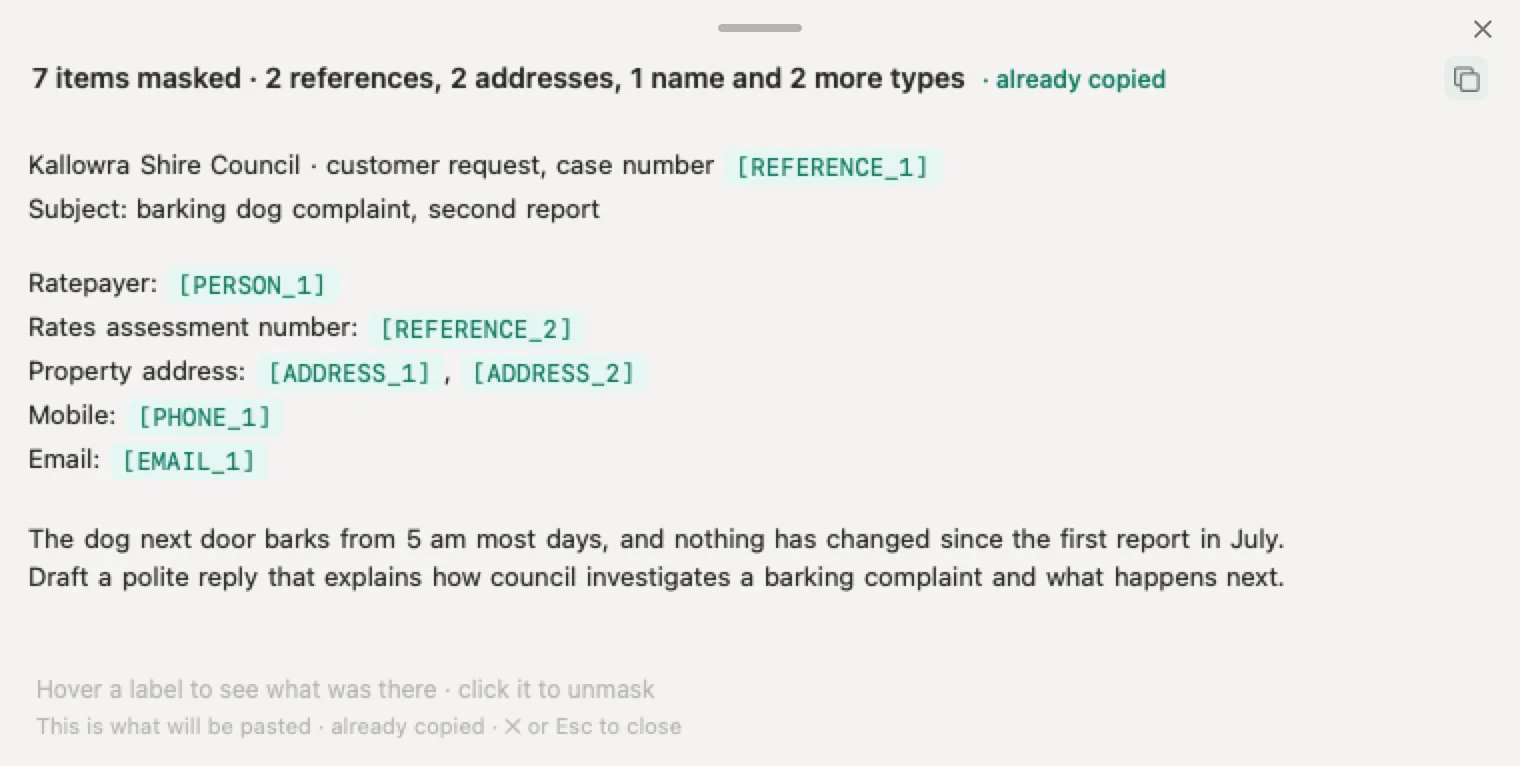
In the invented complaint below, Nonimo has masked six details: the case number, the ratepayer’s name, the rates assessment number, the property address, the mobile and the email. The barking, the hours and the history of the complaint stay whole, which is all the AI needs to draft the reply.
The AI writes back to [PERSON_1]. The officer copies the reply, presses the key again and the resident’s real name returns on screen, ready to check and send from the council’s own system.
Before: what gets pasted
Kallowra Shire Council · customer request, case number 2026-004512
Subject: barking dog complaint, second report

Ratepayer: John Citizen
Rates assessment number: 000000
Property address: 0 Example Street, Kallowra VIC 3999
Mobile: 0491 571 266
Email: j.citizen@example.org

The dog next door barks from 5 am most days, and nothing has changed since the first report in July.
Draft a polite reply that explains how council investigates a barking complaint and what happens next.
After: what the AI receives
Kallowra Shire Council · customer request, case number [REFERENCE_1]
Subject: barking dog complaint, second report

Ratepayer: [PERSON_1]
Rates assessment number: [REFERENCE_2]
Property address: [ADDRESS_1], [ADDRESS_2]
Mobile: [PHONE_1]
Email: [EMAIL_1]

The dog next door barks from 5 am most days, and nothing has changed since the first report in July.
Draft a polite reply that explains how council investigates a barking complaint and what happens next.
No server in the middle: masked on the officer’s own computer
Nonimo is an app on each officer’s Mac or Windows PC, and that is where the masking happens. There is no gateway, no proxy and no cloud service in between: nothing is uploaded to be cleaned, and the resident’s details never leave the computer they were typed on.
That matters for a council. In New South Wales, for instance, the question is often whether personal information leaves the state at all. Here the only text that travels is the placeholder version the officer chooses to paste, and our security page lists what stays on the computer.
It also keeps working with the network cut. Anyone in IT can check it in a minute: turn off the Wi-Fi, press the key and the resident’s details are masked all the same.
What OVIC found about a policy on its own
The closest thing Australia has to a worked example is OVIC’s investigation into a Victorian department whose child protection worker used ChatGPT on a court report. The department had an acceptable use policy and privacy training, and OVIC found them far from sufficient.
A council AI policy sets the rule. What it cannot do is stop a busy officer pasting a resident’s details into a chat at four in the afternoon. Nonimo is the step at the desk that the policy can point to: one key, and the identifiers are placeholders before the text goes anywhere.
If your council does not have that policy yet, start with our model AI policy, and put the key in it.
Nonimo for councils: price and where to start
ChatGPT for councils with Nonimo needs a PC with Windows 10 or 11, or a Mac with macOS 14 or later.
Nonimo’s free plan stops at a set number of words each month. Leave an email address on our licence page and a free licence file comes back that removes the cap until 31 January 2027, with no account to set up. The first desk is usually customer service, which answers residents all day, followed by rates and planning.
To cover every desk without anyone pressing a key, IT deploys the browser extension by policy, and a dashboard receives counts by category only. Our page for organisations explains how. Staff keep the chatbot they already use, and what OpenAI keeps of what it does receive is set out in our ChatGPT guide.
- Free plan, on Mac and Windows
- With a monthly word allowance
- The free licence lifts it until 31 January 2027, no account needed
Questions councils ask
Can council staff use ChatGPT with resident information?
It depends on your state's privacy law and on what goes in. OVIC tells Victorian public sector organisations that staff should not enter personal information into publicly available generative AI tools. Nonimo lets officers keep using the chatbot they know: the resident's name, address, rates assessment number and contact details become placeholders on the officer's own computer before anything is sent.
Does Nonimo send council data to a server to be cleaned?
No. The masking happens on each officer's Mac or Windows PC, so there is no gateway, proxy or cloud service in the middle and nothing is uploaded to be cleaned. The only text that leaves the computer is the placeholder version the officer pastes into the chat, and the originals stay where they were.
Is any of the text about our residents sent to Nonimo?
Not a word. The masking happens on the officer's own computer, and it keeps working with the network cut, which anyone in IT can check in a minute by turning off the Wi-Fi.
What happens to the council's own name?
It stays readable, on purpose. The shire, the department and the service are the context the AI needs to write a good reply, not details about a resident. What Nonimo masks is who the request is about: their name, address, phone, email, rates assessment number and the case number, all shown on screen before you paste.
Can the AI's reply still use the resident's name?
Yes, on your screen. The AI writes to [PERSON_1], you copy its reply, press the key again and the real name and details come back in their place, ready to check and send from your usual system. The chatbot only ever saw the placeholders.
How does a council roll it out?
Start with one customer service desk: install the app, press the key on a made-up request like the one on this page and see what gets masked. To cover every desk without anyone pressing a key, IT deploys the browser extension by policy, and a dashboard receives counts by category only.