· Updated

Joaquín Trapero in Founder of Nonimo, writing on AI and privacy.
A workbook is the hardest file to redact by eye. Excel decides what to draw, while the .xlsx underneath keeps everything it was ever given: hidden sheets, the list behind a drop-down, the author of each note. Before it reaches ChatGPT or Copilot, which reads Microsoft 365 files on its own terms, that gap matters.
Everything below happens on a copy: first finding what the file hides, then coding the names, then cutting the sheet down to what the AI needs. That last step is the one I value most. If the routine should become something staff sign, a ready-to-edit AI policy has a place for it.
Change the values, not the view. On a copy, unhide every row, column and sheet, swap each name for a random code kept in a separate key file, clear notes and comments, then check formulas, named ranges, PivotTables and headers. Run the Document Inspector on Windows; elsewhere, check by hand.
Does hiding a column or a sheet remove the data?
No. Hidden is a display setting saved beside the values. Excel undoes it in two clicks, and a program reading the file can ignore it altogether. The Library of Congress describes an .xlsx as a ZIP package of XML parts, so any ZIP tool opens one.
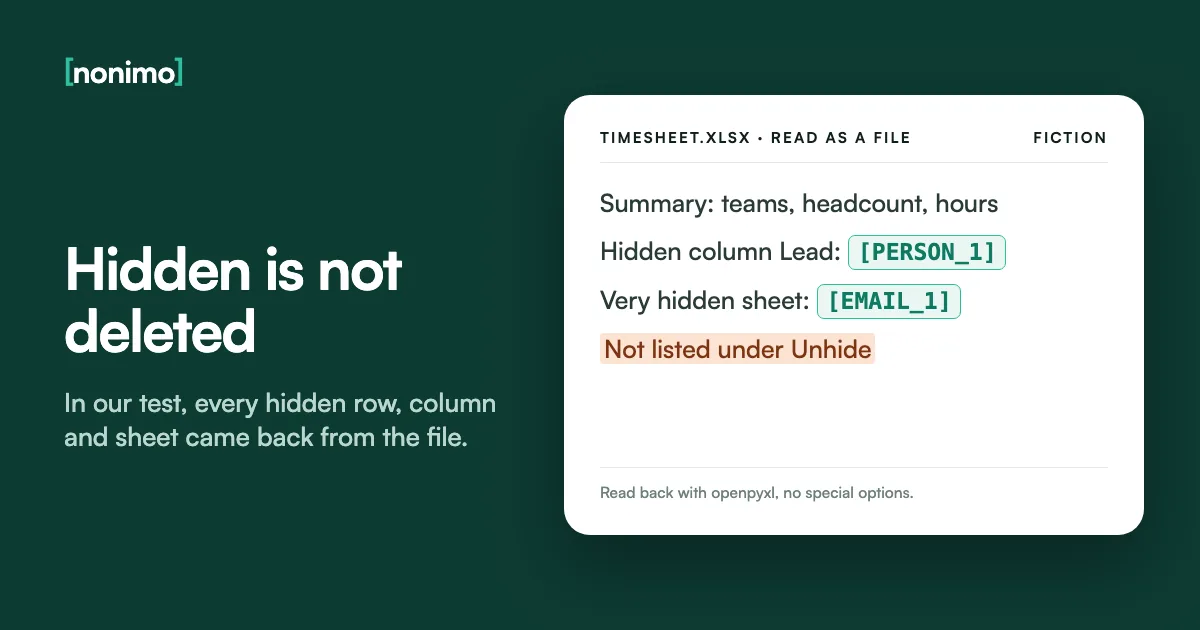
We ran the test on 28 September 2026. We built an invented workbook with openpyxl, an open-source Python library: a hidden row, a hidden column, a hidden sheet and a very hidden sheet, a state Excel’s menus can’t set. Read back with openpyxl 3.1.5 and no special options, all four returned, names included.
Formatting tricks fail the same way. Microsoft’s help on the ;;; number format says the values stay in the formula bar, and white font or black fill do even less. Nor would I rely on a filter: it hides rows too. Boxes drawn over a PDF are the same mistake in another format.
One invented workbook, two ways of opening it
Left, what the Excel window showed. Right, what openpyxl returned from the same file.
What Excel draws
One tab: SummaryTeams, headcount, hoursNo names on screenWhat the file reader returns
Summary, plus the hidden Lead columnThe hidden Front desk rowStaff, a hidden sheet: a name and a made-up US Social Security numberLookup, very hidden: a name and an email addressOur test of 28 September 2026: an .xlsx with invented people, built with openpyxl and read back with openpyxl 3.1.5, no special options.
Check an .xlsx for hidden sheets and comments before it goes
Look before you change anything. Microsoft’s help warns that the Unhide command won’t list a sheet set to very hidden, so an empty Unhide list proves nothing. The box below opens a workbook on your own computer and names every hidden sheet, very hidden ones included.
It also counts hidden rows and columns, notes and comments, and lists the people the file records as author or commenter. It reads structure, not cells, so a visible column full of names won’t register. It takes a .pptx too, for when a slide deck goes out with the workbook.
If it lists a sheet nobody in the office recognises, my move is to stop there and ask who built the file and what that sheet feeds. Deleting it blind can break the totals you were about to send.
Hidden sheets, notes and authors in your copy
Pick the copy you were about to upload.
This check runs locally in your browser and uploads nothing. Cell contents, named ranges, headers, footers and PivotTable caches are beyond it. If a file like this has already gone out, see whether that counts as a breach.
Replace names with consistent IDs and keep the lookup table apart
Deleting the name column is cleanest when the task never needs people. Often it does: you want the AI to find who logged the most overtime, then know who that is. A code gives the model something to point at while the names stay with you.
Copy the names to a new sheet and choose Remove Duplicates on the Data tab; Microsoft warns it deletes permanently, so work on the copy. Give each person a code, fill the main sheet with XLOOKUP (Microsoft 365, Excel 2021 or later), paste as values and delete the names.
Pick codes nobody can guess. The EDPB’s draft guidelines on pseudonymisation warn against pseudonyms predictable from a few observed values, and EMP-001 for the first surname alphabetically is exactly that. Sequential codes are the shortcut I’m most wary of. A code you can reverse is masked, not anonymous.
Where each piece ends up
The middle column is the only one that leaves your computer.
Working sheet
Tamsin Herreweghe · 41 hBartholomew Quayle · 46 hCopy for the AI
R4M9 · 41 hK7Q2 · 46 hKey, in another folder
R4M9 = HerrewegheK7Q2 = QuayleInvented people and codes. The random four-character codes follow the EDPB draft's point about unpredictable pseudonyms (Guidelines 01/2025, paragraph 92).
Is the coded sheet still personal data? For you, yes. The GDPR (EU and UK law) treats data as pseudonymised when it can’t be tied to anyone without extra information kept separately and protected, and your key file is that information. A key left as a hidden sheet in the upload undoes everything.
In EDPS v SRB (4 September 2025), a case under the rules for EU institutions, the EU Court of Justice said pseudonymisation may, depending on the circumstances, stop people other than the controller from identifying anyone. I doubt that ruling helps a sheet whose job title and start date still point to one person.
Whatever the recipient can work out, the file still sits with the AI provider afterwards, under the terms OpenAI applies to what you upload if it goes to ChatGPT.
Who can turn the codes back into names?
Where does the key file live?
Do other columns still single out one person?
Our reading of Article 4(5) GDPR, the EDPB's draft Guidelines 01/2025 and the Court's press release on case C-413/23 P. A sorting aid, not legal advice.
Find and Replace for names: what it misses in notes and comments
Codes handle the name column. Names also sit inside other cells: a remarks column, a label typed beside a total, an email address. Press Ctrl+H, set Within to Workbook, search each surname alone, and step through the hits with Find Next instead of trusting Replace All.
Microsoft’s help holds the catch: on the Replace tab, Look in offers only Formulas. A surname inside a note or a comment survives Replace All untouched. Switch to the Find tab, choose Notes, then Comments, and edit or delete each hit by hand.
Mac and web differ again, as the table shows. Where an office has one Windows machine, the last search belongs there, I think. A sheet that was exported to plain text needs a column-by-column pass of its own.
What each version of Excel searches
The highlighted row is why Replace All leaves names behind.
| Windows | Mac | Web | |
|---|---|---|---|
| Look in, Find tab | Formulas, Values, Notes, Comments | Listed | Not listed |
| Look in, Replace tab | Formulas only | Not listed | Not listed |
| Opening Replace | Ctrl+H | Control+H | Options sit under Search Options |
Microsoft Support, Find or replace text and numbers on a worksheet, Windows, Mac and web tabs.
Formulas, named ranges and PivotTables that still hold the names
A visible sheet can keep pulling from one you meant to remove. A formula such as =Staff!B4 puts a name on screen and shows where the rest live. Paste values over anything that refers to people, then delete the source sheet and look for #REF! errors.
Named ranges sit in Formulas, Name Manager, and a drop-down list built with Data Validation often draws on a range of names on a hidden sheet. Microsoft’s Inspector lists hidden names among the things it finds but does not remove, so delete them yourself.
A PivotTable can carry its own copy of the source rows; Microsoft’s file-size help points to Save source data with file, under PivotTable Analyze, Options, Data. On a copy for an AI, I’d paste the summary as values and delete the PivotTable. Caches are among the quieter ways data leaves an office.
What does this workbook use?
Tick each one you find in the copy.
0 of 6 found
Nothing ticked: the cells are what's left to check.
Each item above can hold names off screen. Fix them on the copy before running the Inspector.
Hidden names, PivotTables and external links are on Microsoft's list of what the Inspector reports but leaves in place.
Comments, notes, headers and footers: names outside the grid
Excel has two kinds of annotation. Notes are the older yellow boxes; threaded comments carry a Reply box. Microsoft’s comparison draws the line clearly: on a note you can remove or change the name, on a threaded comment you cannot.
So a thread keeps every participant’s name, whatever the cell says. Right-click and choose Delete Comment or Delete Note on the copy. A Word report travelling with the workbook has its own edits to accept or reject.
Headers and footers show only in Page Layout view, Print Preview and on paper, so a name typed there years ago goes unseen. Tab names count too. Tabs are the piece I’d expect people to forget, because they look like structure. Author and company fields belong to the file’s metadata.
Names that never sit in a cell
The highlighted row can't be edited, only deleted.
| Where | How to see it | On the copy |
|---|---|---|
| Notes | Point at the cell's marker | Delete Note, or edit the name out |
| Threaded comments | The Comments button on the ribbon | Delete Comment |
| Headers and footers | Insert, Header & Footer (opens Page Layout view) | Clear names and file paths |
| Sheet tabs | The tabs themselves | Rename to a code |
| Chart titles and labels | Select the chart | Retype without names |
Menu names from Microsoft Support: The difference between threaded comments and notes; Insert comments and notes in Excel; Headers and footers in a worksheet.
The Document Inspector in Excel, and the checks on a Mac or the web
On Windows, open File, Info, Check for Issues, Inspect Document, on the copy. Microsoft splits the Excel results in two. Comments, headers and footers, hidden rows, columns and sheets, custom XML and invisible content can be removed there and then.
The second group is found but left alone: external links, embedded files, macros, PivotTables and other features with cached data, scenarios, filters and hidden names. Microsoft adds two warnings. Undo may not restore what was removed, and deleting hidden rows or sheets that hold data can change formula results.
Microsoft’s Inspector help gives only the File, Info route and says nothing of Excel for Mac or the web. To me it is a second opinion, never the method. Word’s Inspector has blind spots of its own, white text among them.
Your version of Excel
File, Info, Check for Issues, Inspect Document. Remove what you've already dealt with, then read the second list: links, cached data and hidden names need your hand, not a button.
No Inspector steps in Microsoft's help. Unhide sheets from the Home tab: Format > Visibility > Hide & Unhide > Unhide. The Replace tab has no Look in, so search notes and comments from Find. Then run the file through the checker further up.
Right-click a tab and choose Unhide for sheets. Find and Replace keeps its settings under Search Options and doesn't list Look in, so read notes and comments by eye or open the file in the desktop app.
Microsoft Support: its Document Inspector article; Hide or unhide worksheets; Find or replace text and numbers on a worksheet.
Dates of birth, postcodes and job titles that point to one person
Removing names still leaves rows that describe someone: a birth date, a postcode or ZIP code and a job title can pick out one employee in a small office. NIST’s de-identification guide treats these quasi-identifiers as a problem of their own, and details that identify someone beyond a name reach well past spreadsheets.
Coarsen rather than delete: a birth year, a region, bands instead of job titles. Build the new column with a formula, paste it as values, then remove the original. The US HIPAA safe harbor, 45 CFR 164.514(b)(2), works the same way: dates to the year, ZIPs to three digits where that area tops 20,000 people.
Small groups give people away: if one team has a single member, its row is that person. NIST calls a table k-anonymous when every combination of these columns appears at least k times, and sets no k. Three is our own floor, not a NIST figure; below it, I’d merge categories.
How many people share each combination?
Your own counts. A low average means some rows are one person.
Under three on average: some combinations hold a single person. Merge bands or drop a column.
The starting numbers are an example: 40 people over 5 teams, 4 age bands and 2 sites gives 1 per combination. Real groups are uneven, so the smallest is usually below the average. k-anonymity and quasi-identifiers: NIST SP 800-188. The threshold of three is our rule of thumb.
Send only the columns the question needs
The quickest redaction is a column never copied. Write the question down, list the columns that answer it, and paste just those into a new workbook as values. Hidden sheets, PivotTables and links stay behind. The GDPR’s data minimisation principle, Article 5(1)(c), asks for the same.
An upload can outlive its chat. OpenAI’s help says ChatGPT saves uploaded spreadsheets to Library automatically, and deleting the chat doesn’t delete the file. Clearing a ChatGPT account properly covers both places.
I’d limit the columns more than feels comfortable: the AI can ask for one it lacks, and a column it never saw can’t leak. Running a model on your own hardware changes who receives the file, not how many columns the question needs.
Which sheet are you sending?
The keep-and-drop advice works in any country. The links under it go to pages we wrote for US readers.
Question: who worked the most overtime last quarter? Keep: code, team, hours. Drop: name, date of birth, bank details, national ID number.
For US employers: what HR may put into AI tools.
Also for the US: taking out an SSN column.
Question: which clinic is busiest on Mondays? Keep: clinic, weekday, visit count. Drop: patient name, phone, diagnosis.
In the US, start with HIPAA and AI assistants.
Then sort PHI from other personal data.
US practices: Nonimo for healthcare.
Question: which invoices are more than 60 days late? Keep: invoice code, due date, amount. Drop: client name, address, account number.
US accountants: AI for CPA firms.
Question: which applications are missing a document? Keep: application code, the checklist columns. Drop: names, ID numbers, income.
US agents: insurance agencies.
A scanned US ID in the file: cover a passport card's numbers.
Question: which matters have a hearing this month? Keep: matter code, date, court. Drop: client and opposing party names.
US lawyers: does redaction keep privilege?
Our suggestions for one typical question per sheet, with invented questions. Minimisation principle: GDPR Article 5(1)(c).

Letting Nonimo find the names in a workbook
The tool at the top of this page takes an .xlsx, processes it on our server and returns the sheet with names, emails and numbers swapped for labels such as [PERSON_1]. In the preview you can redact a whole column by hand, or leave an item visible. What each plan allows covers heavier use.
The download is an Excel file again, without some parts, such as comments or PivotTables. Nonimo’s desktop app, on Mac or Windows, does the same swap on your own computer at a keypress. How the app handles your files is set out separately.
The parts missing from the download are mostly what the hand steps above delete anyway. What no detector judges well is a nickname typed into a remarks column, so that column still gets my own read. When the same workbook comes back every month, Nonimo’s app is on the home page.
This page's tool or the app, for a workbook
The web tool above
- Processed on our server, returned as an .xlsx
- Up to 10 MB per file, and about 200 KB of text in a spreadsheet
- Comments and PivotTables don't come back in the download
- Untick a type, or redact a column by hand, in the preview
The desktop app
- Mac or Windows, on your own computer
- One keypress before you paste into the AI
- Names swapped back in when the answer arrives
- Takes the workbooks that are over the web tool's limits
The limits and options are the ones the web tool shows for spreadsheets.
Sources
- Microsoft Support, the Document Inspector article for Word, Excel and PowerPoint: the Excel inspectors, what is found but not removed, the Undo and formula warnings.
- Microsoft Support, Find or replace text and numbers on a worksheet: Look in on each tab, and the Mac and web differences.
- Microsoft Support, also used: Hide or unhide worksheets (the Unhide path; very hidden sheets missing from Unhide); Find and remove duplicates (permanent deletion); XLOOKUP function (versions); Hide or display cell values (;;;); The difference between threaded comments and notes; Insert comments and notes in Excel; Headers and footers in a worksheet; Reduce the file size of your Excel spreadsheets (PivotTable source data).
- EUR-Lex, Regulation (EU) 2016/679 (GDPR): Article 4(5) on pseudonymisation; Article 5(1)(c) on data minimisation.
- EDPB, Guidelines 01/2025 on Pseudonymisation: version for public consultation, adopted 16 January 2025; lookup tables and unpredictable pseudonyms, paragraphs 92 and 93.
- Court of Justice of the EU, Press release No 107/25, EDPS v SRB (C-413/23 P): pseudonymisation may, depending on the circumstances, prevent people other than the controller from identifying anyone.
- 45 CFR 164.514, via the Legal Information Institute: the safe harbor method: 18 identifier types removed, and no actual knowledge that what remains identifies anyone.
- NIST SP 800-188, De-Identifying Government Datasets (September 2023): transforming quasi-identifiers; k-anonymity defined, with no fixed k.
- Library of Congress, XLSX Transitional (Office Open XML): an .xlsx is a ZIP package of XML parts.
- OpenAI Help Center, Using Library to manage files in ChatGPT: uploaded spreadsheets saved to Library; deleting a chat leaves the file.
- openpyxl documentation, worksheet module: the visible, hidden and veryHidden sheet states.
- Nonimo test workbook, 28 September 2026: an invented .xlsx built with openpyxl and read with openpyxl 3.1.5.
Accessed 10 November 2026.
Common questions
Does hiding a column in Excel remove the data?
No, every value in a hidden column stays in the workbook. Unhide brings it back from the right-click menu, and a program reading the .xlsx returns it without unhiding anything. Delete the column or overwrite its values.
Can ChatGPT read hidden sheets in an Excel file?
Assume it can. OpenAI doesn't document how hidden sheets are treated, and in our test a common Python library returned hidden and very hidden sheets with no special setting. Take them out before uploading.
How do I replace names with ID numbers in Excel?
Build a separate list of each unique name with a random code. Fill a code column with XLOOKUP, paste it as values, delete the names, and save the list in a different file.
Does Replace All in Excel change names inside comments?
No, the Replace tab only searches formulas. On Windows, the Find tab can look in Notes and Comments, so use Find to locate each name there and edit or delete that note by hand.
Where is the Document Inspector in Excel?
On Windows: File, Info, Check for Issues, Inspect Document. Microsoft's help on it doesn't cover Excel for Mac or the web, where the same checks are done by hand.
Is a spreadsheet with codes instead of names anonymous?
No, not for whoever keeps the list of codes. That is pseudonymisation under the GDPR (EU and UK), so the sheet stays personal data for you. A recipient without the list may be in a different position.
Can Nonimo give me back an Excel file?
Yes, the redacted workbook downloads as an Excel file. It is processed on our server, and the copy comes without some parts, such as comments or PivotTables.