How to delete ChatGPT history permanently, step by step
· Updated

Joaquín Trapero in Founder of Nonimo, writing on AI and privacy.
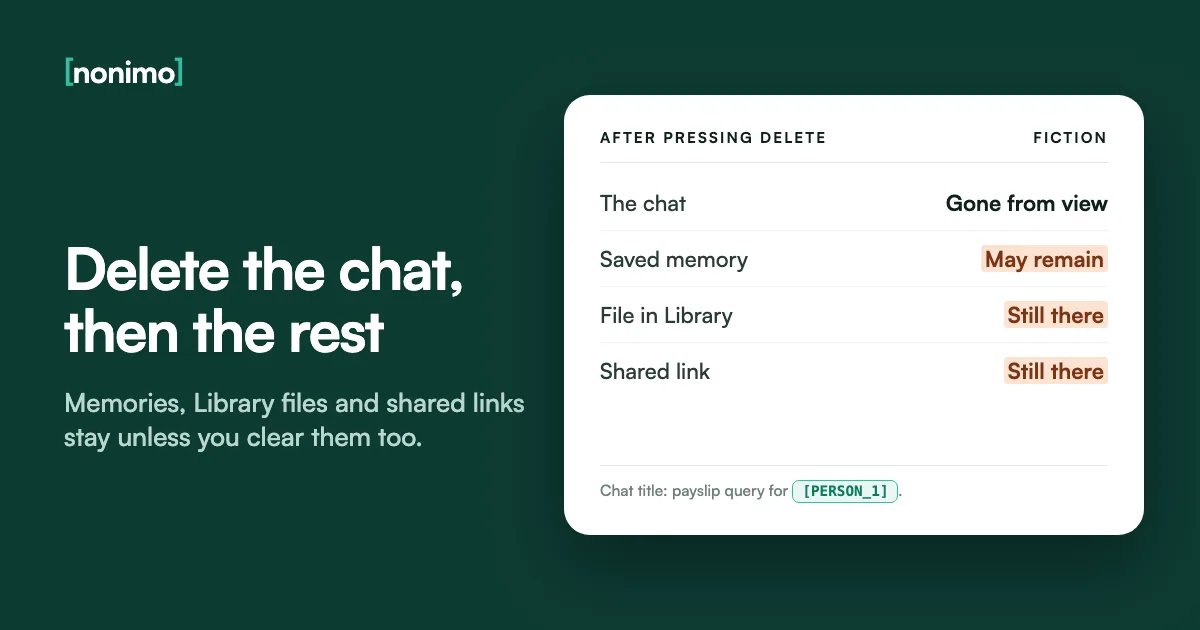
ChatGPT keeps every conversation until you remove it, and removing it is really two jobs. One is the chat itself. The other is everything the chat left in other places: saved memories, files in Library or Space, shared links. None of those disappears just because the conversation did.
This guide takes each in turn, in OpenAI’s own menu labels, then looks at what OpenAI may still hold after you press Delete. I’d flag the memories first: nothing on screen says they survived. What happens to your conversations while you keep them is covered in how ChatGPT handles the data you type.
Open the ••• menu beside a chat and choose Delete, or go to Settings, Data controls, Delete all chats. Deleted chats can't be restored, so export anything you need first. Then clear saved memories and saved files separately. OpenAI removes deleted chats from its systems within 30 days, with legal and security exceptions.
Deleting one ChatGPT conversation, or the whole list
For a single chat, OpenAI gives one route: open your chat history, select the more options menu (•••) beside the conversation, select Delete and confirm. The chat leaves your account view straight away. There is no undo, and OpenAI says its Support team cannot restore it either.
Clearing the lot lives in Settings, under Data controls, where Delete all chats sits next to Archive all chats. OpenAI warns that the bulk action can reach chats in your current account or workspace, chats inside projects included, and that it cannot be undone. Check which workspace is open before you press it.
On a work login, I’d press Delete all chats only after asking whoever runs the workspace. Some firms need certain chats kept, and the firm’s written AI rules are where that should be spelt out, not left to each person’s tidy-up.
What do you want gone?
Pick the case. Each path uses OpenAI's own menu labels.
One chat: chat history, then the ••• menu beside it, then Delete, then confirm. Gone from your view at once; no restore.
Every chat: Settings, then Data controls, then Delete all chats. Read the confirmation, then continue. Reaches project chats too, and can't be undone.
An archived chat: Settings, then Data controls, then Archived chats or View archived chats (Manage, if it shows). Select Delete beside the chat.
Source: OpenAI Help Center, Deleting and archiving chats in ChatGPT. Deleting removes the conversation and any connected-app data kept inside it, not the original data in that app.
Archive or delete? What happens to an archived chat
Archive sits in the same ••• menu as Delete, one line away, and the two are easy to confuse. OpenAI is clear that archiving takes the chat off the sidebar but does not delete it. The conversation stays in your account, stays searchable and keeps the same retention period.
Archived chats are under Settings, then Data controls, as Archived chats or View archived chats depending on the device; select Manage if it appears. From there each chat can be unarchived or deleted. That second button is the one you want if you archived something you meant to remove.
I doubt Archive is fit for anything sensitive. An archived chat holding a client’s bank details is still fully there on OpenAI’s side, a leak route few offices think to check. Only Temporary Chat, in the last row below, keeps a chat out of history from the start.
Delete, Archive and Temporary Chat side by side
The highlighted row is the one people mistake for deletion.
| Control | Where the chat shows afterwards | Can you get it back? | OpenAI's copy |
|---|---|---|---|
| Delete | Nowhere in your account | No | Scheduled for deletion within 30 days, with exceptions |
| Archive | Off the sidebar, still searchable | Yes, with Unarchive | Same retention as any saved chat |
| Temporary Chat | Never in history, unless you save it | No, once you leave it | A copy kept up to 30 days for safety |
Sources: OpenAI Help Center articles Deleting and archiving chats in ChatGPT, and Temporary chat in ChatGPT. A saved temporary chat becomes a regular one and follows your normal settings.
Does ChatGPT remember a chat after you delete it?
It can. OpenAI says deleting a chat on its own does not necessarily delete a saved memory created from it. A detail you mentioned once, a diagnosis, a salary, a colleague’s name, can stay in Memory long after the conversation that produced it.
The controls sit under Settings, then Personalization, then Memory, and vary by plan: you may see Memory, Reference saved memories, Reference chat history, Memory summary, Manage or Saved memories. In the memory summary’s ••• menu, Delete and turn off memory clears what the summary shows and switches Memory off, leaving past chats alone.
Don’t mention this again is the misleading button: OpenAI says it doesn’t delete the source. The saved-memories list alone isn’t enough for me. A stray detail needs the full sweep through the five places below, because clearing one or two still leaves ChatGPT a way to bring it back.
Where a remembered detail can still be
Tick each place once you've cleared it.
0 of 5 places cleared
At least one place may still hold it. Deleting a single chat rarely reaches them all.
That covers every place OpenAI names. It may keep logs of deleted saved memories for up to 30 days, for safety and debugging.
The five places come from OpenAI Help Center, Memory in ChatGPT. Which details are worth clearing at all: a field-by-field list of personal data.
Library files and shared links: what stays behind
ChatGPT saves the files you upload or create to Library on its own, or to Space on some accounts. Deleting the chat leaves that saved file alone. Remove it with Delete or the trash icon; if Recently deleted shows, the file can still be restored until you pick Delete forever or Delete all.
Projects and custom GPTs hold files of their own: a project file stays until you delete it or the project, and a GPT’s knowledge file until the GPT goes. Uploads made in a temporary chat never reach Library. Why a scanned passport is riskier than its text is in our guide to uploaded photos.
Shared links work the other way round. Deleting a conversation removes its shared link, but deleting only the link leaves the conversation, and copies other people already saved stay in their accounts. You can’t set an expiry date on OpenAI’s links, so any link you can’t place is one I’d delete today.
What a deleted chat leaves behind
Read across: does it go with the chat, and if not, where do you remove it?
| Item | Goes with the chat? | Where to remove it |
|---|---|---|
| A saved memory | No | Settings, Personalization, Memory |
| A file saved in Library or Space | No | Library or Space, Delete, then Delete forever if Recently deleted shows |
| A file in a project, or a GPT's knowledge file | No | Delete the file, the project or the GPT |
| The conversation's shared link | Yes | Or earlier: Settings, Data controls, Shared links, Manage |
| A shared scheduled task link | No, the task pauses | Delete the task link separately |
| A copy someone saved from your link | No | It sits in their account, out of your reach |
| Original data in a connected app | No | In that app itself |
Sources: OpenAI Help Center articles on chat and file retention, Library, sharing and Memory. If you're in Ireland, cover the MRZ on a passport copy before it ever reaches Library.
Can you recover a removed ChatGPT chat? Export first
No. OpenAI says a deleted chat cannot be restored in ChatGPT or through OpenAI Support, and that includes everything removed with Delete all chats. Unlike Library files, chats have no Recently deleted area. An export taken beforehand is the only copy you will have, and it can’t revive chats already gone.
On the web: open your profile menu, select Settings, then Data controls, and under Export data select Export, then Confirm export. ChatGPT sends an email or SMS when it’s ready, which can take up to 7 days. The Download data export link expires 24 hours after it arrives.
Self-service export covers Free, Go, Plus, Pro and eligible Edu workspaces, not Business, Enterprise or ChatGPT for Healthcare. If a chat might matter in a dispute or in deciding whether a paste was a reportable breach, the safe order, as I see it, is export first, delete second, never the other way round.
Export first, or delete now?
Could you need any of these chats later, for a client, a dispute or your own records?
Which account are they in?
Source: OpenAI Help Center, Exporting your ChatGPT history and data. The ZIP holds your chat history and other relevant account data.
How long OpenAI keeps a chat you’ve cleared, and when a legal hold applies
A deleted chat leaves your account view at once, then OpenAI schedules it for permanent deletion from its systems within 30 days. OpenAI names two ways out of that window: content already de-identified and disassociated from your account while you allowed training, and data it must keep longer for security or legal obligations.
The de-identified exception is the one to keep in mind if training was ever switched on: that copy no longer counts as yours to delete. Why OpenAI can treat it that way comes down to the difference between de-identified and anonymous data.
Legal holds do happen. In the New York Times lawsuit a court order made OpenAI keep consumer ChatGPT content indefinitely. OpenAI says its obligations ended on 26 September 2025, though it still stores limited user data from April to September 2025. That episode is why I read “30 days” as a policy, not a guarantee.
The clocks after you press Delete
Each window as OpenAI states it. The highlighted row has no clock at all.
| What you removed | OpenAI's stated window |
|---|---|
| A chat, one or all | Permanent deletion within 30 days |
| A temporary chat | Copy kept up to 30 days for safety |
| A file in Library | Permanent deletion within 30 days |
| A saved memory | Logs may stay up to 30 days, for safety and debugging |
| A project file or a GPT's knowledge file | Within 30 days of deleting the file, project or GPT |
| Your account | Data deleted within 30 days, a limited set kept where the law requires or permits |
| Content already de-identified for training | Outside the 30-day promise |
Sources: OpenAI Help Center articles on chat and file retention, Library, Memory and account deletion; OpenAI's privacy policy; its New York Times update of 22 October 2025.
Deleting your ChatGPT account, and the right to erasure
Account deletion is in Settings, then Account: next to Delete account select Delete, enter your account email or phone number, type DELETE and select Permanently delete my account. OpenAI deletes your data within 30 days, apart from a limited set kept where the law requires or permits. ChatGPT and API access both end.
Deleting the account doesn’t cancel a subscription billed through the Apple App Store or Google Play. It can’t be reactivated, though the same email works for a new account after 30 days. Managed workspaces have no self-service deletion. Unless you’re leaving ChatGPT for good, I’d stop at the chats.
If you can’t sign in, use the Privacy Portal: Make a Privacy Request, I have a consumer ChatGPT account, Delete my ChatGPT account. In the EU and UK this is the GDPR’s right to erasure; for Californians, the CCPA gives a right to delete, with exceptions such as a legal duty to keep.
Chats only, or the whole account?
For most people the first column is enough.
Delete chats, keep the account
- Clears history, project chats included, with Delete all chats
- Memory and Library still need their own clean-up
- Subscription, sign-in and API key carry on
Delete the account
- Data deleted within 30 days, with the legal exceptions
- Cancel any App Store or Google Play subscription first
- No reactivation; the email is free again after 30 days
Source: OpenAI Help Center, Deleting your ChatGPT account; GDPR Articles 12(3) and 17. Under EU and UK GDPR rules the controller has one month to act on an erasure request, extendable by two further months. Erasure gives way where data is needed for a legal obligation or legal claims, under Article 17(3). A firm wanting deletion wholly in its own hands ends up weighing a model on its own servers.
Clearing chat history in Gemini, Claude and Copilot
The other big assistants split deletion the way ChatGPT does: the chat list in one place, memory in another. Gemini strikes me as the hardest to clear completely, for the reason below. The table compares each one’s clear-everything route, from their own help pages.
Gemini’s exception is the odd one out: conversations a human reviewer has looked at survive the deletion of your activity, for as long as three years. Google also keeps chats for 72 hours when Keep Activity is off. The wider picture is in our guide to what Gemini does with your data.
Claude behaves like ChatGPT on memory. Anthropic says memory entries generated from a deleted conversation aren’t removed, though you can delete them yourself. How long Anthropic keeps chats when training is on is in our Claude training guide.
Clearing everything, assistant by assistant
The last column is what to clean up after the bulk delete.
| Assistant | Clear all from | Stated window | Still to clean up |
|---|---|---|---|
| ChatGPT | Settings, Data controls, Delete all chats | Within 30 days | Saved memories, Library files |
| Gemini | Gemini Apps Activity, Delete, All time | Auto-delete after 18 months by default (3, 18 or 36, or off) | Human-reviewed chats stay up to three years |
| Claude | Chats and tasks, Select, Select all, Delete | Back-end systems within 30 days | Memory entries from those chats |
| Copilot | Privacy dashboard, Copilot apps, Delete all activity history, Clear | None stated on that page | Saved memories: turning Memory off doesn't delete them |
Sources: Google Gemini Apps Help and Privacy Hub; Claude Help Center; Microsoft Support. Copilot's training and retention rules are in our Copilot guide.

What clearing history can’t undo, and the step before it
Deletion only works on copies still tied to your account. It can’t reach one de-identified for training or held under a court order, and it does nothing about text your own software sent in an API request. To me that makes it housekeeping: the outcome was settled when you sent the message.
So the useful step sits upstream. Nonimo runs on your Mac or Windows computer and replaces names, account numbers and similar identifiers with placeholders before ChatGPT receives the prompt. You then read the answer with the real names in place, and any copy OpenAI retains holds only placeholders.
For a photo of an ID, our photo tools cover the details in your browser, so the photo stays on your device. In Ireland, for instance, you can hide the driver number on a licence photo before it goes anywhere near a chat or Library.
What a retained copy holds once you clear the chat
The same invented request, sent two ways, then deleted.
Sent as typed
"Draft a reminder to Coralie Vantongeren about invoice 4471"IBAN DE89 3704 0044 0532 0130 00Chat deleted: her name and IBAN can sit in the retained copy until it's purged, or longer under a legal holdSent through Nonimo
"Draft a reminder to [PERSON_1] about invoice 4471"IBAN [IBAN_1]Chat deleted: the retained copy holds labels; the real values stayed on your computerInvented name; the IBAN is the standard published example and belongs to no one. Retention terms from OpenAI's help centre and privacy policy. The table linking each placeholder to its real value never leaves your computer; how the app handles your data has the detail.
Sources
- OpenAI Help Center, Chat and file retention in ChatGPT: no restore; 30 days and exceptions; archive retention; temporary chats; Library, Space, project and GPT files.
- OpenAI Help Center, Memory in ChatGPT: deleting a chat doesn’t necessarily delete a memory; where to remove a detail; logs up to 30 days.
- OpenAI Help Center, Deleting and archiving chats; Exporting your ChatGPT history and data; Deleting your ChatGPT account; Using Library to manage files; Sharing conversations: menu steps, export timing, account steps, Recently deleted, link rules.
- OpenAI privacy policy, and “How we’re responding to The New York Times’ data demands”, update of 22 October 2025: account data kept where the law requires; the end of the preservation order.
- GDPR, Regulation (EU) 2016/679, on EUR-Lex: Article 12(3), one month plus two; Article 17, right to erasure and its exceptions.
- California Privacy Protection Agency, Frequently Asked Questions: the CCPA right to delete and its exceptions, including information a business is legally required to keep.
- Google, Gemini Apps Help: manage and delete your activity: Delete, All time; auto-delete at 18 months by default; 72 hours with Keep Activity off.
- Google, Gemini Apps Privacy Hub: human-reviewed chats not deleted with activity, kept up to three years.
- Claude Help Center, Delete or rename a conversation: Select all; removed from history at once and from back-end systems within 30 days.
- Claude Help Center, chat search and memory: memory entries from deleted chats aren’t removed.
- Microsoft Support, Manage your Copilot activity history in the privacy dashboard: Delete all activity history, Clear.
- Microsoft Support, Microsoft Copilot privacy controls: Saved memories; turning Memory off doesn’t delete them.
Accessed 10 November 2026.
Related guides
Common questions
Does deleting ChatGPT history delete it permanently?
Yes, within 30 days in most cases. A deleted chat leaves your account at once and OpenAI's systems within 30 days, unless it was already de-identified for training or must be kept for legal or security reasons.
Can I see my deleted ChatGPT history?
No, a deleted chat can't be viewed or restored. OpenAI Support can't recover it either. Archived chats are another matter: they wait under Settings, Data controls, Archived chats.
Does deleting a chat delete what ChatGPT remembers from it?
No, not automatically. A saved memory can outlive the chat that created it. Remove it under Settings, Personalization, Memory, and check Library or Space for files from the same conversation.
Is archiving a ChatGPT chat the same as deleting it?
No, archiving only takes it off the sidebar. The chat stays in your account, searchable, with the same retention period. Open Archived chats in Data controls to delete it properly.
How long does a ChatGPT data export take?
Up to 7 days. ChatGPT sends an email or SMS with a Download data export link, which expires 24 hours after it arrives. Sign in to the same account before opening it.
What happens to my chats if I delete my ChatGPT account?
They go with it, within 30 days. OpenAI deletes account data in that window, apart from a limited set kept where the law requires or permits. A deleted account can't be reactivated.
Can OpenAI keep my chats after I delete them?
Yes, in two cases. Content already de-identified and disassociated from your account while training was on, and anything OpenAI must keep longer for security or legal reasons, such as a court order.