· Updated

Joaquín Trapero in Founder of Nonimo, writing on AI and privacy.
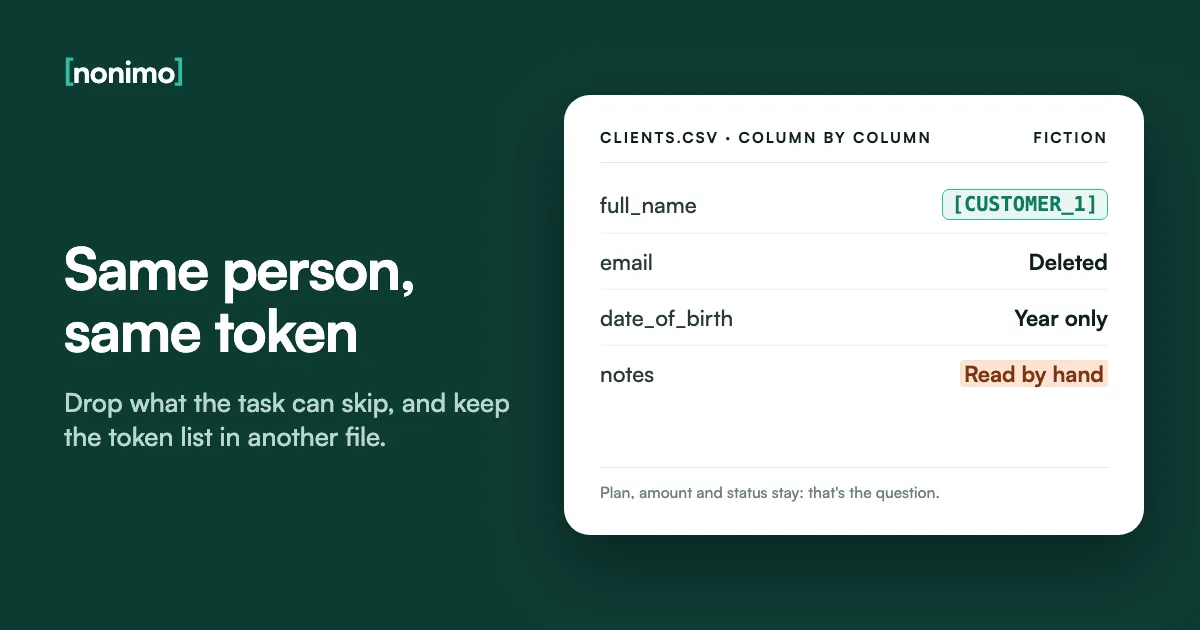
A CSV has no hidden sheets, no cell comments and no formatting. Everything in it sits in plain view, which makes it simple to clean and just as simple for an AI tool to read in full. The risk lives in the columns nobody looked at and in the notes field.
This page covers which columns go, how to swap names for tokens that line up across rows, and how to check the result. In my judgement, that check outweighs any clever token scheme. If your data starts life in a workbook, tidy the spreadsheet in Excel first and export it afterwards.
Work on a copy, delete the columns the task doesn't need, and replace each name or ID with a random token that is the same on every row. Keep the token list in a separate file, cut dates to the year and postcodes to their first characters, then read it as plain text.
Which columns to delete, tokenise or keep
Begin with the header row, not the data. An export from a CRM, a booking system or payroll often writes every field the record holds: internal IDs, the account owner’s email, a last-contact date nobody asked for. For each column, ask whether the question you will put to the AI needs it.
Direct identifiers are the easy part. Names, emails, phone numbers, card and account numbers, national ID numbers: if the analysis runs without them, delete the column. If rows must still be told apart, swap the value for a token. The longer list of details that point to a person covers the less obvious ones.
Keeping a column “just in case” is my first cut. One that never leaves your computer needs no token, no key and no second check. Staff and health files deserve the hardest cut; for a US payroll export, what HR can pass to an AI tool is a sensible first stop.
What to do with each column
Filter by action. Notes columns are marked because no column rule cleans them.
| Column | Action | Why |
|---|---|---|
| Full name | Token | Rows still need to be grouped by person |
| Email, phone | Delete | A task rarely needs them, and they identify on their own |
| Customer or account number | Token | Only if you must join this file with another later |
| Card, bank or national ID number | Delete | No analysis needs the digits |
| Street address | Delete | Points at one household |
| Date of birth | Generalise | Year or five-year band |
| Postcode or ZIP | Generalise | First part only |
| Rare job title | Generalise | "Night charge nurse" becomes "nursing" |
| Notes, comments, descriptions | Read by hand, or delete | Names sit inside sentences |
| Plan, product, amount, status | Keep | Usually what the question is about |
Our default for a client export; your question may need a different mix. Direct and quasi-identifiers as NIST SP 800-188 (2023) describes them. For US health records, see where PHI stops and PII begins.
Free-text fields: where names hide in a notes column
Column rules stop at the notes field. “Spoke to Mrs Penhaligon, her son Rafe will bring the forms” puts two people in one cell, and neither sits under a Name header. Ticket bodies, call summaries and order comments behave the same way, and they often hold the only health detail in the file.
Searching works only for details with a fixed shape. Emails, card numbers, phone numbers written with a country code and some national ID formats can be found by pattern. Names, addresses and nicknames cannot. Paste a row from your masked copy into the box below to see what still has a recognisable format.
If the question doesn’t need the notes, I’d cut the column rather than read four thousand of them. When it does, cut the file down to the rows that matter before reading. Free text is also how client details reach AI tools through routes nobody planned for.
Check a row from your masked file
The example is an invented row where the notes field leaked.
The check happens on this page in your browser and the row goes nowhere. It spots card numbers that pass the Luhn test, IBANs with valid check digits, SSN-shaped and NI-shaped numbers, IPv4 addresses, common API key prefixes, emails and phone numbers that start with + and a country code. It cannot see names, so Wilmette above goes unflagged.
Consistent tokens, and a lookup table kept somewhere else
A token stands in for a value: P-8304370a instead of Aurelio Penhaligon. It must be the same on every row, and in every file you send in that conversation, or the AI cannot tell that rows 4 and 19 are one customer. Totals per person, repeat visits and churn all depend on it.
NIST’s guidance on de-identifying datasets says that when a lookup table maps people to pseudonyms, the pseudonyms must be assigned at random and the table must be highly protected. So never build a token from initials, a birth date or the last digits of an ID: anyone holding the original could rebuild it.
Under the GDPR (EU and UK law) this is pseudonymisation, and Recital 26 treats such data as still relating to an identifiable person. The key, to my mind, belongs in another folder, with fewer people able to open it. Why de-identified data isn’t automatically anonymous goes into the legal side.
Two files, stored in two places
Only the left one goes to the AI.
clients_masked.csv
name,date_of_birth,postcode,planP-8304370a,1979,021,GoldP-f2b1c7ea,1990,200,SilverP-8304370a,1979,021,GoldP-b26d8413,1958,205,NAkey_keep_apart.csv
name,tokenAurelio Penhaligon,P-8304370aBronwen Keatley,P-f2b1c7eaMatthias Quarrington,P-b26d8413Invented rows for a fictional optician, Thistlecombe Opticians, produced by the script further down on 10 November 2026; tokens change on every run. Tools that keep tokens consistent across many files include the open-source Presidio anonymiser and masking APIs such as Protecto. The EDPB's January 2025 guidelines on pseudonymisation are still a consultation draft.
Does hashing a column make the data anonymous?
Hashing looks like a shortcut: run each email through SHA-256 and you get a string that never changes. That stability is the flaw. In July 2024 the FTC’s Office of Technology wrote that hashes still track a person, and that hashed emails and phone numbers can be reversed by guessing.
We ran that guess on a fictional number: a plain Python loop, one thread on an Apple M4 computer, hashed every 11-digit number starting 0770, the shape of a UK mobile, ten million of them, and found our target in under four seconds. Emails are easier still: hash a mailing list and compare.
NIST adds that an unkeyed hash generally gives no security, and it advises against hashing direct identifiers at all: one leaked key exposes the whole file. To my eye, a hash is the weaker pick where a random token would do. A keyed HMAC is a fallback for when no lookup table can be kept.
Delete, token or keyed hash?
Answer for one identifier column at a time.
Does the AI need to tell rows apart by person?
Will you join this file with a later export, person by person?
Can the same lookup table be kept safely until the next export?
Our reading of NIST SP 800-188, sections 4.3.1 and 4.3.2, and the FTC Office of Technology post of 24 July 2024. Test: Python 3.9.6 hashlib SHA-256, one thread on an Apple M4, 10 November 2026; the time depends on the machine. For how US state privacy laws draw the line, see anonymising data before AI under US rules.
Generalising dates of birth, postcodes and ages
Remove every name and a row can still point at one person. A birth date, a postcode and a sex together can be enough. NIST calls these quasi-identifiers and measures the risk with k-anonymity: how many rows share each combination. A combination that only one row holds is a name in disguise.
The fixes are blunt and they work. Cut dates of birth to the year or a five-year band, keep the first part of a postcode and group ages above a ceiling. The US HIPAA safe harbor is one worked example: years only, three-digit ZIPs for areas over 20,000 people, everyone over 89 grouped.
For a file of a few hundred rows, I’d generalise harder than feels comfortable. Our rule of thumb, as in our Excel guide, is at least three rows per combination; it is not a legal threshold. Whether the result counts as anonymous where you work is for a lawyer to judge.
2,000 invented rows, coarsened step by step
How many rows stay alone in their combination of birth date, postcode and sex.
| What the file keeps | Combinations | Rows alone | Rows in groups under three |
|---|---|---|---|
| Full birth date, full postcode, sex | 1,999 | 1,998 | 2,000 |
| Birth year, full postcode, sex | 1,918 | 1,839 | 1,993 |
| Birth year, postcode district, sex | 1,669 | 1,378 | 1,894 |
| Five-year band, postcode district, sex | 908 | 307 | 879 |
| Five-year band, broad postcode area, sex | 222 | 3 | 15 |
Our measurement on 10 November 2026: a seeded Python script made 2,000 fictional rows with birth dates spread evenly from 1940 to 2005, 40 postcode districts of four sectors each, grouped into eight broad areas, and two values for sex. Real files bunch up differently, so count your own. Method: k-anonymity as NIST SP 800-188 describes it. Outside HIPAA, Washington's consumer health data law also reaches health details.
Opening a CSV in Excel without losing leading zeros
Double-clicking a CSV hands it to Excel, which guesses a type for every column. Microsoft’s support page says Excel removes leading zeros, shows long numbers in scientific notation such as 1.23E+15, and keeps only 15 significant digits, so a 16-digit card or account number has its last digit turned into a zero.
That bites twice. Customer number 000412 becomes 412 and no longer matches your key file, and if you save the masked copy from Excel, the change is written into it. Import instead: Data > From Text/CSV, then Edit, then set the identifier columns to Text, the route Microsoft documents for this.
Scripts guess too. In our test, pandas read 000412 as 412 and turned a plan literally called NA into an empty cell; with dtype=str and keep_default_na=False, both survived. Before any program re-saves the file, I’d check one row against the original in a text editor.
Three values, three ways of opening the file
| In the file | Excel, double-click | pandas, defaults | pandas, dtype=str, keep_default_na=False |
|---|---|---|---|
| 000412 | 412 | 412 | 000412 |
| 4111111111111111 | 4.11111E+15, stored as 4111111111111110 | 4111111111111111 | 4111111111111111 |
| NA (a plan name) | Not covered by Microsoft's page | Missing (NaN), saved as an empty cell | NA |
Excel column from Microsoft Support, Keeping leading zeros and large numbers. pandas columns: our test with pandas 2.3.3, invented file, 10 November 2026. Accented names open cleanly in Excel when the UTF-8 file has a byte order mark, Microsoft notes. Data that still lives in a workbook has its own Excel walkthrough.
Masking a CSV with Python: pandas and csvkit
For a file you mask every month, a script beats hand edits: same steps each time, and a record of them. The one below uses pandas and Python’s secrets module, which Python’s docs prefer over random for tokens. Try any script on ten invented rows first; I fear a silent failure more than a crash.
It reads every column as text, drops four columns, gives each distinct name a random token, cuts the date of birth to its year and the postcode to three characters, then writes the masked copy and the key separately. Exact matching treats “A. Penhaligon” as a new person, so tidy spellings before you run it.
Without Python, csvkit does the column work: csvcut -n lists headers, csvcut -C drops columns, and csvgrep -r finds notes with Mr, Mrs or an @. It makes no tokens, so for names the script wins. If the CSV feeds an app that calls a model, masking inside the API call is the other half.
mask.py, and the same column cut with csvkit
Change the column names to yours. Dates must be written year first (1979-03-14).
import secrets
import pandas as pd
df = pd.read_csv("clients.csv", dtype=str, keep_default_na=False)
df = df.drop(columns=["email", "phone", "account_no", "notes"])
people = df["name"].unique()
key = pd.DataFrame({
    "name": people,
    "token": ["P-" + secrets.token_hex(4) for _ in people],
})
df["name"] = df["name"].map(dict(zip(key["name"], key["token"])))
df["date_of_birth"] = df["date_of_birth"].str[:4]
df["postcode"] = df["postcode"].str[:3]
df.to_csv("clients_masked.csv", index=False)
key.to_csv("key_keep_apart.csv", index=False)
csvcut -n clients.csv
csvcut -C email,phone,account_no,notes clients.csv > clients_cut.csv
csvgrep -c notes -r "Mr|Mrs|@" clients.csvRun on 10 November 2026 with Python 3.9.6, pandas 2.3.3 and csvkit 2.2.0 against an invented four-row file. Options from the pandas read_csv reference and the csvkit csvcut documentation; token_hex from Python's secrets module.
Checking the masked file before ChatGPT, Claude or Copilot sees it
Open the masked copy in Notepad, TextEdit or any plain editor, not in a spreadsheet. What you see there is exactly what the AI receives, every comma included. Count the fields in a few rows against the header: one stray quote mark can shift a value under the wrong heading.
Then search for @, for a plus sign followed by digits, for long runs of digits, for Mr, Mrs and Dr, and for every surname in your key file. One surname left in a note undoes that person’s token everywhere. What OpenAI does with an uploaded file is the next question.
I’d keep the masked copy, dated, with the job it was made for. If anyone later asks what went to the assistant, you open a file instead of reconstructing it from memory. Retention after upload depends on the provider and plan; how Anthropic handles chats for training has its own settings.
Before you upload
Tick what you have done to the masked copy.
0 of 7
Not ready yet: the unticked checks are where leftovers usually turn up.
Close. Finish the last checks before the file leaves your computer.
Ready to upload. Keep a dated copy of exactly this file.
Our own list for a masked export. Microsoft's chat assistant has its own training rules: Copilot and your prompts. In a US lawsuit, masking raises separate questions about redaction and legal privilege.

The tool on this page, the app, or a script of your own
The redaction tool above this article takes .csv and .tsv files up to 200 KB, plus .txt, .md, .odt and .rtf. It sends the file to our server, which finds names and identifiers and returns a redacted copy with a list of what it replaced. Our security page explains how uploads are handled.
Untick a type in that list to leave it visible, then copy the result or download it. A word processor file is a different animal: an .odt or .rtf can carry edits that were only hidden, never removed, so settle those before uploading.
For a 40-row file, installing anything is overkill in my opinion. A weekly export, or one over the limit, is where the Nonimo app makes sense: the swap runs on your own computer, so the column of real names stays there. Get it from the Nonimo home page.
Which route fits your file
Tool on this page
- A one-off CSV or TSV up to 200 KB
- Processed on our server
- Copy or download the result
Nonimo app
- Regular or larger exports
- Runs on your own computer
- Real names come back in the reply; plans are listed here
Your own script
- A fixed pipeline with fixed columns
- Tokens that must last across months
- You maintain it and its key
Limits and formats as the web tool states them. Other files need other steps: a PDF, a Word document, a slide deck and author names in file properties. US teams can see the same step for insurance agencies, CPA firms, real estate brokerages and healthcare practices.
Sources
- FTC Office of Technology, No, hashing still doesn’t make your data anonymous. 24 July 2024: hashes stay a unique signature; hashed emails and phone numbers can be reversed by guessing.
- NIST SP 800-188, De-Identifying Government Datasets. Random pseudonyms from a protected lookup table; unkeyed hashes give no security; k-anonymity, dates and top-coding.
- Microsoft Support, Keeping leading zeros and large numbers. Leading zeros removed, scientific notation, 15-digit precision, From Text/CSV with Text columns.
- Microsoft Support, Opening CSV UTF-8 files correctly in Excel. A UTF-8 CSV opens normally when saved with a byte order mark.
- pandas, read_csv. dtype=str to keep values uninterpreted; keep_default_na=False so no strings become NaN.
- csvkit, csvcut. -n lists column names; -C excludes the columns given.
- Python documentation, secrets. Preferred over random for security tokens; token_hex.
- EUR-Lex, Regulation (EU) 2016/679 (GDPR). Article 4(5) and Recital 26 on pseudonymised data.
- EDPB, Guidelines 01/2025 on Pseudonymisation. Public consultation draft, feedback until 14 March 2025.
- 45 CFR 164.514, via the Legal Information Institute. Safe harbor: year only, three-digit ZIPs over 20,000 people, ages over 89, codes not derived from the person.
Accessed 10 November 2026.
Related guides
Common questions
Is hashed data anonymous?
No, a plain hash is still a stable identifier. FTC technology staff note that hashed emails and phone numbers can be reversed by guessing. Deleting the column, or random tokens with a separate key, protects more.
How do I stop Excel removing leading zeros from a CSV?
Import the file rather than double-clicking it. Use Data > From Text/CSV, choose Edit and set the ID columns to Text. Excel keeps only 15 significant digits, so long numbers need Text as well.
Is masked data still personal data?
For you, yes, as long as the token key exists. Under the GDPR (EU and UK), that is pseudonymised data. Whether it is personal for an AI provider that never sees the key is a narrower legal question.
Should the same person get the same token on every row?
Yes, within one file and one conversation. Otherwise the AI counts one customer as several. Assign tokens at random from a lookup table instead of building them from initials or birth dates.
How can I mask a CSV without Excel?
Use a script or a command-line tool. The csvkit tool csvcut drops columns by name, and pandas can swap names for tokens. Read every column as text so IDs keep their leading zeros.
How should I generalise dates of birth and postcodes?
Keep the year, or a five-year band, and only the first part of the postcode. Then check that every combination of the remaining columns covers at least three rows.
Can I upload a masked CSV to ChatGPT?
Yes, once you have read the masked copy as plain text. Check the notes column for names, and keep the token key out of the folder you upload from.