· Updated · Written and maintained by Nonimo
How to redact a PDF comes down to one distinction: remove the words from the file, not from view. A black rectangle laid across a name hides it on screen, but in most PDFs the name is still sitting in the text underneath. Anything that reads the file’s text gets it back, and an AI tool that answers questions about an uploaded PDF has to read that text to do its job.
So the safe order is the reverse of what most people do. First take the details out, with a tool that deletes them. Then check the result in a way that does not trust your eyes. Only then does the file go to ChatGPT, Copilot, Claude or Gemini.
This guide is for people in Irish offices who now send documents to AI tools: solicitors and their staff, accountants, payroll bureaus and HR teams. We built a test PDF with invented details, blacked it out the way people usually do, and extracted its text. The results are below, with the steps in Acrobat Pro, the three checks that catch a failed job, and what changes when the PDF is a scan.
How to redact a PDF: the black box is not the redaction
A PDF page is built in layers. The text is stored as characters with a position, which is why you can select a sentence, search for a word or copy a paragraph. Shapes, lines and images are drawn on the same page, and the viewer paints them in order, so a black rectangle added later simply lands on top of the words.
On screen the effect is convincing. The name disappears behind a solid bar, the page prints the same way, and a colleague reviewing it would sign it off. But nothing has been taken out. The characters are still in the page’s content, at the same position, in the same order.
Why the drawing tools make this so easy to get wrong
Every PDF editor has a rectangle tool, a highlighter and a colour picker, and most people meet those long before they meet a redaction feature. Drawing a black box is the obvious move. It is also what a lot of free viewers offer, because they can annotate a file but cannot rewrite its text.
The difference only shows up when something reads the file instead of looking at it. That is exactly what happens when you upload a document to an AI tool, so the old habit fails at the worst moment. The same habit turns up in slide decks, where a black shape drawn over a name leaves every word in the file.
Whether a client’s details reaching a chatbot counts as a personal data breach is a question no firm wants to answer.
A real redaction does two things: it removes the characters from the text of the page, and it puts a mark where they were. The mark is optional. The removal is the whole point.
Three black boxes, and the text that came back
To see it rather than take it on trust, we made a one page PDF with the kind of detail an Irish tenancy dispute file carries: a client name, a PPS number, an Eircode, a mobile, an email, an IBAN and the other party. Every detail is invented. We then drew solid black rectangles over the name, the PPS number and the IBAN.
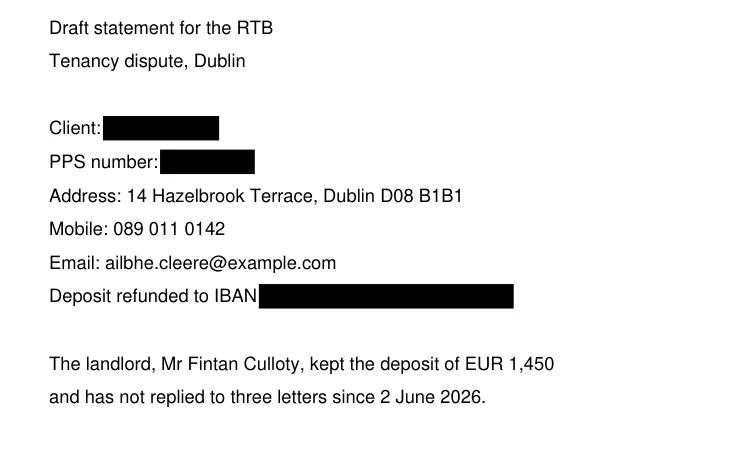
On screen the three values are gone. We then ran the file through pypdf, a common open source library for reading PDFs, and through a second reader, PyMuPDF, to rule out a quirk of one tool. Both returned the full text of the page, the three blacked out values included, in their original positions.
| test file | what it is | boxed values in the extracted text |
|---|---|---|
| boxes drawn on top | the letter above | 3 of 3, in full |
| real redaction applied | the same letter, text removed under the boxes | none |
| the letter as a scan | the page saved as a picture | no text at all |
Our test on 28 September 2026, pypdf and PyMuPDF. Invented details throughout.
That first row is the whole problem in one line. The person who drew the boxes would say the file was redacted, and on paper it was. To anything that reads the file, it was not.
What the second row still gave away
The properly redacted copy is the interesting one. The name, PPS number and IBAN were gone from its text, but the extraction still returned the Eircode, the mobile number and an email address that begins with the client’s first name and surname. The landlord’s name was untouched too, because nobody had thought of him as the data to protect.
None of that is a fault of the redaction tool. It removed exactly what it was told to remove. The failure was in the choice of what to mark, and that failure survives any tool. The Eircode is the classic survivor, for reasons our guide to the PPS number and the Eircode sets out.
What a tool reads when it opens a PDF
When you upload a document to an AI assistant, the assistant has to turn the file into something the model can work with. For a PDF that has a text layer, the obvious material is that text, which is the same text our extractor returned. How each provider processes files internally is its own business and changes over time, so this guide does not guess at it.
What does not change is the starting point. If the name is in the text of the file, it is available to any program that reads the text of the file. A black rectangle has no say in that. The same holds a step earlier, in a Word draft, where a name deleted with tracking on stays in the file until someone clears the tracked changes from the Word document.
Why AI uploads raise the stakes
A person reading a printed copy sees what the page shows. A program reading the file sees what the file contains, which can be more. Our boxed letter makes the gap concrete.
| who or what reads the boxed letter | what it gets |
|---|---|
| a colleague with the printout | three black bars |
| the same colleague on screen | three black bars |
| a search of the file | the hidden name and numbers, found |
| a text extractor | the whole page, boxed values included |
Our test on 28 September 2026, invented letter.
With an AI tool there is a second difference: the text is sent to a provider, processed on its systems and, depending on the plan and the settings, kept for a period.
What each provider keeps and for how long is covered in our guides to OpenAI’s retention rules and Microsoft’s Copilot terms. For this guide the point is simpler. Whatever the provider does with the text, a box you drew over it did not stop the text from arriving.
Most Irish firms will not have an AI tool of their own that runs inside the building. The upload is therefore a disclosure to an outside processor, and our guide on which AI is GDPR compliant sets out the contract questions that follow. Redaction done properly is what keeps the client’s details out of that conversation altogether.
How to redact a PDF in Acrobat Pro, step by step
Adobe’s own guide on how to redact a PDF describes the process in Acrobat Pro, which is the edition the page is written for. The steps below follow Adobe’s page for Irish users; menu names can shift slightly between versions.
- Work on a copy. Save the original under its usual name and do the redaction in a duplicate, as both Adobe and the Data Protection Commission advise.
- Open the redaction tool. Choose Tools, then Redact. Draw rectangles over the text or images you want removed, or use Find Text and Redact to search for a name or a number across every page.
- Apply the redactions. Marking an area does nothing on its own. Click Apply and confirm, and only then are the marked characters deleted.
- Save as a new file. Use Save As with a new name, so the redacted copy never overwrites the original.
At step 3, Acrobat also offers to remove hidden information from the file. Hidden data and document properties are a subject of their own, covered in our guide to removing metadata from PDF and Word files; for this guide, the text of the page is what matters.
The step that most people skip
Adobe’s guide makes the point that marked content is only removed when the redactions are applied. A file saved with marks that were never applied can look very like a redacted one, with red outlines or overlay boxes, while the text underneath is still complete.
That is why the next section exists. Whatever tool you used, the only proof that the job worked is a test on the saved copy, and it is worth writing that test into your firm’s AI policy as a step of its own.
Find Text and Redact deserves a word of caution too. It finds the string you type, so it will catch “Ailbhe Cleere” and miss “Ms Cleere”, “A. Cleere” and “ailbhe.cleere@”. Search for surnames on their own, and then for first names.
Copy, search, extract: testing a redacted file
These three checks take a couple of minutes and need nothing more than the PDF viewer you already have and a plain text editor. Run them on the saved copy, never on the file still open in the redaction tool. The same editor is the right way to read a CSV file before it goes to an AI tool, since Excel shows a tidy grid rather than the file itself.
The first check is search. Press Ctrl+F, or Cmd+F on a Mac, and look for every value you meant to remove: the surname, the first name, the PPS number, the IBAN, the Eircode. A properly redacted file returns no match. A file with boxes drawn on top will jump straight to the hidden word.
The second check is copy. Drag across one of the black bars, copy, and paste into Notepad or TextEdit. If anything comes across apart from blank space, the box is sitting on live text.
The third check is the one closest to what an AI tool sees. Select all, copy the whole document and paste it into the text editor. Then read it from top to bottom. This is how you find the things nobody marked: the surname inside an email address, the client named again in a footer, the other party’s name in the last paragraph.
If any check fails, do not patch the redacted copy. Go back to the original, make a new duplicate and redo the job. Layering a second set of boxes over a failed first set is how files end up with the text still in them under two coats of black.
GP practices meet the same test with referral letters and hospital discharge summaries, and our guide on clinical letters in general practice covers what should stay out of those.
A scanned PDF is a picture, and a different problem
A scan contains no text layer at all, only an image of each page, like a photo of your driving licence. From the boxed letter pypdf returned 63 words, and from the properly redacted copy 54. Our third test file was the boxed letter saved as a picture, and both extractors returned nothing: not the hidden values, not the visible ones, not a single word.
That can look like a clean result, and it is misleading. The words are still on the page, as pixels. Software that reads text from images, which is what optical character recognition does, can turn them back into words, and many AI tools accept images and read the writing in them. How long they then keep the image is the subject of our guide to whether ChatGPT keeps your photos. For a scan, as for a photo of your passport, what matters is what the picture shows.
When a scan is safe, and when it is not
If the redaction was done on paper before scanning, with opaque tape or a marker that really covers the text, the words under the bar are not in the picture. The Data Protection Commission’s note suggests photocopying or scanning the result to check it, because text under a marker can still be legible when held up to the light. For a licence copy, boxes burned into the image avoid that.
If the boxes were added after scanning, in a PDF editor, the file may hold the picture plus the boxes as a separate layer. Some scanners also add an invisible text layer through OCR, so the scan becomes searchable, and then everything above applies again. Run the three checks on any scan too.
Our Irish guide to the PPS number and the Eircode explains why an Eircode left visible on a scanned letter can matter as much as the name you covered.
What the DPC’s note on redacting documents asks for
The Data Protection Commission published a short note, Redacting Documents and Records, last updated in August 2021. It was written mainly for organisations answering subject access requests under Article 15 of the GDPR, where a copy must go out without disclosing other people. The advice on electronic files applies just as well to a PDF about to be uploaded.
Three of its points map directly onto the test above.
| what the DPC note says | what our test file showed |
|---|---|
| work on a copy | the original stays whole if a redaction goes wrong |
| search cannot find text stored as an image | the scan returned no words to search |
| highlighting or recolouring leaves the text, even after export or printing to PDF | drawn boxes left all three values in the text |
DPC, Redacting Documents and Records, August 2021, against our test of 28 September 2026.
Its suggestion is to replace, not to hide
The note’s simplest recommendation for electronic text is to select the words and replace them with something like [REDACTED], which removes them and shows clearly where the redaction was made. It also points out that exporting a document to plain text can strip out hidden content and make the review easier. For a spreadsheet the nearest thing is a CSV of the one sheet you need, though rows hidden on that sheet still travel with it.
Both ideas matter for AI work. A replacement cannot be peeled off, because the original characters are no longer there. And a plain text version is what you would want to hand a model in any case, since it contains the words and nothing else. Firms working to Practice Direction HC 142 will recognise the same instinct: know exactly what went into the tool.
The note’s reminder that people are referred to in different ways is the other thing to keep in front of you. A client turns up as a full name, as Mr or Ms plus a surname, as initials or as a relationship, and a search for one form finds only that form.
The regulator treats a missed redaction as a security failure, not a slip: its 2020 decision against Tusla, covered in our guide to redacting in Word, rested on Article 32 of the GDPR. Councils share files with third parties every day too, which is why our guide for council staff handles resident records with such care.
What a box never covers: the email address and the other party
In our test the properly redacted letter still carried the client’s surname, inside her email address. It is an easy leak to miss, and no redaction tool will catch it for you unless you tell it to. Names hide in places nobody reads as names.
| where the name was left | why nobody marked it |
|---|---|
| the email address | it reads as contact details, not as a name |
| the file name of the PDF | nobody opens the file name |
| a header or footer on every page | the eye skips repeated lines |
| the other party or a witness | they are not the client |
| a reference line, such as “Re: Cleere” | it sits above the letter’s first line |
Typical misses in Irish office files. Our list, not exhaustive.
The other party deserves a line of its own. In our test the landlord’s name survived because the redaction was planned around the client. Anyone outside the client relationship has the same rights and signed nothing, which is why a client’s consent in an AI clause in the engagement letter does not reach them.
Leaving the facts in is usually fine
Redacting for an AI tool is not the same job as redacting for publication. The model usually needs the facts of the matter: the dates, the amounts, the sequence of letters, the dispute. What it rarely needs is who the people are. So the useful question for each detail is whether the task changes without it. A deposit of €1,450 matters to the letter; the IBAN it went to does not.
Which details identify a person in an Irish file, and in what order to take them out, is the subject of our guide to what personal data should be redacted.
Health, union membership and the other Article 9 categories have a guide of their own.
What an online redaction site receives
Search for how to redact a PDF and the first results are websites that take the file and redact it for you. The tool on this page also masks the details and hands you the result, and the PDF is discarded as soon as you have it, so no copy is kept.
Whatever online service you pick, its terms should tell you what goes up, how long it is retained and who gets to see it. The Nonimo app does the covering on the machine in front of you, which suits a solicitor’s file or a payroll file thick with PPS numbers.
Any route, then the three checks
For a file that should stay on your computer, the Nonimo app or a desktop program such as Acrobat Pro does the job there. Online or on the desktop, the checks above are what prove the result.
Accountants will know the pattern from payroll files, where the same PPS numbers appear on every page, and Nonimo for accountants starts from exactly that file. For solicitors the equivalent is a bundle of correspondence, the case Nonimo for solicitors is built around.
For an AI tool, a label works better than a black bar
A black bar tells a human reader that something was removed. To a language model it tells almost nothing, and if the text underneath was really deleted, the model simply sees a gap. “Client: . PPS number: .” is a harder sentence to work with than it looks, and in a long letter the model cannot tell whether two gaps were the same person or two people.
A label solves that. If the client becomes [PERSON_1] every time she appears, and the landlord becomes [PERSON_2], the model can still follow who did what to whom. The draft it returns keeps the labels, and the real names go back in on your own copy.
Replacing, the way the DPC describes it
This is close to the replacement approach in the Data Protection Commission’s note, with one practical difference: consistent labels instead of a single [REDACTED] for everything. It also changes what you send. Instead of a PDF with parts removed, you send only the text the task needs.
Keep the vocabulary straight while you do it. Replacing names with labels while you keep the original is pseudonymisation, not anonymisation, and the file in your system is still personal data. Our Irish guide to pseudonymised data shows where that line sits under Irish and EU law.
Dropping the PDF into Nonimo
The Nonimo app runs on Windows and Mac, on the computer itself, and the PDF stays on it. You drop a document into the app’s window and it opens a preview of the text with the personal details replaced by labels. From there you copy it for the chatbot or download a masked copy of the file. For a PDF, that copy is a new PDF containing only the text, without the original layout and without its metadata. The tool above this guide is a separate route: it masks your PDF, gives you the result to copy or download and discards the file as soon as you have it.
Nonimo turned the text of our test letter into this.
| in the letter | what goes to the AI tool |
|---|---|
| Client: Ailbhe Cleere | Client: [PERSON_1] |
| PPS number: 0000000W | PPS number: [REFERENCE_1] |
| Address: 14 Hazelbrook Terrace, Dublin D08 B1B1 | Address: [RECORD_FIELD_1] |
| Mobile: 089 011 0142 | Mobile: [PHONE_1] |
| Email: ailbhe.cleere@example.com | Email: [EMAIL_1] |
| IBAN IE21 BOFI 9999 9900 0000 00 | IBAN [IBAN_1] |
| The landlord, Mr Fintan Culloty | The landlord, Mr [PERSON_2] |
Nonimo’s actual output on an invented letter. The deposit, the dates and the dispute stay in the text.
The facts the model needs stay; the people do not. A scanned PDF holds pictures, not text, and the Nonimo app reads a fully scanned PDF of up to 50 pages on the computer, on Mac and Windows, and gives you the masked text.
For what the app stores locally and the little that leaves your computer, read the security page.
Sources
- Data Protection Commission, Redacting Documents and Records (updated August 2021). Work on a copy; search functions cannot find text stored as images; do not rely on highlighting or colour changes, as the text can be copied into a text editor and may survive export or printing to PDF; replace text with [REDACTED]; exporting to plain text strips hidden content; check paper redactions by scanning. dataprotection.ie
- Data Protection Commission, Inquiry into Tusla Child and Family Agency (IN-19-10-1, decision of 7 April 2020). Failures to redact documents provided to third parties found to infringe Article 32(1) GDPR. dataprotection.ie
- Adobe, How to redact a PDF (Irish edition). Tools, then Redact; draw rectangles or use Find Text and Redact; Apply to remove the marked content; the option to remove hidden data; Save As under a new name; Acrobat Pro. adobe.com
- Nonimo, our own test of 28 September 2026. A one page PDF with invented details, three values under drawn rectangles, a copy with real redaction and a copy saved as an image, read with pypdf and PyMuPDF; the text run through Nonimo. Method and results as described in this guide.
Nonimo is the software that does this on your own computer: it masks client names and IDs before your text reaches ChatGPT. No account needed, and the app does it without your files leaving your machine.
Common questions
How to redact a PDF so an AI tool cannot read it?
Use a redaction tool that deletes the text, not one that draws over it. In Acrobat Pro that means marking the areas, pressing Apply and saving a new copy. Then test the copy: select all, drop it into a blank note and look for the name. If it appears, the redaction failed. The Nonimo app goes about it differently, swapping the details for labels right there on your PC or Mac, so the file never has to go anywhere. The tool at the top of this page covers them too, gives you the result to copy or download, and discards the file as soon as you have it.
Can an AI tool read text under a black box in a PDF?
If the box was drawn on top, the text is usually still in the file. We tested it on an invented letter: three values sat under black rectangles, and a standard text extractor returned all three in full. A tool that reads the file's text receives what the extractor receives. The Data Protection Commission warns about the same effect with highlighting in its note on redacting documents.
How can I check that a PDF has been redacted properly?
Run three checks on the saved copy. Search it for each removed name and number with Ctrl+F. Select all, copy and paste into Notepad or TextEdit, then read what came across. Finally look at the parts nobody checks: headers, footers, email addresses and the names of other people. If any removed value appears anywhere, go back to the original and start again.
Is a scanned PDF safe to upload once it is blacked out?
It depends how it was blacked out. If the marker went on the paper before scanning, the words are not in the picture. If boxes were added afterwards in a PDF editor, check them like any other file. And remember that a scan is an image: any tool that reads text from images can read what was left visible. The Nonimo app reads a scanned PDF of up to 50 pages on the computer itself, on Mac and Windows, and gives you its text with the details masked.
What should I check before uploading a client file to an online redaction tool?
Look at three things, all of which the service's terms should answer: what gets uploaded, whether it is kept and who can see it. The tool on this page masks the file, gives you the result and discards the file as soon as you have it, so nothing is kept. For files you would rather keep on your own desk, the Nonimo app masks the details locally, so the file never leaves your computer.
Does printing to PDF remove the hidden text?
Not reliably. The Data Protection Commission says in its note on redacting documents that text hidden by highlighting or a colour change may still be legible or recoverable even after the document is exported or printed to a PDF. Printing on paper and scanning does flatten the page into an image, but then you have a scan, with the limits that brings.
Is a black highlighter enough to redact a PDF?
No. A black highlight changes how the words look, not whether they are there. The Data Protection Commission's note on redacting documents says not to rely on highlighting or changing the colour of text, because the content can be seen by copying it into a text editor. Our own test on an invented letter gave the same result with drawn rectangles.
What does Nonimo give back when you drop in a PDF?
Drop the PDF into the Nonimo app and it opens a preview of the text with names, PPS numbers, addresses and similar details replaced by labels. From there you copy it for the chatbot or download a masked copy, which for a PDF is a new PDF with the text only, without the original layout and without its metadata. If the whole PDF is a scan, the Nonimo app reads it on the computer, on Mac and Windows, up to 50 pages, and gives you the masked text. The tool above this guide takes a PDF as well: it masks the details, gives you the result and discards the file as soon as you have it.