Remove metadata from PDF and Word files before an AI upload
· Written and maintained by Nonimo
To remove metadata from PDF and Word files is to deal with what the file says when nobody is looking at the page: the author, the person who last pressed save, the firm behind it, which template it was built on, where it sat on the office server and, for any photo inside it, where and when that photo was taken. None of that shows on screen. All of it travels with the file.
That matters more now than when files only went to clients and the other side. Hand a .docx or a PDF to Copilot, ChatGPT, Gemini or Claude and the tool receives the whole package, properties included, and OpenAI’s own help pages list pulling the author and creation date out of a document as one of the things its chatbot can do.
This guide is for Irish solicitors, accountants, HR teams and practice managers who now hand documents to AI tools. We built a Word letter and a PDF with invented details, read their metadata with ordinary open source libraries, and set out what we found, where each piece lives, and how to clear it in Word and in Acrobat.
Remove metadata from PDF and Word files: the details nobody sees
Metadata is information about a file rather than in it. Microsoft’s support pages treat the two words as one: properties are the details that describe or identify a file, such as its title, the author’s name, its subject and keywords. Some of those you type yourself. Many are filled in by Word without asking.
The Data Protection Commission names the same thing in its guidance note Redacting Documents and Records, revised in August 2021. It separates file properties, which can hold the name of whoever created or edited a file, dates of creation and revision history, from wider metadata, and it gives the example of phones and cameras that add the username, date, time, location and lens settings to a photo.
Why it goes unnoticed
The page is what gets checked. A colleague reads the letter, confirms the client’s name has been replaced and signs it off. Nobody opens File, then Info, before pressing send, and nothing in the normal flow of work puts the properties in front of anyone.
So the safe starting point is to assume every file you did not create from scratch carries properties you have not read. A precedent reused for a new client is the classic case, because its title and custom fields can still describe the last client it was used for. If that earlier client’s name reaches a chatbot, the next question is a reportable breach or not, and nobody wants to answer it.
One advice letter, clean on the page, and what its properties said
To test it, we built a short advice letter as a .docx with python-docx, an open source Python library for reading and writing Word files, and filled in its properties as they tend to end up after a few weeks of drafting. The body was already redacted: the client appeared only as [CLIENT] and the reference as [REF]. We added a photo of a damaged wall with camera data in it. Names are invented; the GPS is a public park.
Placeholders like those replace names while the firm keeps the key, so the letter was pseudonymised rather than anonymous, a distinction our Irish guide on pseudonymisation sets out in full.
Then we read the file back. The body text contained no trace of the client. The properties, the photo and the list of files inside the package told a different story.
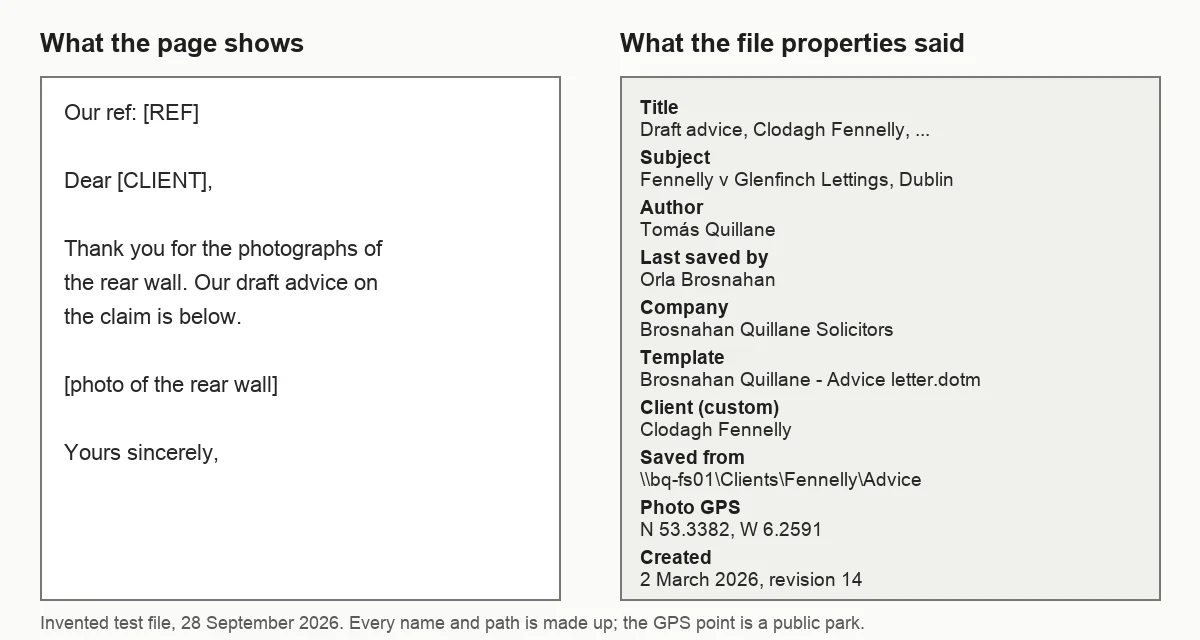
The client’s surname appeared nowhere in the body and in five of the file’s properties: the title, the subject, the keywords, a custom Client field and the path the letter had been saved from. The firm’s name sat in the company field and in the template name. Two members of staff were named as author and as the last person to save it.
What the photo added
The picture of the wall carried its own record: the camera maker and model, the moment the shot was taken, an artist field with a name, and a GPS position to four decimal places. A position that precise identifies a building, and in a tenancy dispute the building is the client’s home. A phone photo of your driving licence carries the same record.
That gap, between the visible letter and the file behind it, is the whole subject of this guide. A letter can pass a careful read and still name the client five times.
Where a Word file keeps its metadata
A .docx file is a zip package of separate parts. The text of the letter is one part. The properties are others, and each has its own job. Knowing which part holds what explains why clearing one field in one dialog rarely clears everything.
| part of the file | what it holds | in our test |
|---|---|---|
| core properties | title, subject, author, last saved by, keywords, dates, revision | client in three fields |
| extended properties | company, manager, template, editing time | firm name twice |
| custom properties | anything a system or a person adds | client and network path |
| embedded pictures | the image file, with its own data | camera and GPS |
Our test .docx, 28 September 2026. Property names as python-docx and the package itself give them.
Author, last saved by and the dates
The author field is usually filled in when the file is first created, and the last saved by field changes every time someone saves. Microsoft describes the name of whoever saved a document most recently, and its creation date, as properties its programs maintain automatically. Our file also recorded a revision number, 14, and 312 minutes of total editing time.
For a file that goes outside the firm, those fields show who worked on a matter and when. For a precedent reused across clients, they can show someone who has left the firm, or a date that contradicts the letter.
Company, manager and template
The company field, where it is filled in, usually carries the firm’s name. Manager is often empty unless someone types in it. The template name catches people out, because many firms name their templates after themselves, and in our test it read Brosnahan Quillane, then the letter type. In a slide deck the template goes further, because a name typed into the slide master sits behind every slide built on it.
Microsoft lists the template name among the items its Document Inspector finds, under Document Properties and Personal Information. It is also easy to overlook, because nobody types it: it comes with the template.
Custom properties and network paths
Custom properties are added by practice management systems, document management software or a person who wanted the file to be searchable. They often hold the matter number and the client’s name, because that is what they are for. In our test the Client field read Clodagh Fennelly and a Saved from field held the full server path, with her surname as a folder name.
A path like that tells an outsider the name of your file server, how your folders are organised and the client the document belongs to. Microsoft’s page notes that documents saved to a document management server may carry extra properties about that location too. An AI clause in your engagement letter describes the work done for the client; it was not drafted with server paths and template names in mind.
Photos inside the file: EXIF, GPS and the camera
A photo from a phone, such as a copy of your passport, is two things: the picture, and a block of EXIF data written by the camera. That block commonly names the phone or camera, records when the shot was taken and, if location was switched on, where. The DPC’s note gives the same list for phones and cameras, adding the username and lens settings.
None of the four main AI assistants says whether it keeps or strips that block when you upload a photo, as our guide to AI photo uploads found.
When a photo goes into a document, the picture is stored as its own file inside the package. In our test the open source library kept it exactly as it came, EXIF and all, and Pillow read the GPS point straight back. We did not test what Word itself does to a picture on insertion, so do not assume the data has gone: check the picture.
A quick way round it
For a photo that only needs to show something, such as a crack in a wall, a page of a certificate or a copy of your driving licence, a screenshot of the picture does not carry the original photo’s GPS point or camera details. Nor does a copy exported from a photo editor with its location option switched off. The step takes seconds and removes the question.
Scans of documents behave differently. The picture is the page, and whatever the page shows can be read by any tool that reads text from images. That problem belongs to redaction, the job our PDF redaction guide walks through.
Health records deserve extra care here. A photo of an injury in a personal injuries file is both a picture of health data and a record of where and when it was taken, and the rules for that category are in our Article 9 guide.
PDF metadata sits in two places at once
A PDF can store its properties twice. One set is the document information dictionary, with fields such as Author, Title, Subject, Keywords, Creator and Producer. The other is an XMP packet, a block of XML that holds much the same details in a different format. A viewer might show one set, and a tool that reads files can see both.
Next came a single page PDF carrying the same invented details, and we filled in both sets. Two copies followed: one with only the information dictionary emptied, the way many simple property editors work, and one with both sets removed.
The copy with its dictionary emptied looked clean in any viewer that shows only those fields. Read with pypdf, its XMP packet still named the author and still gave a title with the client’s full name. Only the third copy was free of both.
The software line and the dates
Two more fields are easy to overlook. Creator and Producer record the programs that made the PDF, which can tell a reader the file came from Word and which PDF engine produced it. The creation and modification dates are stamped automatically, and they can contradict the date typed on the letter.
None of this is visible on the page, and the text of our three PDFs was identical. The difference between them lived entirely outside the words. Councils, which publish and share PDFs every day, carry the same double record, one more reason for the care we describe for council staff using AI.
Why metadata matters when the whole file goes to an AI tool
Paste three sentences into a chatbot and those three sentences are all it receives. Attach the file and it receives the file. OpenAI’s help page on file uploads lists, under extraction, an example that reads: “Extract metadata (author, creation date, etc.) from a document.” In OpenAI’s article on data analysis, a second line matters: “For some data-analysis tasks, ChatGPT writes and runs Python code”, and code opened on a .docx or a PDF can reach every part of the package.
That does not mean every upload is mined for its properties. It means the properties are part of what you handed over, and the tool is able to read them. A title that names the client, or a path with her surname in it, has left your office as surely as the letter itself.
A disclosure you did not intend
Under the GDPR the question is not whether the provider looks at the author field. It is whether you disclosed personal data that the task did not need, which the GDPR’s Article 5(1)(c) calls data minimisation. The client’s name in a custom property, a colleague’s name as author, and a GPS point near someone’s home are all personal data, and none of them helps a model draft a reply.
Retention after the upload varies by provider and by plan. Our Irish guides cover what ChatGPT keeps and how Microsoft’s Copilot terms treat files, and our comparison of which AI is GDPR compliant asks which of them can sit inside a GDPR contract at all.
An AI provider is an outside party like any other, so the check on properties belongs in the same routine as the check on the page, written into the firm’s AI policy rather than left to memory.
Where Word shows the properties
Before clearing anything, look at what is there. Microsoft’s page on viewing and changing properties gives the steps for Word in Microsoft 365. Select the File tab, then Info, and the properties appear on the right. Show All Properties at the bottom of that panel adds the less common ones.
For the full set, select Properties at the top of the Info panel, then Advanced Properties. Its Summary tab holds the eight standard fields, with Author, Company and Manager among them, and the Custom tab lists anything a system or a person has added.
| where you look | what you see |
|---|---|
| File, Info panel | the main properties, editable in place |
| Show All Properties | the less common properties |
| Advanced Properties, Summary | the eight standard fields |
| Advanced Properties, Custom | matter numbers, client fields, paths |
| Advanced Properties, other tabs | document information and statistics |
Source: Microsoft Support, View or change the properties for an Office file. Word in Microsoft 365, Windows version.
Editing a field by hand
You can type over most fields in the Info panel. Microsoft notes that for some, such as Author, you click the name with the right mouse button and choose Remove or Edit. That works for a single file where you know exactly what is wrong, and it is how you would correct a title that names the wrong client.
Across a dozen fields it is slow and easy to get wrong, and custom properties sit on a separate tab. For a file leaving the firm, the Inspector is the better tool. The same goes for a GP practice whose referral templates carry the practice name, the setting our page for Irish healthcare teams is written for.
Clearing the properties in Word, and what stays behind
Microsoft’s Document Inspector has a check called Document Properties and Personal Information. According to Microsoft, that one check reaches the Custom, Summary and Statistics tabs of the properties dialog, plus routing slips, any email headers, document server properties, content type details, send for review details, the username and the template name.
- Save a copy first. File, Save As, with a name that marks it as the outgoing version. Microsoft advises inspecting a copy, since what the Inspector takes out may be impossible to get back.
- Open the Inspector. With the copy open, choose Info on the File tab; under Check for Issues, pick Inspect Document.
- Inspect and remove. Tick Document Properties and Personal Information, select Inspect, and choose Remove All next to it.
- Check the result. Save, close, reopen and look at Advanced Properties again.
The same dialog offers checks for comments, tracked changes, headers and hidden text. They are about what is written inside the document, not about the file’s description of itself, and our separate guide to redacting in Word deals with them.
What it leaves for you to check
The Inspector works on the Word file. The camera data inside pictures is not on its list in Microsoft’s page, so the EXIF check from the photo section above still applies. It does not rename the file, and a file name such as Fennelly advice v3.docx sends the client’s surname with every upload. Clearing properties also leaves the drafting history alone: a clause deleted under Track Changes stays in the file until someone settles the tracked changes.
Microsoft’s privacy options page describes a setting to remove personal information from file properties on save. It is off in Word by default, and even with it off, the page says, you can remove the information on demand with the Inspector. On a Mac, the Inspector page covers only the Windows editions of Word, which makes the read of Advanced Properties and the text route below more important.
Firms with a document management system should ask their provider which custom properties it writes, and whether it adds them back on the next save. The file your Irish solicitors team sends out is only as clean as the last system that touched it.
How to remove metadata from PDF files in Acrobat
Adobe’s Irish page on PDF metadata puts it in four steps. With the PDF open, choose Menu on Windows or File on macOS, and then Document Properties. Edit or delete the properties, check the additional metadata fields as well, press OK and save. Adobe notes that once metadata is deleted it cannot be undone, and that some PDF permissions can stop you deleting it.
That route edits what the properties dialog shows. For a file leaving the office, Adobe’s learning page on removing sensitive information describes a sanitise step, which removes information that is not visible in the file, such as comments, metadata and hidden layers, and saves the result to a new file.
Checking the PDF you made from Word
A PDF exported from Word is a new file, but it can start life with the Word file’s title, author and subject copied across. Adobe’s page lists the author’s name, the title, the creation date, keywords and sometimes the software used as the typical contents of PDF metadata, and those are the fields a Word export can bring with it.
The reliable habit is to clear the Word file first, then export, then open the new PDF’s Document Properties and read every field, including the additional metadata. Remember the lesson of our second PDF: a clean properties dialog is not proof that the XMP packet is empty.
Accounts files are a common case, because the same PDF goes to Revenue, the bank and the client, and Irish accountants may export straight from a template with the practice name built in.
Removing metadata also leaves the words on the page untouched. If a name sits in the text under a black box, clearing the properties does nothing about it, and that job belongs to our redaction guide for PDFs.
Sending text instead of the file
Most tasks you give an AI tool need the words, not the file. A summary, a first draft, a list of dates, a reply to a letter: all of them work on text. And text copied out of a document leaves the properties, the template, the custom fields, the embedded photos and the network paths behind, because none of those live in the words.
The DPC’s note makes a related point in its advice on exporting to plain text: doing so strips out hidden content, including various types of metadata, and makes the review easier. The same logic applies to an AI upload. The less the tool receives, the less there is to check. A plain text export still has to be read, since a CSV or a .txt file keeps every column and line nobody took out.
When the file has to go
Some tasks do need the file: a form whose layout matters, a spreadsheet with formulas, a contract whose clause numbering the tool has to follow. Then the order is the one above: a copy, the Inspector or Acrobat’s sanitise step, a check of the result, and only then the upload. A workbook needs one more step, since the Inspector finds pivot caches and external links but cannot remove them.
Solicitors bound by Practice Direction HC 142 already have a reason to keep a record of what went into an AI tool, and a note that the properties were cleared belongs in that record.
Nonimo, the text and the file properties
The Nonimo app runs on the office computer, not on a server. Give it a document and you get two things back: the text, where each client detail has become a label, ready to paste, and a masked copy of the file.
A Word copy comes back with its author, last saved by and company fields emptied, its title, subject, description, keywords, category and custom properties masked, the list of people with their email addresses emptied, the thumbnail and custom XML removed, and embedded pictures without their EXIF data. A PDF copy is a fresh PDF holding the text alone, with neither the original layout nor its metadata.
We gave Nonimo the text of our test letter’s properties.
| as typed in the properties | what the AI tool would get |
|---|---|
| Title: Draft advice, Clodagh Fennelly, water damage claim | Title: Draft advice, [PERSON_1], water damage claim |
| Subject: Fennelly v Glenfinch Lettings, Dublin | Subject: [PERSON_2] v Glenfinch Lettings, Dublin |
| Client: Clodagh Fennelly | Client: [PERSON_1] |
| Matter number: BQ-2026-0418 | Matter number: [REFERENCE_1] |
| Saved from: \\bq-fs01\Clients\Fennelly\Advice | Saved from: \\bq-fs01\Clients\[PERSON_2]\Advice |
Nonimo, run on invented text, 28 September 2026.
The Inspector step above takes care of the template name and the dates of comments and revisions. Our security page lists what the app stores and the little that it sends.
Sources
- Data Protection Commission, Redacting Documents and Records (updated August 2021). File properties can contain the name of the person who created or edited a file, dates of creation and revision history; phones and cameras can add the username, date, time, location and lens settings; exporting to plain text strips hidden content, including types of metadata. dataprotection.ie
- Microsoft Support, View or change the properties for an Office file. Properties described as metadata; File, Info, Show All Properties; Properties, Advanced Properties, and the Summary fields Title, Subject, Author, Manager, Company, Category, Keywords and Comments; Author removed or edited from its context menu. support.microsoft.com
- Microsoft Support, Remove hidden data and personal information by inspecting documents, presentations, or workbooks. What the Document Properties and Personal Information check covers, including username and template name; automatically maintained properties; document server properties; inspect a copy; File, Info, Check for Issues, Inspect Document. support.microsoft.com
- Microsoft Support, View my privacy options in Microsoft Office. The setting to remove personal information from file properties on save, off in Word by default, and the Inspector as the on demand alternative. support.microsoft.com
- Adobe, Remove metadata from a PDF in 4 steps (Irish edition). Menu or File, Document Properties; typical PDF metadata; deletion cannot be undone; permissions can prevent it. adobe.com
- Adobe Experience League, Remove sensitive information. The sanitise step removes information not visible in the file, such as comments, metadata and hidden layers, and saves a new file. experienceleague.adobe.com
- Regulation (EU) 2016/679, the GDPR, Article 5(1)(c). Personal data must be adequate, relevant and limited to what is necessary for the purpose. eur-lex.europa.eu
- Data Protection Commission, Guidance on Anonymisation and Pseudonymisation (June 2019). Masked or pseudonymised data remains personal data where the controller can still identify people. dataprotection.ie
- OpenAI Help Center, File Uploads FAQ. Among the extraction examples: extract metadata, such as the author and creation date, from a document. help.openai.com
- OpenAI Help Center, Data analysis with ChatGPT. For some data analysis tasks, ChatGPT writes and runs Python code. help.openai.com
- Nonimo, our own test of 28 September 2026. An invented .docx built with python-docx 1.2, with core, extended and custom properties and a photo carrying EXIF and GPS, read with python-docx and Pillow; an invented PDF made with reportlab, with an information dictionary and an XMP packet, in three versions, read with pypdf 6.10; the text of the properties run through Nonimo.
Nonimo is the software that does this on your own computer: it masks client names and IDs before your text reaches ChatGPT. No account needed, and the app does it without your files leaving your machine.
Common questions
How do I remove metadata from PDF files before uploading them to ChatGPT?
Open the PDF in Acrobat, go to Document Properties and clear the author, title, subject and keywords, then use the sanitise step, which Adobe says removes metadata, comments and hidden layers into a new file. Check the saved copy again: in our test, a PDF with its main properties emptied still named the author in a second block. Nonimo gives you the text instead, with client details replaced by labels.
Will an AI chatbot see the author and dates of an uploaded file?
It can. OpenAI's own help page on file uploads lists, among its extraction examples, pulling the author and creation date out of a document. Its data analysis page adds that ChatGPT sometimes writes and runs Python on the file, which reads the whole package, properties included. Clearing the properties before the upload, or sending plain text, removes the question altogether.
Does Document Inspector clear the author's name from a Word file?
Yes, if you run the Document Properties and Personal Information check and choose Remove All. Microsoft's page says that check covers the Custom, Summary and Statistics tabs of the properties dialog, along with the username, the template name and any email headers. Run it on a copy, because Microsoft warns that removed data cannot always be restored, and then open the Properties dialog to confirm the fields are empty.
Does saving a Word file as PDF leave the author's name behind?
It can. Adobe's page on PDF metadata lists the author's name, the title, the creation date, keywords and the software used as typical contents, and a PDF made from a Word file can inherit them. Open the new PDF's Document Properties and read every field before sharing it. The simplest route is to clear the Word file's properties first, so the PDF starts empty.
Do photos in a Word document keep their GPS location?
They can. A photo taken on a phone usually carries EXIF data, and the Data Protection Commission notes that cameras can record the username, date, time, location and lens settings. In our test file, the embedded picture still held its GPS point and camera details. Check each picture, or replace it with a fresh screenshot, which does not carry the photo's GPS point or camera details.
Is pasting the text safer than uploading the whole file?
For metadata, yes. Pasted text carries none of the file's properties, templates, embedded photos or network paths, because none of them live in the words on the page. The Data Protection Commission makes a similar point about exporting to plain text, which strips hidden content. The names in the text itself still need replacing, and that is the part Nonimo handles.
Does clearing the properties take a file outside the GDPR?
No. Removing the author, company and paths deals with one route by which a file points to people, but the text usually still names the client, and your office keeps the original. In the DPC's anonymisation guidance, masked data like this is pseudonymised at best, and the GDPR goes on applying to it. Clearing metadata is a step in keeping disclosure to a minimum, not a way out of the rules.
Which Word properties does Nonimo clear in its copy?
In the copy it makes of a Word document, the author, last saved by and company fields are emptied, and the title, subject, description, keywords, category and custom properties are masked. The list of people with their email addresses is emptied, the thumbnail and custom XML are removed, and embedded pictures go without their EXIF data.