· Updated · Written and maintained by Nonimo
In one line, how to redact a PDF means removing the characters, never just hiding them. A black shape drawn across a surname stops you seeing it, yet the surname is still inside the file, and any program that pulls out the file’s wording will find it. So will the chatbot you upload the PDF to. Proper redaction strips the details from a duplicate of the document, and you test that duplicate before it travels.
This guide is written for UK offices whose client letters, HR files, tenancy references and court bundles arrive as PDFs, and who now want ChatGPT, Claude or Copilot to read them. It walks through why hiding fails, a test on an invented letter, the ICO’s position, Acrobat Pro and Mac routes, a one minute check and scans.
Whether staff should be using a given AI service in the first place is its own question, and the UK GDPR questions to put to an AI supplier deal with it.
A black box on a PDF covers the words, it does not delete them
Think of a PDF page as a sandwich. At the bottom sit the characters themselves, each with a font and coordinates, which is why you can highlight, search and copy them. Shapes, highlighter strokes and comments are laid over the top. Paint a black rectangle across a name and the top slice changes. The bottom slice stays exactly as it was. A slide falls for the same trick: a shape laid over a name leaves the text intact.
That explains why a hidden PDF looks done. Printed or on a monitor, nobody could tell it apart from a genuinely redacted copy. The gap appears only when software reads the file instead of displaying it: a Ctrl+F search, a paste into an email, a screen reader, a document management index, or an AI service that pulls the wording out before replying.
Picture an estate agent with a memo of sale whose buyer details were blacked out for the vendor’s solicitor, later uploaded whole to ChatGPT for a chasing letter. The black bars travel with the file, and so do the names under them. Our estate agents page works from the wording rather than the PDF for that reason.
Two layers in one file
The ICO makes this point in its 2025 guidance on disclosing documents. Information hidden beneath a shape stays in the electronic file, it says, and a recipient can expose it by pasting the PDF somewhere else. Its chosen illustration is Notepad. No hacking is involved, which is precisely why the mistake keeps repeating.
A genuine redaction tool works on the bottom of the sandwich. It deletes the characters within each marked area and then paints its box where they used to be. Certain tools go further and turn the whole page into a flat picture, leaving nothing selectable. The acid test does not change: once redacted, the details are absent from the file.
We covered an invented letter and asked the file for its text
Describing the failure is less convincing than producing it, so we did. Our test document is a one page grievance outcome letter whose details belong to nobody. The employee’s name is made up. Her birthday is 31 April, which never happens. Her National Insurance number starts with QQ, a prefix HMRC never issues. Her postcode begins ZZ, an area that does not exist, her mobile sits in Ofcom’s drama range, and her email address uses example.com.
From that letter we generated six PDFs and ran each through two widely used open source libraries, pypdf and PyMuPDF, asking for the page text. Extraction is what any program does when it treats a PDF as words rather than an image; whatever the libraries return is what such programs are handed.
Six files, one letter
| File | What we did | Details left in the extracted text |
|---|---|---|
| A | Drew black rectangles over 6 details | 6 of 6 |
| B | Added black filled rectangles as comments | 6 of 6 |
| C | Marked the same areas and applied redaction | 0 of 6 |
| D | Turned the covered page into a flat image | 0 of 6, and no text at all |
| E | A scan of the letter with a hidden OCR text layer | 6 of 6 |
| F | Placed the same redaction marks as C, never applied | 6 of 6 |
Run through PyMuPDF 1.26 and pypdf 6.10 on 28 September 2026, with invented data. Script and files sit with this guide’s working notes.
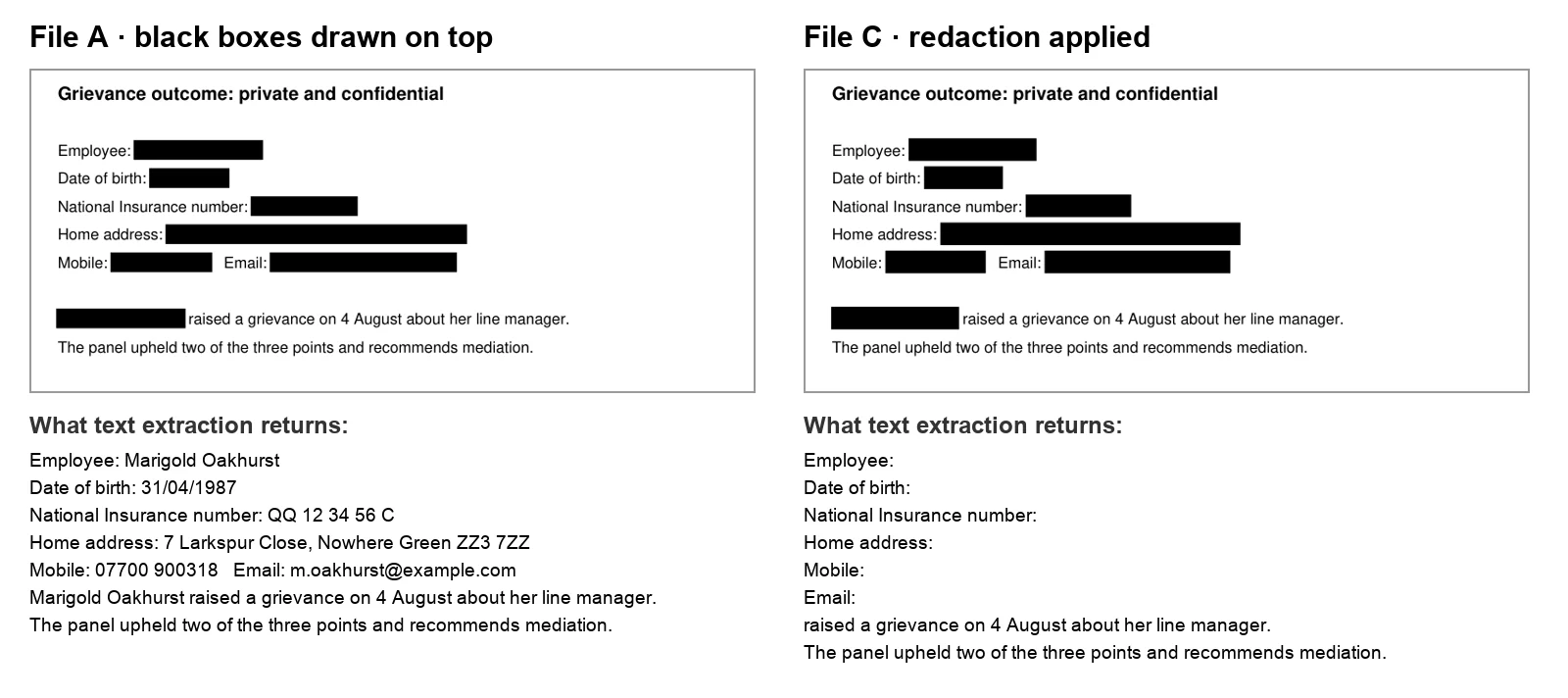
A and C are the pair worth staring at. Side by side they are the same page, and a printer would produce identical sheets. Yet file A surrendered all 385 characters of the letter to both libraries, hidden details and all. File C returned the field labels, “Employee:” and “Date of birth:”, with empty space after each.
We picked those six because nearly every HR letter carries them. They are the easy part. The details that identify someone without naming them, a job title in a small team or an unusual date, are a separate problem, dealt with in pseudonymisation under UK GDPR.
What the test does not show
One invented page proves a mechanism, not the behaviour of every product. Paid redaction software varies, and some websites do more or less than they advertise. The narrow lesson is the useful one: looking at a PDF cannot tell you whether it is covered or redacted. Only questioning the file can.
What an AI is sent when you upload a PDF
Only OpenAI, Anthropic and Microsoft know precisely how their consumer apps treat an uploaded file, and we will not pretend otherwise. They do publish how their developer platforms treat PDFs, though, and on this question the published answers line up.
OpenAI’s page on file inputs states that, for vision capable models, its API pulls out both the wording and an image of every page and gives the model both. Anthropic’s page on PDF support describes turning every page into an image, extracting that page’s wording and supplying the two together. Either way, characters sitting under a box arrive at the model as ordinary words.
How long a provider then keeps an upload is a separate matter; for Anthropic’s consumer apps, see what Claude keeps and for how long.
The picture and the words travel together
So a hidden PDF is arguably worse than an unredacted one, because it looks safe. The page image contains a black bar while the extracted wording beside it spells out the name behind it. Nothing tells a model to trust the image over the words. Ask for a summary of file A and you should assume the employee’s name, birthday and home address are all in play.
A redacted file cures this at the root: extraction yields nothing where the details were, and the picture shows a bar. Retention, training and access then depend on your account and contract, which we cover separately in ChatGPT’s business plans under UK law and Copilot and confidential material.
What the ICO expects from a redaction
On 31 July 2025 the ICO released fresh guidance on disclosing documents to the public securely. It superseded an advisory note written straight after the 2023 breaches, and the Deputy Commissioner’s announcement cited the Police Service of Northern Ireland and the Ministry of Defence as cases where documents went out without proper checks. At the PSNI, the document was an Excel workbook with a worksheet nobody had spotted, its tab scrolled out of view.
The chapter on redaction leaves little room for doubt. Do not cover information in electronic documents with black rectangles while the wording survives underneath. Redact a duplicate rather than the original, record who removed what and why, and have redactions reviewed, all of them or a sample, to confirm they hold. If the PDF began as a Word draft, clear its tracked changes and comments first, as the ICO counts both among the hidden details a sender can miss.
For organisations lacking redaction software, it describes a roundtrip: export the PDF to a basic image format such as a Windows bitmap, then rebuild a PDF from those images, so the picture is all that survives.
The ICO’s own worked example
None of this is new. Back in 2018, version 1.2 of the ICO’s How to disclose information safely took a freedom of information reply the ICO had itself written, blacked out part of it with Word’s highlighter, exported it to PDF and then lifted the hidden wording straight back out. The same document cautioned that Save as PDF and Print as PDF were unlikely, by themselves, to redact anything effectively.
The National Archives’ Redaction Toolkit, aimed at public bodies handling FOI and data protection requests, states the principle underneath: always redact a copy, never the original record. Its appendix on electronic records sets out the same image roundtrip. Councils already doing this for FOI will find their AI questions in how UK councils are approaching AI.
Where UK offices already redact
Most practices redact more often than they think. A subject access request answer has third parties’ names taken out before it goes back to the requester. A tenancy reference passed to a landlord loses the previous landlord’s contact details. A tribunal bundle shared with a client’s insurer can lose a witness’s home address. Each ends with a PDF somebody believes is clean, now one drag and drop away from a chatbot.
Written for disclosure, and it fits an upload
The ICO wrote for documents going to the public, under FOI or in reply to a subject access request. An upload to an AI service goes to a provider rather than the world, but the physics are the same: the whole file travels. Whether sending client material to a chatbot counts as a breach in itself is examined in the breach question for client data in ChatGPT.
How to redact a PDF properly in Acrobat Pro
Adobe markets redaction as an Acrobat Pro capability, and its UK walkthrough assumes Pro. The job has two stages, marking and applying, and the second is the one people forget. Until it is applied, a mark is merely an outline sitting over intact wording. Our file F, with the marks placed and never applied, gave back every detail.
- Duplicate the file. Save it under a fresh name before touching anything. Both Adobe and the ICO recommend this, and the untouched original stays on record.
- Choose Redact. Pick Redact from Tools or from the left panel, then drag over each passage or image that must go.
- Search, then mark. Find Text and Redact looks up a term, a whole phrase or a pattern such as phone numbers or email addresses, and marks each hit.
- Press Apply. This is the moment the characters are deleted. Before it, they sit intact beneath coloured outlines.
- Leave sanitising switched on. Acrobat offers to strip hidden information at the same time; accept.
- Save, reopen, test. Close the redacted duplicate, reopen it and run the check set out further down.
Outlines sit over the details. Extraction still returned 385 characters, all 6 details included.
The characters are deleted. Extraction returned the field labels and nothing after them.
Why the search step matters
People redact what they can see, and what they see first is page one. Across a long letter or a bundle, one surname crops up in a heading, a footer, a forwarded email and a signature block. Searching for every name and number is the only reliable way to catch its later appearances, along with the short forms: a first name on its own, initials, a reference without its prefix.
British paperwork has its own repeat offenders. A tribunal bundle prints the case number in every page header. A payslip may carry the National Insurance number in more than one place. A solicitor’s letter repeats the client reference under each heading. Run a search for each of those, and do not trust the first page to speak for the rest.
What the tool cannot decide for you
Acrobat deletes what you mark and nothing else. It has no idea that a job title plus a street name points to one person in a twelve person office. That call is yours, and the ICO treats it as a matter of training and review rather than software. Details that identify somebody without naming them are covered in pseudonymisation under UK GDPR, which works through the ICO’s motivated intruder test.
How to redact a PDF on a Mac, or without Acrobat
Mac users have Preview, whose Redact tool lives among the Markup controls. According to Apple’s guide, you select wording to take it permanently out of view, you may alter a redaction during editing, and the change becomes fixed when the document is closed. The order therefore matters: redact a duplicate, close it, reopen it, test it.
Without Acrobat or a Mac, the choices are another PDF editor offering true redaction, or the ICO’s roundtrip, which rebuilds every page as a picture. A document that began in Word is its own job, since the ICO notes that saving from Word to PDF is not, alone, a secure way to redact.
| Route | What it does to the text | Watch out for |
|---|---|---|
| Acrobat Pro, Redact then Apply | Deletes the marked text | Marks that were never applied |
| Preview on a Mac, Redact | Removes selected text once the file is closed | Testing before closing |
| Roundtrip to an image and back | Leaves no text layer at all | The PDF is no longer searchable |
| Online redaction site | Depends on the service | The whole file is uploaded; check whether it is kept and who can see it |
Adobe’s UK redaction guide, Apple’s Preview guide and the ICO’s redaction chapter. The last row is our note, not a finding about any named service.
What an online tool receives, and what it keeps
With any online redaction service, three things matter: what it receives, whether it keeps it and who can see it. The tool at the top of this page covers the file, gives you the result and discards the document as soon as you have it. For a privileged file or health records, the Nonimo app covers it on your own computer, so the file never leaves it. Firms that want the choice in writing can adapt a ready made AI use policy, which covers outside services.
Checking a redacted PDF before it leaves the office
This takes about a minute, and no software will do it on your behalf. It puts to the file the very question an AI service puts to it: which characters do you hold?
Select all the text in the redacted copy, copy it and paste it into Notepad or TextEdit. Does any removed detail appear?
YesThe redaction failed. Go back to the original, not the failed copy.
NoGo on to the search.
Search the file for a surname, a postcode and one number you removed. Does the search find anything?
YesSomething was covered rather than removed, or a second occurrence was missed.
NoGo on to the last question.
Does the text that is left still say who the person is, through a job title, a site or a date?
YesRemove or generalise it before sending.
NoThe copy is ready for the task.
Should nothing highlight at all, the page carries no text layer. Either a redaction tool flattened it or it is a scan. For the removed details that is reassuring, but it limits what the paste test can tell you, which brings us to scans.
Let someone else look
The ICO’s in house procedure for redacting its own reprimands, disclosed under freedom of information, asks the case officer for a fresh pair of eyes on proposed redactions and a further check once they are applied. The 2025 guidance likewise suggests peer or senior review. In a small practice, that can simply mean whoever did not redact the file runs the paste test.
Brokers know the pattern from claim files, where a medical report or a loss adjuster’s note is passed on with sections blacked out. A second person running the paste test on those files costs a minute, and our page for insurance brokers covers what to take out of them before an AI sees them.
Scanned PDFs: a picture of a page, and still readable
A scanned PDF is essentially a photograph of paper inside a PDF wrapper. With no text layer, pasting yields nothing and searching finds nothing. Our flattened file D handed 0 characters to both libraries. That emptiness is why scans get treated as harmless.
Clinical correspondence is a common source of scans, and the NHS side of ChatGPT treats clinic letters as well as typed notes.
They are not harmless where AI is concerned. Anthropic documents that Claude examines an image of every page alongside any text, and OpenAI documents that page images go to its vision models. A model that reads pictures can read a scanned letter, or a photo of a driving licence, roughly as a person would. A surname on a scan is exposed through the image, even though the paste test cannot see it.
The uploaded picture is then stored like the rest of the chat, and in ChatGPT a copy saved to Library outlives the chat.
The scan that has text after all
Plenty of scanners and PDF apps run OCR so that a scan becomes searchable, tucking the recognised wording into an invisible layer behind the picture. We built file E like that. It looked like a photograph and still gave back all 385 characters, the 6 details included. If you can highlight words on a scan, redact it as you would any text PDF.
Redacting a scan
With a true image, such as a photo of your passport, redaction means blocking out the area on the picture and exporting to a format that cannot hold layers. The ICO’s advice on images says the same: obscure the region with solid colour, then export to something simple such as PNG or JPEG so the change is permanent. Blurring or pixelating falls short, because it can sometimes be undone.
When the AI only needs the text, send the text
Most things people ask an AI about a PDF concern its wording: summarise this letter, draft a response to this complaint, list the dates in this bundle. For those, the file is packaging you can leave behind. Plain text has no hidden layers, and you can read every line of it before it goes. In a .txt file, what Notepad shows is exactly what the AI receives.
The ICO makes a related observation: converting to a simpler format such as plain text discards whatever the page does not display. Plain text still needs its identifiers removed, though. A surname in a pasted paragraph is as exposed as one inside a PDF; the difference is that you can see it, and swap it for a placeholder that keeps the sentence usable.
Health or union details in an HR letter raise extra questions, answered in our note on special category data and AI, and solicitors will want the confidentiality angle for law firms.
Redaction and pseudonymisation are different tools
Redaction deletes, and it is the right tool when the document itself is being released. Swapping names for labels that you can reverse on your side is pseudonymisation, and according to the ICO the result is still personal data to the organisation that holds the key. The distinction matters when you describe what you did, and our explainer on deidentified, pseudonymised and anonymised data sets out the terms.
Handing a PDF to Nonimo
The Nonimo app runs on your own computer, on Mac and Windows, and the document stays there. Drop a PDF onto it and you see the wording with the details it recognises swapped for placeholders you can paste straight into the AI, and you can download a copy of the document as a new PDF that holds only that wording, without the original layout or metadata. On a Mac, the save dialog opens in the original’s folder.
The Nonimo app reads a PDF scanned from start to finish on the computer itself, on Mac and Windows, up to 50 pages, and you get its wording back covered.
Here is the text of our invented letter, before and after Nonimo:
BEFORE
Grievance outcome: private and confidential
Employee: Marigold Oakhurst
Date of birth: 31/04/1987
Home address: 7 Larkspur Close, Nowhere Green ZZ3 7ZZ
Mobile: 07700 900318   Email: m.oakhurst@example.com
Marigold Oakhurst raised a grievance on 4 August about her line manager.
The panel upheld two of the three points and recommends mediation.

AFTER (Nonimo)
Grievance outcome: private and confidential
Employee: [PERSON_1]
Date of birth: [BIRTH_DATE_1]
Home address: [ADDRESS_1]
Mobile: [PHONE_1]   Email: [EMAIL_1]
[PERSON_1] raised a grievance on 4 August about her line manager.
The panel upheld two of the three points and recommends mediation.
The grievance and its date remain, since any reply needs them. When the AI answers, the Nonimo app puts the genuine details back on your machine. For what the app keeps on disk, and the once a day usage tally that carries none of your wording, read how Nonimo handles your data.
A five step routine for any PDF
Here is the whole guide as a five step routine. It suits a single letter as well as a lever arch bundle, and the sequence matters more than the software.
- Decide what the AI needs. If it is the wording, send text instead of the file, with identifiers replaced.
- Redact a duplicate, never the original, and keep both, clearly labelled, as the ICO and the National Archives advise.
- Delete rather than hide: Acrobat Pro’s Redact and Apply, Preview’s Redact, or the image roundtrip. Never a drawn shape.
- Search for repeats. Names, initials, postcodes and reference numbers appear more than once.
- Paste and search before sending. If a removed detail reappears, the file is not redacted, however it looks.
None of this makes a document anonymous, and none of it settles which AI services may see client material. Where AI has touched a court filing, AI and court filings is the next read. The routine’s job is narrower: making sure the details you meant to remove are not waiting inside the file for its next reader, human or machine.
Sources
- ICO, How do we avoid an accidental breach when redacting information? Published 31 July 2025. Text covered by a shape stays in the file and can be revealed by pasting a PDF into Notepad; do not cover with black rectangles; redact a copy; review redactions; roundtrip via BMP; converting to plain text removes non displayable information; images exported to PNG or JPEG; Word saved as PDF is not secure redaction on its own.
- ICO, New guidance on disclosing documents to the public 31 July 2025. Replaces the advisory note issued after the 2023 breaches; PSNI and Ministry of Defence named by the Deputy Commissioner.
- ICO, How to disclose information safely (version 1.2, 2018) Paragraphs 60 to 65: the ICO’s own FOI response covered with a black highlighter, exported to PDF and copied out; Save as PDF and Print as PDF unlikely to be effective.
- ICO, Reprimand redaction process (10 November 2022, released under FOI) Fresh pair of eyes before applying redactions and a second check after; redactions must not be removable.
- The National Archives, Redaction Toolkit Redact a copy, never the original record; Appendix 2 on roundtripping PDFs through an image format.
- Adobe, How to redact a PDF (UK) Redaction presented as an Acrobat Pro feature; Redact, Apply, the sanitise option, Find Text and Redact, saving under a new name.
- Apple, Annotate a PDF in Preview on Mac (UK) The Redact tool removes selected text from view; editable while editing, permanent once the document is closed.
- OpenAI, File inputs For PDFs, the API extracts both text and page images and sends both to vision capable models.
- Anthropic, PDF support Each page is converted into an image and its text is extracted and provided alongside it; Claude analyses both.
Nonimo is the software that does this on your own computer: it masks client names and IDs before your text reaches ChatGPT. No account needed, and the app does it without your files leaving your machine.
Common questions
What is the right way to redact a PDF?
Delete the characters rather than hide them: that is how to redact a PDF. Mark each detail with a real redaction tool, apply the marks, save under a new name, then test the copy. In Acrobat Pro, Apply is the stage people skip. The ICO's guidance says wording kept under black rectangles stays in the file and returns when pasted into Notepad. Nonimo takes another route, giving the AI labelled wording instead.
Can a redacted PDF be unredacted?
Not if it was done properly, since the characters have gone from the file. If they were only hidden under shapes, anyone can read them back in seconds. When we drew boxes over an invented letter, extraction still returned all 6 details we had hidden. The ICO describes the same failure, using Notepad as its example. Nonimo sidesteps the problem by swapping the names and numbers it recognises for labels: the Nonimo app does it before anything leaves your machine, and the tool on this page discards the document as soon as you have the result.
Can an AI read text hidden under a black box?
Yes, whenever the wording is still inside the file. OpenAI and Anthropic both document that a PDF sent through their APIs arrives at the model as extracted page text plus a picture of each page. A box drawn on top alters the picture and leaves the extracted wording untouched. Nonimo acts on that wording instead, swapping the names, addresses and contact details it recognises for labels before the AI sees them. The app does that on your own computer; the tool on this page does it in one step and discards the file once you have the result.
Is there a redact tool in the free Acrobat Reader?
Adobe sells redaction as part of Acrobat Pro, and its UK walkthrough is written for Pro users. A filled square added with a comment or drawing tool is something else: an annotation lying over live characters, like file B in our test, which gave everything back. With only Reader, choose another route and test what you produce. Nonimo needs no Acrobat at all, since what you paste into the AI is its labelled text, not your file.
What is the quickest test that a redaction worked?
Select everything in the redacted copy, paste it into Notepad or TextEdit, and read the result line by line. Then search the file for a surname, a postcode and a number you took out. That mirrors the ICO's own illustration of a failed redaction, a PDF pasted into Notepad. Any removed detail reappearing means the copy is not redacted. Nonimo lets you see its labelled version before anything goes to the AI.
Can I redact a PDF on a Mac without Acrobat?
Yes. Preview, which comes with macOS, has a Redact tool among its Markup controls, and Apple says a redaction can be changed while you edit but becomes final at the moment you close the document. So make a duplicate, redact it, close it, open it again and run the paste test. When you only want an AI to read the wording, the Nonimo app runs on Mac and Windows and swaps personal details for labels locally, so the PDF stays on your computer.
Does printing to PDF get rid of the text under the boxes?
Not reliably. The ICO's 2018 guidance on disclosing information safely warned that Save as PDF or Print as PDF is unlikely to produce effective redaction, since a PDF can keep marks such as a black highlighter over live wording. Its 2025 guidance suggests converting to a simple image format and back instead. Whichever you use, test the output. Nonimo avoids the question by giving you labelled text to paste instead of a file.
Will a chatbot read a scanned PDF?
Often, yes. A scan holds a photograph of paper, so extraction finds no characters, yet Anthropic's documentation says Claude examines an image of every page alongside any text. Whatever the page shows can therefore be read, and a box burned into the scan only hides the area it covers. Many scans also carry an invisible OCR layer. The Nonimo app reads a fully scanned PDF on the computer itself, on Mac and Windows, and covers its wording.
Should I upload the PDF to the AI, or paste the text?
For summaries, translations or draft replies, the wording is usually all the AI needs, and wording is easier to inspect than a file. The ICO notes that converting to a simpler format such as plain text drops whatever the page does not display. A PDF brings its layout and anything lurking behind it. Nonimo hands you the wording with names, dates of birth, addresses and contact details swapped for labels, to paste as it is.