How to remove metadata from PDF and Word files before AI
· Written and maintained by Nonimo
Open the properties of almost any office file and you find names: a fee earner, whoever last pressed Save, the name of the practice and, more often than you would like, the client. None of it appears on the page.
The safe way is to work on a duplicate. Remove metadata from PDF and Word files in the application that produced them, then open the duplicate in some other program to confirm the fields are blank before it goes near an AI tool. Checking after the upload is too late, since a file sent to ChatGPT can stay in Library once its chat is gone, as our guide to deleting ChatGPT chats and files shows.
This guide is for UK offices whose letters and reports leave the building as attachments, and who now upload them to AI tools as well. Below: the fields that matter, why an upload differs from a paste, a test file of ours, the regulator’s position, the menus in Word and Acrobat, photographs, and a checklist.
What happens to a file once it reaches a provider is its own subject: see ChatGPT’s retention rules for UK users.
The details a file carries that the page never shows
Every Office document and every PDF has two parts. One is the content you read. The other is a set of fields about the file. Microsoft calls them document properties; most people say metadata. Some are typed in by a person. Many are filled in by the software without asking, the moment someone creates or saves the file.
Microsoft’s page on viewing properties lists what Word keeps on its Summary tab: title, subject, author, manager, company, category, keywords and comments. A Custom tab holds whatever your firm has added, such as a matter number or a fee earner’s initials. Neither tab is visible while you read or print the document.
Author, last saver and client
The author field is often filled in by the software itself: the ICO’s 2018 guidance on disclosing information safely notes that the logged in user’s name can land there automatically. Word also records the last person to save the file. Between them, those two fields name the fee earner and the colleague who tidied the draft.
The client tends to appear in fields people type themselves. A title such as “Letter to Mrs Varcoe re deposit” is ordinary office practice. So is a category or keyword with the client’s surname, which is how many firms make documents searchable in their own systems.
Dates, template and editing time
Word also keeps dates and statistics: Microsoft’s Document Inspector page mentions the date a document was created and the name of whoever most recently saved it, and adds the template name to the list of personal information a file can hold. A template called after a client, or after a matter, puts that name in the file without anyone typing it.
A PDF has its own set: author, title, subject, keywords, the program that created it and the one that produced it. A PDF can also carry a second copy of the same details in an XML block known as XMP, as our test file did. That duplication matters later in this guide, because clearing one copy does not clear the other.
Public bodies meet these fields all the time, because freedom of information releases go out as Word files and PDFs. Council staff weighing up AI tools for the same paperwork will find the wider picture in our note on AI in councils.
Uploading a file sends its properties along with the words
Paste a paragraph and the AI receives that paragraph. When you upload the document, the whole file travels, and its properties go with it. The words on the page are a separate problem, handled in the PDF redaction guide.
The body of a letter is usually checked before it goes out. The properties rarely are, because nobody sees them. An estate agent can take every name out of a memo of sale and still upload a file whose title names the buyer, which is one reason our estate agents page starts from the text instead of the file.
What OpenAI says ChatGPT can do with an upload
We do not know exactly how each consumer app processes a file, and we will not guess. OpenAI does describe what its users can ask for. In its File Uploads FAQ, one of the example requests is “Extract metadata (author, creation date, etc.) from a document.” So reading the properties is a use case the provider itself suggests.
A help page from OpenAI about analysing data goes further: “For some data-analysis tasks, ChatGPT writes and runs Python code…” Our own test further down needed only a short script to pull every property out. For what Microsoft’s assistant does with material inside your tenant, see Copilot and confidential information.
Pasting text leaves the properties behind
If the task is a summary, a translation or a draft reply, the AI usually needs the wording and nothing else. Copying the text out of the document and pasting it leaves every property behind, along with the template, the revision count and any picture. The wording itself still needs its names taken out, but at least you can see all of it.
What our test letter said about the people behind it
To check all of this against a real file, we built one. It is a short letter from an invented firm of solicitors, Pellowe Quist LLP, about a tenancy deposit dispute. The body names nobody: it opens “Dear Sir or Madam” and refers only to “our client”. Then we typed into its properties what a busy office typically types there, and had a script read the file back.
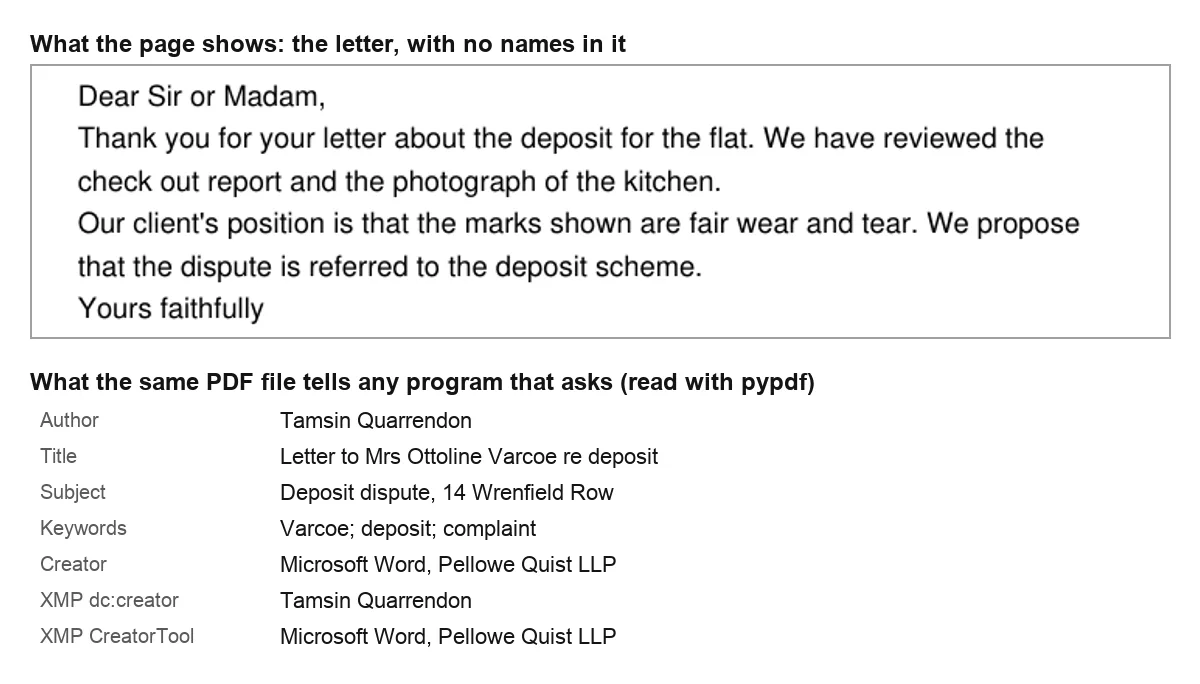
The Word version held more. Its core properties named the author, Tamsin Quarrendon, and the colleague who last saved it, Ollie Brackenridge. The title, keywords and category named the client, Mrs Ottoline Varcoe. The subject gave the address of the flat. The comments field read “Draft 3. Check with Priya before it goes”, which names a third member of staff.
| Where in the .docx | What it gave away (all invented) |
|---|---|
| Core properties | Author, last saved by, client in title, keywords and category, flat address in subject, a colleague in comments |
| Extended properties | Firm, manager, and a template named after the client |
| Custom properties | Matter number and fee earner’s initials |
| People list | The author’s work email address |
| Embedded photo | Camera, time taken and GPS position |
Our test file, built with python-docx and read part by part with a script on 28 September 2026. The script and its results sit alongside our notes for this guide.
The count is 14 fields spread over 5 parts of the file: 7 in the core properties, 3 in the extended ones, 2 custom properties, the email address in the list of people who worked on the document, and the GPS position of the photo. A reader of the printed letter would learn none of it.
The photo that knew where it was taken
The letter includes a photograph of the kitchen, as deposit disputes often do. We gave the photo the kind of EXIF data a phone adds: a make and model, the time it was taken, and a GPS position, which we placed in the North Sea so it points at nobody’s home. Once inside the Word file, the photo kept all of it.
A real photo from a check out inspection would point to the flat itself, and the time stamp would say when someone was there. That matters less for a kitchen than for a photo of an injury or of a person, where the rules on special category data come into play.
The ICO’s guidance on metadata in documents you disclose
The ICO’s guidance of 31 July 2025 for organisations releasing documents has a chapter that covers personal details tucked away inside files where nobody sees them. It defines metadata as information embedded within a document, often added automatically when you create, edit and save it, and gives three kinds of example: document properties, email sender and routing details, and EXIF data in images.
The risk, as the ICO puts it, is that you may disclose metadata accidentally if you do not realise it is there, and that it is easy for recipients to see. Its answer is practical. Staff should know how to find metadata and remove it, using a tool such as the Document Inspector or by converting the file to a simpler format. Read the result anyway: a text export from Writer can still carry tracked deletions.
The older guidance said the same
The ICO’s 2018 guidance, How to disclose information safely, already warned that files rarely contain only what the author typed or what the screen displays. It named previous authors, earlier versions, comments and the GPS coordinates in smartphone photos, a licence photo included. The National Archives’ Redaction Toolkit makes the same point about office formats, which may hold change histories and embedded metadata.
The guidance is written for documents released to the public, but the mechanics do not change when the file goes to an AI provider instead. For how the ICO approaches AI more broadly, see the UK GDPR checks on an AI supplier.
Where it bites in a UK office
Solicitors send drafts to the other side and bundles to counsel. Accountants send reports to lenders. HR teams answer subject access requests with documents that were never written for the requester. In each case the file’s properties can name a person the content was careful not to name. Solicitors will find more on this in our page on AI for law firms.
How to see the properties of a Word document
Looking comes before removing, and it takes a minute. In Word, select File, then Info, and the main properties appear beside the document. Show All Properties, at the foot of that panel, reveals the others: company, manager, category. An Excel workbook keeps the same fields, and adds an author’s name to every comment and note.
To see every field in one dialog, Microsoft points to Properties, at the head of the Info page, and then Advanced Properties. Its first tab, Summary, carries the fields listed earlier; the Custom tab carries any your firm added. Read both, because the Custom tab is where document management systems tend to write matter numbers.
Removing a single name by hand
Microsoft notes that some properties, such as the author, are edited by right clicking the name and choosing Remove or Edit. That is fine for one field, but it deals with only the field you remember. Last saved by, the template name and the list of people who worked on the file stay as they were, which is why the Inspector is the better route for a whole document.
Accountants who circulate management accounts built on a client template will recognise the pattern, and our page for accountants covers what else to take out before an AI sees the file.
How to remove metadata from a Word document with the Document Inspector
Word has its own tool for this. Microsoft’s advice is to point it at a duplicate, since some of what it deletes is gone for good. The steps below follow Microsoft’s UK support page. Settle the copy’s tracked changes and delete its comments before you start, as our guide to clearing track changes and comments from Word explains, so the Inspector checks a finished text.
- Save a copy. File, Save As, a new name. Then close the original.
- Open the Inspector. In the duplicate: File, then Info, then Check for Issues, then Inspect Document.
- Tick the properties box. Make sure Document Properties and Personal Information is selected, plus whatever else you want looked at.
- Inspect, then remove. Press Inspect. Beside each finding you want rid of, press Remove All.
- Read the properties again. Open Advanced Properties and check the Summary and Custom tabs are empty.
What it lists under document properties
Microsoft’s table puts a lot under that one heading, from the three tabs of the properties dialog and email headers to, near the end, the user name and the template name. The template is worth knowing about, because it is a field nobody types and nobody reads.
The same dialog offers to remove comments, tracked changes, headers, footers and hidden text. They belong to what the document says, not to what the file says about itself, and they deserve more thought than one button. Our pseudonymisation guide explains why a file holds more than its visible text. Word’s tracked changes and comments are covered in a separate guide.
What it leaves for you
The Inspector removes fields; it does not judge them. A client’s name typed into the body, or into the file name, is untouched. The file name travels with every upload and every email attachment, so rename the copy to something neutral before it leaves. The ICO also asks for a person to check the result, not only a tool. In PowerPoint the gap is wider, because hidden slides are missing from the Inspector’s list altogether.
Using Acrobat to remove metadata from PDF documents
Adobe’s own guide gives the short route. With the PDF open, go to Menu (Windows) or File (macOS) and choose Document Properties. On the Description tab, edit or delete the fields, and use Additional Metadata to see the rest. Select OK and save. Adobe adds that permissions on a shared PDF can stop you changing its properties.
For a deeper clean, the Redact a PDF tool in Acrobat Pro includes an option to sanitise the file. Adobe’s guidance describes it as permanently removing hidden PDF data and metadata, and asks you to make a copy of the PDF first. You then choose between removing everything hidden and removing items selectively.
| Where the details sit | Where to clear them | How to check afterwards |
|---|---|---|
| Word properties and custom fields | Document Inspector, on a copy | Advanced Properties, Summary and Custom tabs |
| PDF document information | Acrobat, Document Properties, Description | A second PDF reader |
| PDF XMP block | Acrobat, Additional Metadata, or sanitise in Pro | A second PDF reader |
| Anything hidden in the PDF | Acrobat Pro, sanitise | A fresh copy, opened and read |
Menus as Microsoft and Adobe describe them; the right hand column reflects what our test files taught us.
A PDF made from Word inherits Word’s properties
Most office PDFs start as Word documents, and the conversion carries properties across. The ICO’s 2025 redaction chapter says converting a Word document to PDF can remove some metadata and hidden information but is not a completely secure method on its own. Clean the Word copy first, make the PDF from it, then open the PDF’s properties and read them.
What an online metadata remover sees and keeps
Many websites offer to strip metadata. Unless the service works entirely inside your browser, the file reaches its server first, contents and properties together, so the questions are how much of it the service receives, how long it holds on to it and who else can open it. For a client file, the Nonimo app makes its covered copy locally, and your firm’s AI and tools policy can say which online services staff may use.
A PDF keeps its properties in two places, and sometimes in old saves
Clearing the author field in a PDF can look successful and still leave the name inside. Our invented letter went through four PDF versions to show it. Each was read by pypdf and by PyMuPDF, two open source libraries, and then searched byte by byte for the invented names.
| File | What we did | What reading the properties showed | Names still in the file’s bytes |
|---|---|---|---|
| A | Nothing: properties as created | Author, title, subject, keywords | 4 of 4 |
| B | Cleared the document information only | PyMuPDF: empty. pypdf: author and title, from XMP | 3 of 4 |
| C | Cleared both, saved as an update to the file | Empty in both | 4 of 4 |
| D | Cleared both, file written out afresh | Empty in both | 0 of 4 |
pypdf 6.10 and PyMuPDF 1.26, 28 September 2026. Names searched: the author, the client, the firm and the street, all invented.
File B is the two place problem. The PDF keeps a document information dictionary and, separately, the XMP block. We emptied the first and left the second, and the two libraries disagreed: one reported no author, the other reported Tamsin Quarrendon. Whatever program opens your file decides which copy it reads, so check with more than one.
Neither library is exotic: both are free, widely used and a single install away, which is the point. If a short script on a laptop can read a property, so can any system that receives the file. For documents headed to court, the court documents guide covers what else a solicitor signs off.
An update added to the end rather than a file rewritten
File C is the subtler case. The PDF format allows a program to save changes by adding them to the end of the file, leaving the earlier version in place underneath. Our file C had two end of file markers, one per version. Any program reading it normally saw empty properties, and all four invented names were still in the file.
Properties read as empty. The author, client, firm and street were all still in the file's bytes.
Properties read as empty, and none of the four names was anywhere in the file.
The practical lesson is to save the cleaned PDF as a new file, not over the old one, and to test the new file. The National Archives’ toolkit warns that some formats may allow changes to be rolled back, which is why it prefers a roundtrip through a bitmap image for redacted copies: BMP has no room for metadata.
Photos inside documents: EXIF and GPS
Phones and cameras write EXIF data into every photo, including the passport copy a letting agent asks for: who made the device and which model it is, when the picture was taken and, on many phones, where. When the photo is inserted into a report, a claim form or a check out inventory, that data can travel inside the document. Our test photo kept its GPS position after going into the Word file.
The ICO’s suggestions are to remove the data with photo editing software or Windows File Explorer, or with redaction software that extracts the image alone, and to turn off metadata collection on the device where that is an option. For a document on its way to an AI, the simplest approach is to strip the photo before inserting it, or leave it out.
None of the four big chatbots says whether it keeps or strips that data when a photo is uploaded on its own, which is the case for removing it first.
Where photos turn up in client files
Insurance claims are full of them: damage to a car, a leak, a broken fence. So are clinical letters with wound images and HR files with photos from an incident. Brokers will find the claim file angle on our page for insurance brokers, and the NHS side is covered in whether NHS staff can use ChatGPT.
Nonimo and the properties of a Word or PDF copy
The Nonimo app works locally, on your own computer, and the document stays there. Drop a file onto it and it gives you two things. First, the words, with every personal detail it recognises turned into a label, ready for the chat box. Second, a covered copy of the file to download, in the same format for Word, Excel and PowerPoint; on a Mac, the save dialog opens in the original’s folder.
The Word copy has its author, last saved by, company and manager emptied. Its keywords, title, subject, category, description and custom properties are covered just as the body text is. It also empties the list of people who edited the file, drops the thumbnail and the custom XML, and strips EXIF data from the pictures.
A PDF is rebuilt as a clean PDF of its text, so the source’s design and metadata stay behind. The Nonimo app reads a PDF scanned from start to finish on the computer itself, on Mac and Windows, up to 50 pages. Here is the text route on an invented extract, first as typed, then the version Nonimo handed back:
BEFORE
Our ref: PQ/2291/VAR
Client: Mrs Ottoline Varcoe
Property: 14 Wrenfield Row, Nowhere Green ZZ4 9ZZ
Email: o.varcoe@example.com   Mobile: 07700 900462
Mrs Ottoline Varcoe says the marks in the kitchen were there when she moved in.

AFTER (Nonimo)
Our ref: [REFERENCE_1]
Client: [PERSON_1]
Property: [RECORD_FIELD_1]
Email: [EMAIL_1]   Mobile: [PHONE_1]
[PERSON_1] says the marks in the kitchen were there when she moved in.
Run Word’s Document Inspector first to clear the template name and comment dates, then read the result before you paste it. Our security page details what the app stores and where.
Remove metadata from PDF copies and Word files in the right order
The steps below pull the guide together. They take a few minutes per document, and the order matters more than the software.
Does the AI need the file, or only the wording?
Only the wordingPaste the text, with names swapped for labels. No properties travel.
The fileWork on a copy with a neutral file name.
Is it a Word document?
YesRun the Document Inspector with Document Properties and Personal Information ticked, then read Advanced Properties.
No, a PDFClear Document Properties and Additional Metadata, or sanitise in Acrobat Pro, and save as a new file.
Does it contain photos?
YesStrip their location data before inserting them, or replace them.
NoGo on to the check.
Does a second program still show a name in the properties?
YesSomething is left, often the XMP copy or an old save. Clean again.
NoThe properties are clear. Now check the content itself.
Clean properties are only one layer. The body text still needs its names and numbers dealt with, and whether a given AI service should see client material at all is a separate decision; our breach analysis for client files sent to ChatGPT helps you frame it. For the words on the page of a PDF, the redaction guide is the next read.
Sources
- ICO, How do we avoid an accidental breach when personal information is ‘hidden’ in documents? Published 31 July 2025. Metadata defined as information embedded within a document, often automatically; examples: document properties, email routing information, EXIF with GPS; easy for recipients to see; Document Inspector or conversion to simpler formats; photo editing software or Windows File Explorer for image metadata.
- ICO, How do we avoid an accidental breach when redacting information? 31 July 2025. Converting a Word document to PDF can remove some metadata and hidden information but is not a completely secure method on its own.
- ICO, How to disclose information safely (version 1.2, 2018) Paragraphs 71 to 74: files rarely contain only what the author typed; previous authors, versions, GPS in smartphone photos; the logged in user’s name inserted into the author field automatically.
- The National Archives, Redaction Toolkit Office formats may incorporate change histories and embedded metadata; some formats allow changes to be rolled back; BMP chosen because it has no provision for metadata.
- Microsoft Support, View or change the properties for an Office file File, Info; Show All Properties; Properties, Advanced Properties; Summary tab fields; custom properties; Author edited by right click, Remove or Edit.
- Microsoft Support, Remove hidden data and personal information by inspecting documents, presentations, or workbooks Use a copy; File, Info, Check for Issues, Inspect Document; the Document Properties and Personal Information inspector covers Summary, Statistics and Custom tabs, user name and template name.
- Adobe, Remove metadata from a PDF Menu or File, Document Properties; edit or delete properties; Additional Metadata; permissions can prevent changes.
- Adobe, Remove sensitive content and information by sanitising and redacting Make a copy; Redact a PDF; selectively remove or remove all hidden data; an Acrobat Pro feature that removes hidden PDF data and metadata.
- OpenAI Help Center, File Uploads FAQ Extraction examples include extracting metadata such as author and creation date from a document.
- OpenAI Help Center, Data analysis with ChatGPT For some data analysis tasks, ChatGPT writes and runs Python code.
Nonimo is the software that does this on your own computer: it masks client names and IDs before your text reaches ChatGPT. No account needed, and the app does it without your files leaving your machine.
Common questions
How can I remove metadata from PDF documents safely?
Clear the fields, then prove they are clear. In Acrobat, Document Properties shows who is named as author, plus the title, subject and keywords, and Additional Metadata shows the rest; Acrobat Pro can also sanitise the file. Save the result under a new name, because in our test a PDF saved as an update still held the old author. Nonimo's copy of a PDF is a new PDF with only the text and none of the original's metadata.
What metadata does a Word document hold?
More than most people expect. Microsoft lists title, subject, author, manager, company, category, keywords and comments on the Summary tab, plus custom properties and details Word keeps by itself, such as who last saved the file and when it was created. Our invented letter also carried a template name and a colleague's email address. The Nonimo app's Word copy empties the author, last saved by, company and manager fields.
Will a PDF made from Word keep the Word file's properties?
Only partly, so do not rely on it. The ICO's 2025 redaction guidance says converting a Word document to PDF can remove some metadata and hidden information but is not a completely secure method on its own. Clean the Word file first, save the PDF, then open the PDF's properties and check what came across. Nonimo's PDF copy is rebuilt from the text alone, without the original's metadata.
Can ChatGPT read the author of a file I upload?
OpenAI says so itself. Its File Uploads FAQ gives, among the things you can ask for, extracting metadata such as the author and creation date from a document. OpenAI also explains that ChatGPT may run Python on your files for analysis, and a short script is enough to list every property. Treat the properties as part of the upload. Nonimo gives you the text with names swapped for labels, which carries no file properties.
Does the Document Inspector remove the template name?
Yes, by Microsoft's account: the template name and the user name both fall under the inspector for document properties and personal information, beside email headers and the tabs of the properties dialog. So run it on a copy with that box ticked, then open Advanced Properties and read the Summary tab again.
How do I strip location data from a photo in a document?
Remove it from the photo before the photo goes into the document, or replace the picture with a clean copy. The ICO suggests photo editing software, or Windows File Explorer, and turning off location data on the device where you can. Our test photo kept its GPS position after being placed in a Word file. When the Nonimo app makes a Word copy, the pictures inside go without their EXIF data.
Can the author field of a document count as personal data?
Yes, when it names or identifies a living person, which an author, a manager or a last saved by field usually does. The ICO's guidance on hidden information treats metadata as one of the ways personal information ends up in a document without anyone noticing, and expects organisations to know how to find and remove it before disclosure. The Nonimo app empties those fields, company and manager included, when it makes a Word copy.
Does copying the text into a new file get rid of the metadata?
It leaves the old properties behind, but the new file starts collecting its own. The ICO's 2018 guidance notes that Office can put the logged in user's name into the author field automatically, so the new document may carry yours. Check its properties before sending, or skip the file entirely and paste the text. Nonimo gives you the text with names and contact details swapped for labels, ready to paste.
Are metadata removal websites safe for client files?
That depends on what the site takes in, whether the file is kept and who has access, and its terms should say. For a client file, Word's Document Inspector and Acrobat already on your machine do the job without an upload, and the Nonimo app gives you a covered copy of the document without it leaving your computer.