Delete ChatGPT history, and the copies a chat leaves behind
· Written and maintained by Nonimo
To delete ChatGPT history, open a chat’s more options menu (•••), select Delete and confirm. On iPhone or Android, press and hold the chat’s title and tap Delete. To clear everything, open Settings, select Data controls and choose Delete all chats. The chats leave your account at once, and OpenAI schedules them for permanent deletion within 30 days. Saved memories, files in Library and some shared links live separately, and each needs its own delete.
That is the short version. The longer one matters if a client’s letter, a payslip or a medical note ever went into a chat, because the buttons in ChatGPT do quite different things, and some of them sound more final than they are.
This guide goes button by button: what you press on the web, on an iPhone and on Android, and what each one removes and leaves behind, all taken from OpenAI’s help centre as it read on 4 October 2026. It also covers your right to erasure under the UK GDPR. What OpenAI collects and who it discloses it to is a separate question, answered in our guide on whether ChatGPT shares your data in the UK.
How to delete a ChatGPT chat on the web, iPhone and Android
One chat at a time is the precise option, and the one to use when a single conversation holds something it should not. OpenAI publishes separate instructions for each platform, and the labels below are the ones its help centre prints.
On the web
- Open your ChatGPT chat history in the sidebar.
- Hover over the chat and select the more options menu (•••).
- Select Delete.
- Confirm the deletion.
On iPhone
- Open the ChatGPT app and tap the menu icon (≡) in the top left corner to open your conversation history.
- Find the chat, then press and hold its title.
- In the menu that appears, tap Delete, shown in red.
OpenAI’s iPhone article adds that the deletion is permanent and the chat cannot be recovered.
On Android
- Open the menu with the two lines in the top left corner.
- Find the chat, then press and hold its title.
- Tap Delete, shown in red at the bottom of the menu.
On the desktop apps
There is no separate OpenAI article on deleting a chat in the Mac or Windows app. The general instruction is the one above: the more options menu (•••), then Delete. For the macOS app, it states that conversations, screenshots and files “follow the same data retention policies as the web version”.
Whichever device you use, think before you confirm. OpenAI’s help centre is plain that you cannot restore a deleted chat, either in ChatGPT or through OpenAI Support. If the conversation is evidence of something, such as a client file that went in by mistake, our guide on whether that upload is a data breach explains why you may want an export before you delete.
How to delete all your ChatGPT history at once
The bulk option sits in settings, under Data controls rather than General.
- Open Settings from your profile menu.
- Select Data controls.
- Select Delete all chats.
- Read the confirmation message, then continue.
OpenAI warns that the action reaches every chat in the account or workspace you are signed into, projects included, and that it cannot be undone. So check which account you are signed into before you press it, particularly if you use a personal login at home and a work login in the office.
On a Business or Enterprise workspace the picture changes. Your organisation’s administrators set how long data is kept, and OpenAI notes that authorised compliance tools may still reach eligible workspace data under that retention policy. Whose account it is decides almost everything here, which is the first thing our guide to choosing GDPR compliant AI tools asks a UK business to settle.
Archiving hides a chat, it does not delete it
Archive all chats sits right next to Delete all chats, and the two are easy to confuse. Archiving a single chat takes one click from the same ••• menu, with no confirmation at all.
According to OpenAI, an archived chat only drops out of the regular sidebar. It stays searchable, its retention period is unchanged, and so is its eligibility for model training. If you archived something to get rid of it, it is still there.
To find archived chats and delete them for good:
- Open Settings and select Data controls.
- Select Archived chats, or View archived chats, depending on your device. If Manage appears, select it.
- Select Unarchive to bring a chat back, or Delete to remove it.
What each button really erases
ChatGPT now keeps your information in more than one place. The chat is one, the memory is another, your files sit in Library, and a shared link is a public snapshot with a life of its own. Each button reaches some of those places and not others, and the table sets out which.
| Control | Removes | Leaves in place |
|---|---|---|
| Delete (one chat) | That conversation and its shared link | Memories it produced, its files in Library |
| Delete all chats | All chats, project chats too | Memories, Library |
| Archive | Nothing, it only tidies the sidebar | The full chat, searchable as before |
| Delete shared link | Anyone opening that link from now on | The chat itself, and copies made by others |
| Delete and turn off memory | What the memory summary remembered | Your past chats |
| Improve the model for everyone, off | Training on your new conversations | Every saved chat |
| Delete account | The account and its data, within 30 days | A limited set kept where the law requires or permits |
Source: OpenAI help centre articles on deleting chats, memory, sharing, data controls and account deletion, checked 4 October 2026.
Saved memories survive a deleted chat
This is the gap that catches most people. OpenAI’s memory article puts it plainly: memories are kept apart from chat history, so removing the chat a memory came from does not remove the memory. A detail can outlive the conversation it came from and turn up again in a later answer.
The memory controls live under Settings, then Personalization, then Memory. Depending on your plan, OpenAI says you may see Memory, Reference saved memories, Reference chat history, Memory summary, Manage or Saved memories. To get rid of one detail for good, OpenAI says to delete both the memory and the chat it first appeared in, then clear it from the memory summary, archived chats, Library files and any connected app.
Two newer controls do more than one thing. Delete and turn off memory, in the ••• menu of the memory summary, deletes the remembered information shown there and switches Memory off, while your past chats stay. Switch off Reference chat history and what ChatGPT gathered from earlier chats is queued for deletion within 30 days, while the chats themselves stay put. OpenAI may also hold logs of a deleted memory for up to 30 days, for safety and debugging.
Files in Library and projects
Library, which OpenAI introduced in March 2026 and opened to Free and Go accounts in May, saves the files you upload and create automatically, and OpenAI is explicit that deleting a chat does not delete the files saved there. Select the file in Library, then Delete or the bin icon. Where a Recently deleted section appears, you can restore from it, or use Delete forever. Deleted files go from OpenAI’s systems within 30 days, with the same exceptions as chats.
Projects have their own button. From the project’s ••• menu, Delete project removes its chats, its instructions and any files stored only in the project, but not files saved separately in Library, and it cannot be undone. A generated image is removed from My images by deleting the conversation that created it. On eligible Pro, Business and Enterprise accounts, Space replaces Library from 29 September 2026, and deleting a page there moves it to Trash.
Before any of this, it is worth asking what was in those files in the first place. A spreadsheet export carries more than the columns on screen, as our guide to removing personal data from a CSV shows.
Shared links
OpenAI states that deleting a conversation removes its shared link. The one exception is a conversation with a scheduled task: deleting it pauses the task, and the task’s own shared link keeps working until you remove it by hand.
- Go to Settings and select Data controls.
- Next to Shared links, select Manage.
- Choose Delete shared link for one, or More actions, then Delete all shared links.
A deleted link stops future access, but it does not delete the original conversation, nor the copies other people saved by continuing it. On a personal account the link is a snapshot, and messages added later are not included unless you select Update link.
OpenAI says shared pages are not intended for search engine indexing, “but this does not make a link private. Anyone who can access a link can also forward it.” Links have no expiry date, so the safe habit is an occasional look at the Manage list.
Temporary Chat: history that is never written
The cleanest way to have nothing to delete is a chat that never enters your history. OpenAI’s steps:
- Open a new chat.
- Select Temporary.
- Choose Personalized or Unpersonalized before you send your first message.
OpenAI says a temporary chat, for as long as it stays temporary, is kept out of your history and your memories and is not used to improve its models, though it may be held for up to 30 days for safety purposes. Files you upload in a temporary chat are not saved to your account or to Library.
Two changes from 27 August 2026 are worth knowing. A temporary chat can now be personalised, meaning it uses your existing memories and custom instructions, and you cannot change that once the conversation starts. And a temporary chat can now be saved, at which point it becomes a regular chat that follows your normal retention, memory and training settings. If the reason you chose Temporary was to keep something out of the record, do not save it.
Temporary Chat changes where a conversation is filed. It does not change what goes in it, which is the subject of our guide to what personal data to remove before AI sees it.
After you delete ChatGPT history: the 30 day clock
When you delete a chat, OpenAI’s help centre says ChatGPT removes it from your account view immediately and schedules it for permanent deletion from OpenAI’s systems within 30 days. The privacy policy that covers the European Economic Area, the UK and Switzerland, updated on 24 August 2026, uses the same 30 days.
The exceptions to the 30 days
The same sentence carries its own exceptions. A chat is not removed within 30 days if it “was already de-identified and disassociated from your account”, or if OpenAI must keep it longer for security or legal obligations. The privacy policy gives examples of the longer cases:
- A legal requirement. Such as a subpoena, for as long as the obligation lasts.
- Banned content. Kept to protect the service against fraud and abuse.
- Payment records. Kept for accounting where OpenAI was party to a transaction.
- Your own erasure request. OpenAI keeps the record that it carried it out.
ChatGPT agent runs on a longer clock. OpenAI says deleting an agent chat deletes the screenshots taken during it, and that deleted agent chats and their screenshots go from its systems within 90 days rather than 30.
Training sits apart. OpenAI states that once you switch off “Improve the model for everyone”, it will not use your new conversations to improve its models, and its policy excludes from the 30 day deletion any content already stripped of identifiers and separated from your account when you allowed model improvement. Read together, they make the case for setting the switch before a conversation, and for writing that into your AI acceptable use policy.
The court order that ended in 2025
In 2025, a US court order in the New York Times case required OpenAI to retain consumer ChatGPT content indefinitely. OpenAI’s update of 22 October 2025 says those obligations ended on 26 September 2025, and that deleted conversations and temporary chats are again deleted automatically within 30 days.
The same update says OpenAI is no longer required to retain any conversations originating from the European Economic Area, Switzerland or the United Kingdom. It keeps a limited set of user data from April to September 2025, accessible only to a small legal and security team. As of 4 October 2026, OpenAI has published nothing newer on that retention, and this episode is the clearest example of what “legal obligations” can mean in practice.
Your right to erasure under the UK GDPR
Pressing Delete is a product feature. The right to erasure is a legal one, and in the UK it sits in Article 17 of the UK GDPR, which gives you the right to have personal data about you erased without undue delay where one of its grounds applies: the data is no longer needed for its purpose, you withdraw the consent it relied on, you object and there is no overriding reason to continue, or it was processed unlawfully.
The ICO’s guidance adds the practical edges. The right “is not absolute and only applies in certain circumstances”, and an organisation must respond without undue delay and at the latest within one month of receiving the request. Where a valid request is received and no exemption applies, the ICO expects erasure from backup systems as well as live ones, or at least that the data is put beyond use.
Asking OpenAI through its privacy portal
For a consumer account, OpenAI’s privacy portal at privacy.openai.com is where formal requests go. Choose Make a Privacy Request, then I have a consumer ChatGPT account, and pick what you want: Download my data, Delete my ChatGPT account, Do not train on my content, or Remove my personal data from ChatGPT responses. The account deletion route works even if you can no longer sign in.
If a request goes unanswered, the ICO’s advice is to raise the concern with the organisation first and give it a chance to put things right, and then to complain to the ICO.
When the data belongs to your client
In a firm the more common problem runs the other way. Someone put a client’s details into a chat, and the erasure right belongs to the client, exercised against your firm as controller. Deleting the chat, its memories and its files is then part of your answer, and so is recording what went in and when. For anything touching health, beliefs or union membership, our guide to special category data in AI sets out the extra conditions.
Export your data first, or delete the whole account
Deleting is final, so take a copy of anything you may need before you start. If a client’s details went into a chat, the export is also your record of what was sent, which is why our guide to AI in local government puts recording what left ahead of any deletion.
- Sign in and open Settings from your profile menu.
- Select Data controls.
- Under Export data, select Export.
- Select Confirm export.
The download arrives by email or text message, and OpenAI says exports can take up to 7 days. The button is Download data export, and the link expires 24 hours after you receive it, so download it promptly, signed into the same account.
The ZIP file holds your chat history and other account data. An export cannot bring back chats that are already deleted, and it is available on Free, Go, Plus, Pro and eligible Edu accounts, not on Business or Enterprise.
Delete the ChatGPT account
When you want everything gone, not just the history, close the account itself.
- Sign in and open Settings from your account menu.
- Select Account.
- Next to Delete account, select Delete.
- Enter your email address or phone number and type DELETE.
- Select Permanently delete my account.
OpenAI says it then deletes your data within 30 days, except for a limited set kept for longer where the law requires or permits it, and the account loses access to ChatGPT and to the API. Shared conversation links go with the account, though shared scheduled task links must be deleted first. A deleted account cannot be reactivated.
Two practical points. Deleting the account does not cancel a subscription bought through the App Store or Google Play, so cancel that first. And you can open a new account with the same email address after 30 days, provided the old one was fully deleted. Self service deletion is not available on Business, Enterprise or Edu workspaces, where the administrator holds the controls.
Gemini, Claude and Copilot: deleting their history too
Google, Anthropic and Microsoft follow the same pattern, with their own names for each button and their own version of the memory gap.
| Assistant | Where to clear it all | After you delete |
|---|---|---|
| Gemini | The Activity page, Delete, All time | Reviewed chats kept up to three years |
| Claude | Select all, in Chats and tasks | Gone from the back end within 30 days |
| Copilot | The Microsoft privacy dashboard | No period published for the new app |
Source: Google Gemini Apps help, Claude help centre and Microsoft support pages, checked 4 October 2026.
Delete Gemini history
On the web, hover over a chat in the side panel, click More, then Delete. In the mobile app, tap Menu, then touch and hold the chat under Recent and tap Delete. On a personal account these options only appear when Keep Activity is on, and Google states that deleting a chat this way also deletes it from Gemini Apps Activity.
To delete Gemini history in bulk, open Activity on gemini.google.com, or myactivity.google.com/product/gemini, and choose Delete with All time, the last hour, the last day or a custom range. Auto delete runs at 18 months by default, and you can set 3 or 36 months or switch it off.
Two things survive the delete. Switching Keep Activity off still leaves conversations held with your account for up to 72 hours. And a chat a human reviewer has seen stays out of reach of your activity controls: Google holds it for up to three years, no longer tied to your account, as our guide on whether Gemini uses your data explains.
Google’s own pages disagree on whether deleting a chat removes its public link, so delete links yourself under Settings & help, then Your public links.
Delete Claude chats
On the web, find the conversation in the sidebar or under Chats and tasks, hover, click ⋮ and select Delete, then confirm. To delete several Claude chats, click Select in Chats and tasks, tick them or choose Select all, and delete. The iPhone app works by touch and hold, then Delete; the Android app has a ⋮ menu inside each chat and a checklist icon in the chat list for clearing several.
Anthropic states that a deleted conversation leaves your history immediately and is deleted from its back end systems within 30 days. Memory is the gap again, in Anthropic’s words: “When a conversation expires or is deleted, related memory entries generated from it won’t be removed”. Delete them under Settings, then Memory, or use Reset memory. If you allowed model improvement, deleting a chat keeps it out of future training, as our guide on whether Claude trains on your data explains.
Delete Copilot history
Microsoft made an updated Copilot app for web, desktop and mobile available on 18 August 2026, and these steps are for that version. To delete one chat, select it in the Chats list, then More, then Delete. To delete all Copilot history, open the privacy dashboard of your Microsoft account, go to Copilot app activity history, select Delete all activity history and confirm with Clear. The same page offers Export all activity history as a CSV file.
Saved memories are separate here too, and switching memory off leaves them in place: delete them from Manage, beside Saved memories, under Settings and Personalization. Shared links stop under Settings, then Data controls, then Shared links. The 18 months often quoted applies to the older app; for the new one, Microsoft’s pages give no retention period. Our guide on Copilot and confidential information covers the work version.
Deleting afterwards does not unsend it
Every button in this guide acts after the event. A chat you delete had already been sent to OpenAI, could have fed model training if that setting was on, and can sit in its systems for 30 days, or longer where the law demands it. What changes the outcome is covering client details before you send.
That is what Nonimo does. In the app for Mac and Windows, you select the passage and press one key: names, dates of birth and identifiers such as UTRs and NHS numbers become labels on your computer, before the text reaches ChatGPT, Claude or Copilot. The reply comes back with the labels in it, and Nonimo swaps the real details back in. The client’s names and numbers never leave your computer, as our security page sets out.
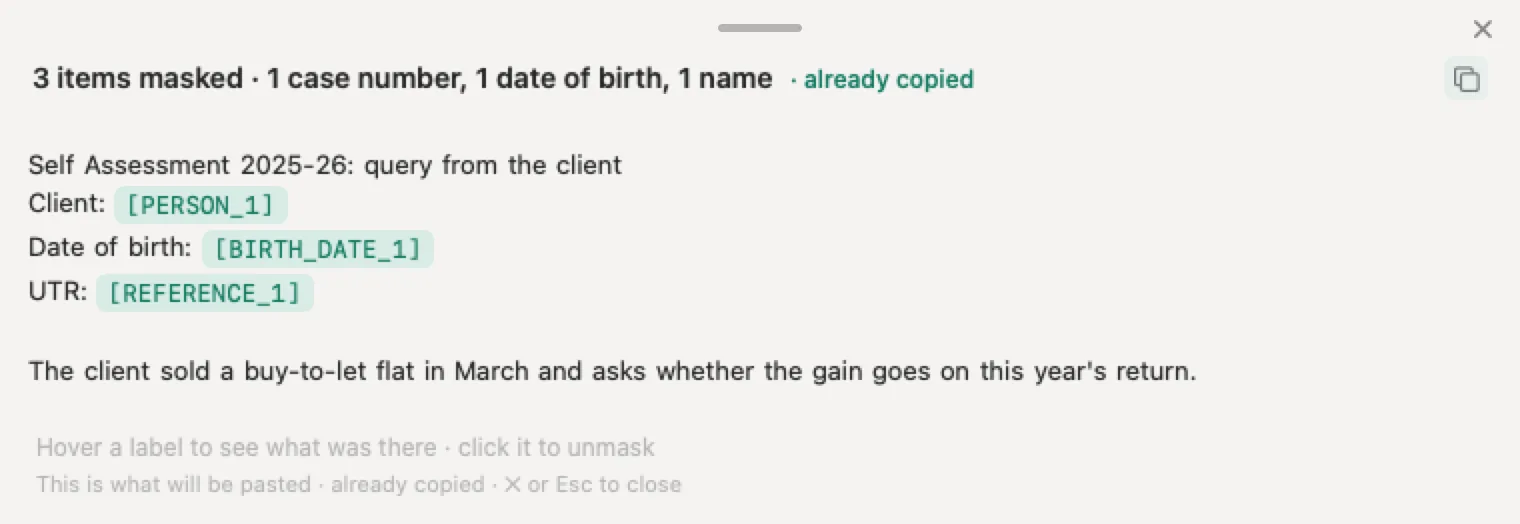
For a single document without installing anything, the tool at the top of our guide to what personal data to remove masks it, gives you the result and discards the document the moment you have it, as its privacy notice explains. And for a passport copy or a driving licence copy, the photo is read and covered in your browser, so it never leaves your computer.
Sources
Checked 4 October 2026. The help.openai.com pages refuse automated requests and were read in a browser that day.
- OpenAI, Deleting and archiving chats in ChatGPT. The web steps, Delete all chats under Data controls, projects included, no restore, archive versus delete, archived chats, workspace compliance tools, and removal from view at once with deletion within 30 days.
- OpenAI, Deleting a conversation in the iOS app and in the Android app. The mobile steps and that deletion is permanent.
- OpenAI, How is data retained in the macOS app. That the macOS app follows the same retention policies as the web version.
- OpenAI, Chat and file retention in ChatGPT. The 30 days, its exceptions, and that deleting a chat leaves Library files.
- OpenAI, Memory in ChatGPT. Saved memories stored apart from chats, the memory controls, Delete and turn off memory, Reference chat history, and the 30 days of memory logs.
- OpenAI, Using Library to manage files and Projects in ChatGPT. Library, Recently deleted, temporary chat files, and Delete project.
- OpenAI, Images in ChatGPT. Removing a generated image by deleting its conversation.
- OpenAI, ChatGPT release notes. Library from March 2026, Space from 29 September 2026, and the Temporary Chat changes of 27 August 2026.
- OpenAI, Sharing conversations and scheduled tasks. Shared links, the scheduled task exception, snapshots, indexing, no expiry, and links removed with the account.
- OpenAI, Temporary chat in ChatGPT. The steps, what a temporary chat skips, the 30 days for safety, personalisation and saving.
- OpenAI, Data controls in ChatGPT and How your data is used to improve model performance. Archiving does not change training, and opting out covers new conversations.
- OpenAI, ChatGPT agent. Agent chats and screenshots deleted within 90 days.
- OpenAI, Exporting your ChatGPT history and data. The export steps, up to 7 days, the 24 hour link, contents and plans.
- OpenAI, Deleting your ChatGPT account. The steps, 30 days, app store subscriptions, reuse of the email, and workspaces.
- OpenAI, Privacy policy for the EEA, UK and Switzerland, updated 24 August 2026. The 30 days and the examples of longer retention.
- OpenAI, Enterprise privacy, updated 8 January 2026. Administrators control retention on business workspaces.
- OpenAI, Response to the New York Times data demands, update of 22 October 2025. The order’s end on 26 September 2025 and the UK, EEA and Swiss conversations.
- OpenAI, Privacy portal. Make a Privacy Request and its four options.
- UK GDPR, Article 17. The right to erasure and its grounds.
- ICO, Right to erasure. Not absolute, one month to respond, and backups.
- ICO, Check if you can complain. Raise the concern with the organisation first.
- Google, Manage and delete your activity in Gemini Apps and Find and manage your recent chats. Deleting chats and activity, auto delete, Keep Activity and the 72 hours.
- Google, Gemini Apps Privacy Hub, updated 24 September 2026. Reviewed chats kept for up to three years. And Share your chats: Your public links.
- Anthropic, Delete or rename a conversation, 10 August 2026. The Claude steps and the 30 days.
- Anthropic, Chat search and memory and How long do you store my data, 1 July 2026. Memory entries survive a deleted chat, and deleted chats stay out of future training.
- Microsoft, Copilot privacy controls and Copilot activity history in the privacy dashboard. The new app’s steps, saved memories, and Delete all activity history.
- Microsoft, Share conversations in Copilot and Conversation history in Copilot. Stop sharing, and the 18 months of the older app.
- Nonimo, Privacy notice for the masking tool. The document is masked and discarded as soon as you have the result.
Nonimo is the software that does this on your own computer: it masks client names and IDs before your text reaches ChatGPT. No account needed, and the app does it without your files leaving your machine.
Common questions
How do I delete ChatGPT history?
To delete ChatGPT history, open a chat's more options menu (•••), select Delete and confirm; on a phone, press and hold the chat's title and tap Delete. For everything at once, go to Settings, then Data controls, and select Delete all chats. Saved memories and files in Library need deleting separately. To keep client details out of the history in the first place, Nonimo replaces them with labels on your computer before you send.
Does archiving a ChatGPT chat delete it?
No. OpenAI's help centre says archiving removes the chat from the sidebar but does not delete it: an archived chat stays searchable, keeps the same retention period and is treated the same way for training. To remove it, find it under Archived chats in Data controls and select Delete. If the chat held client details, Nonimo is the step that covers them before the next one is sent.
If I delete a chat, does ChatGPT forget what was in it?
Not automatically. In OpenAI's words, saved memories are stored separately from chat history, so a memory can outlast the chat it came from. Remove it under Settings, then Personalization, then Memory, as well as deleting the chat. A detail that never reached ChatGPT cannot become a memory, which is why Nonimo replaces client names with labels before the text is sent.
How long does OpenAI keep deleted ChatGPT chats?
A deleted chat leaves your account straight away and is scheduled for permanent deletion from OpenAI's systems within 30 days. The exceptions are content already stripped of identifiers and separated from your account, and content OpenAI must keep longer for security or legal obligations. Chats with ChatGPT agent run on 90 days. Nonimo shortens the question: the client details it replaces are never in the chat to begin with.
Is there a way to undo deleting a ChatGPT chat?
No. OpenAI's help centre says you cannot restore a deleted chat in ChatGPT or through OpenAI Support, and the mobile articles call the deletion permanent. If you might need the conversation later, export your data first from Settings, then Data controls. Nonimo works from the other end: the label map that puts names back into an answer stays encrypted on your own computer.
Do I have a right to have my ChatGPT data erased in the UK?
Yes, in the circumstances Article 17 of the UK GDPR sets out, such as data no longer needed or consent withdrawn. The ICO says the right is not absolute and that an organisation must respond within one month. OpenAI takes requests through its privacy portal. For client files, Nonimo means far less of the client ever reaches the provider: names and identifiers stay on your computer.
Does ChatGPT Temporary Chat keep anything?
Yes, briefly. A temporary chat does not appear in your history, creates no memories and is not used to improve models, but OpenAI may keep it for up to 30 days for safety purposes. If you save it, it becomes a regular chat. Temporary Chat decides where the conversation is filed; Nonimo decides what the conversation contains, replacing client details with labels before it is sent.
Does deleting a ChatGPT chat remove its shared link?
Yes, with one exception. OpenAI states that deleting a conversation removes its shared link, but a scheduled task's shared link stays available until you delete it separately. Manage every link under Settings, then Data controls, then Shared links. A link someone forwarded can travel further than you meant it to, and Nonimo's labels make sure the client's name is not in the snapshot.