Delete ChatGPT history permanently: what still survives
· Written and maintained by Nonimo
You delete ChatGPT history from two places. For one conversation, use the three dots (•••) beside it in your chat list, then Delete and confirm; in the phone apps, a long press on the title brings up Delete. For the lot, Settings, then Data controls, has Delete all chats. The chats leave your account straight away, and OpenAI says it removes them from its systems within 30 days, apart from what it must keep for legal or security reasons.
That covers the chat list. It does not cover the memories ChatGPT saved from those chats, the files it filed in Library, the links you shared, or the copy you may want to keep.
This guide goes through each button in turn, using OpenAI’s help centre as it read on 4 October 2026, and quotes the labels as the help centre prints them. What OpenAI does with your data while you keep it is the subject of our guide to what ChatGPT keeps.
How to delete ChatGPT history: one chat, or all of them
There are two routes, and they reach different amounts. Deleting a single chat works from the chat list on any device. Deleting everything lives in the settings, under Data controls rather than General, which is where most people look first.
OpenAI is plain about one thing before you start: a deleted chat cannot be restored, either in ChatGPT or through OpenAI Support, and the help centre mentions no bin for chats. If there is any chance you will need a conversation later, for a client file or a breach assessment, export first, as described further down.
On the web
OpenAI’s article on deleting and archiving chats, updated around 20 September 2026, gives these steps:
- Open your ChatGPT chat history.
- Select the more options menu (•••) for the chat you want to delete.
- Select Delete.
- Confirm the deletion.
OpenAI publishes these steps for ChatGPT in general rather than for each desktop app. Its note on the macOS app says conversations, screenshots and files there follow the same retention policies as the web version.
On iPhone and Android
On the iPhone app, tap the menu icon (≡) in the top left corner to open your conversation history, press and hold the title of the chat, and tap Delete, which shows in red. On Android, open the menu through the two lines in the top left corner, press and hold the title, and choose Delete in red at the bottom of the menu. Both help articles say the deletion is permanent.
Delete all chats at once
- Open Settings.
- Select Data controls.
- Select Delete all chats.
- Review the confirmation message, then continue.
OpenAI warns that this can affect chats in your current account or workspace, including chats inside projects, and that Delete all chats cannot be undone. Codex chats inside the ChatGPT app work differently: the help centre says they have to be archived before they can be deleted.
Archive and Temporary Chat: the two buttons that are not delete
Two controls sit close to Delete and are easy to mistake for it. Neither one deletes anything, and both leave a copy with OpenAI.
Archive is the one that catches people out. From the same ••• menu, select Archive and the chat leaves the sidebar with no confirmation. OpenAI’s help centre is explicit that this “does not delete it”: archived chats stay saved to your account, remain searchable, keep the same retention period and stay exactly as eligible for model training as before. Archiving tidies the list, and the chat itself stays where it was.
Archived chats live under Settings, then Data controls: look for Archived chats or View archived chats (the label depends on the device), and Manage if it shows. Each one can be unarchived or deleted properly from there.
Temporary Chat keeps a chat out of your history
Temporary Chat works from the other end: the chat never enters your history in the first place. Start a new chat, pick Temporary, and settle on Personalized or Unpersonalized before the first message goes. As long as it stays temporary, OpenAI says it is left out of your history, adds nothing to memory and is not used to improve its models.
Two details matter. OpenAI may keep a temporary chat for up to 30 days for safety purposes, so it leaves your history but not OpenAI’s systems.
And since 27 August 2026 a temporary chat can be saved, at which point it becomes a regular chat with the normal retention, memory and training settings. Files you upload in a temporary chat are not saved to Library unless you save the chat. The text still reaches OpenAI, and whether masked text counts as personal data once it gets there is the question our guide to pseudonymised data answers.
What each button removes, and what stays behind
Most confusion about ChatGPT history comes from treating every control as a version of Delete. They are separate tools, and each one reaches a different store. The table puts them side by side.
| What you press | Gone | Still there |
|---|---|---|
| Delete, one chat | That conversation, link included | Memories, Library files, OpenAI’s copy for up to 30 days |
| Delete all chats | Your whole list, project chats too | Memories and Library files |
| Archive | Only its place in the sidebar | Everything else, searchable, same retention |
| Temporary | No entry in your history at all | OpenAI’s safety copy, up to 30 days |
| Delete shared link | Visits through that link | Your chat, and other people’s continued copies |
| Delete and turn off memory | What the memory summary shows | Your past chats |
| Delete account | The account, with data deleted within 30 days | A limited set kept where the law requires |
Source: OpenAI Help Center, articles on deleting and archiving chats, temporary chat, memory, sharing and account deletion, read 4 October 2026.
The rows that matter most are the first two. A chat you delete leaves your list at once, and two things it produced carry on without it: what ChatGPT remembered from it, and any file it saved. Those are the two places where a client’s PPS number can outlive the chat that carried it, and the next two sections deal with each.
Memory: what deleting a chat leaves behind
This is the part of ChatGPT history that most people never reach. OpenAI’s memory article draws the line clearly: what ChatGPT has saved as a memory is filed apart from your chats, so removing the chat where a detail first came up does not remove the memory built from it. The new Privacy Center inside ChatGPT puts it more briefly still.
So a client’s name you mentioned in March can survive the March chat, and if the detail was about health or a trade union, it is special category data sitting in a store you may never have opened. To remove something completely, OpenAI says to delete the saved memory and the chat where you first shared it, and to check the memory summary, archived chats, Library files and connected apps as well.
Where to find and delete memories
- Open Settings.
- Select Personalization.
- Select Memory. Depending on your plan, you will see controls such as Memory, Reference saved memories, Reference chat history, Memory summary, Manage or Saved memories.
- Delete the individual memory, or use Delete and turn off memory from the ••• menu of the memory summary.
Delete and turn off memory clears the remembered information shown in the summary and switches Memory off, while leaving your past chats in place. The option Don’t mention this again is a different thing: it stops the mention and leaves the source where it is.
Turning off Reference chat history has its own effect. OpenAI says information remembered from past chats is then scheduled for deletion from its systems within 30 days, while the chats themselves stay in your history unless you delete them. And after you delete a saved memory, OpenAI may keep logs of it for up to 30 days for safety and debugging.
Shared links, Library files and the copies a chat leaves elsewhere
A chat can leave copies in places the chat list does not show. Three are worth checking before you call your ChatGPT history clean.
Shared links
Deleting a conversation removes its shared link, according to OpenAI’s sharing article. The exception is a conversation with a scheduled task: the task pauses, but its shared task link stays available until you delete it separately. To see every link you have made, open Settings, then Data controls, and for Shared links select Manage. Each link has a Delete shared link option, and More actions offers Delete all shared links.
A deleted link simply stops working for anyone who tries it later. The conversation itself stays in your list, and anyone who had already continued it keeps their own copy. Search engines are not meant to index shared pages, OpenAI says, though that does not make a link private, since whoever has it can pass it on.
Files in Library and in projects
Since Library arrived in 2026, uploads are saved outside the chat. OpenAI confirms that removing a chat leaves any file saved to Library in place, so a payslip or a spreadsheet you uploaded can outlast the conversation. Open Library, select the file and choose Delete or the trash icon; if a Recently deleted section appears, Delete forever empties it. Deleted files then leave OpenAI’s systems within 30 days, on the same terms as chats.
Projects follow their own rule. Delete project takes the project’s chats, its instructions and any file that lived only inside it, and leaves alone anything also saved to Library.
If you used ChatGPT agent, its chats, browsing history and screenshots are kept until you delete them, and deleting the chat deletes the screenshots taken during it. The difference is the clock: OpenAI says those are removed from its systems within 90 days rather than 30.
Download a copy of your ChatGPT history first
An export is your own copy of your ChatGPT history, and OpenAI is clear that it cannot bring back chats already deleted. If a conversation might matter later, to a client, an insurer or a court asking how an affidavit was drafted, take the export first.
- Sign in and open the profile menu.
- Select Settings, then Data controls.
- Under Export data, select Export.
- Select Confirm export.
OpenAI sends it by email or text message, sometimes after as long as 7 days. Inside is a Download data export button whose link lasts 24 hours from the moment it arrives, so open it when you have a few minutes. You have to be signed in to the same account to download it. The ZIP file holds your chat history and other relevant account data.
Self service export is available on Free, Go, Plus and Pro, and on eligible Edu accounts. It is not offered on Business, Enterprise or ChatGPT for Healthcare, where the workspace decides. If you cannot sign in at all, the Privacy Portal has a route of its own: Make a Privacy Request, then I have a consumer ChatGPT account, then Download my data.
What happens after you delete ChatGPT history
OpenAI describes deletion as two events, not one. The chat leaves your account view immediately. Then OpenAI has 30 days to delete it permanently from its systems, unless it was already deidentified and disassociated from your account, or OpenAI must keep it longer for security or legal obligations.
The exceptions, as OpenAI names them
OpenAI’s Europe privacy policy, updated on 24 August 2026, names the cases rather than gesturing at them. Content or an account banned for breaking its usage policies may be kept to protect the service. Data covered by a lawful subpoena is kept for the duration of the obligation. Payment and transaction records are kept for accounting and regulatory purposes.
And when you ask for your data to be deleted, OpenAI keeps the audit record of the erasure request so it can show it complied.
On a Business, Enterprise or Edu workspace the arithmetic is the workspace’s. OpenAI says administrators control how long data is kept, that deleted conversations leave its systems within 30 days unless the law requires otherwise, and that authorised compliance tools may still reach eligible workspace data under your organisation’s retention policy.
The New York Times order ended in 2025
For part of 2025 the 30 days did not apply. In the New York Times lawsuit, a court order required OpenAI to keep consumer ChatGPT content indefinitely. OpenAI’s update of 22 October 2025 says its obligations under that order ended on 26 September 2025, that deleted chats and Temporary Chats are back on the 30 day rule, and that conversations from the EEA, Switzerland and the UK no longer have to be kept at all.
Training, and the conversations it has already reached
Here it pays to read OpenAI’s words exactly. The privacy policy’s 30 day promise excludes content that has already been deidentified and disassociated from your account while you allowed OpenAI to use your content to improve its models. The training switch, for its part, looks forward: once you opt out, OpenAI says it will not use your new conversations to improve its models.
To switch it off, open Settings, then Data controls, select Improve the model for everyone, turn it off and select Done. The Privacy Portal offers the same through Do not train on my content, and either one is enough. What else the setting leaves untouched is covered in our guide to what OpenAI keeps.
A thumbs up or thumbs down on a reply is the exception OpenAI names: the whole conversation linked to that feedback may then be used for training.
Your right to erasure in Ireland, and the regulator in Dublin
For anyone in Ireland, deleting ChatGPT history is also a legal right with an Irish address attached. OpenAI’s Europe privacy policy names OpenAI Ireland Limited, at the Liffey Trust Centre on Sheriff Street Upper in Dublin 1, as the controller for people in the European Economic Area and Switzerland. Its list of statutory rights includes the right to delete your personal data from its records.
The Data Protection Commission describes the right to erasure under Articles 17 and 19 of the GDPR as a right to have data erased without undue delay where one of the listed grounds applies, such as data no longer being necessary or consent being withdrawn. It also lists where the right gives way, including compliance with a legal obligation and the defence of legal claims. Read against OpenAI’s list of exceptions, the two line up closely.
Using the Privacy Portal
OpenAI’s policy sends you to the tools in your account first. Where those are not enough, it points to privacy.openai.com or the address dsar@openai.com. In the portal, select Make a Privacy Request, then I have a consumer ChatGPT account, and choose from Delete my ChatGPT account, Download my data, Do not train on my content or Remove my personal data from ChatGPT responses.
The portal is for consumer accounts. OpenAI says it does not apply to its business offerings, where the workspace administrator holds the controls, so an employee on a firm’s account starts with the firm’s own administrator. That is also where the firm’s written AI rules should say who deletes what.
When to bring in the DPC
The Commission asks people to contact the organisation first, and to raise a concern through its online form if they are unhappy with the outcome. OpenAI’s policy points people in the EEA to the Irish Data Protection Commission “as our lead supervisory authority”, or to their local authority. For an Irish user, both answers lead to the same office in Dublin 2.
Our guide to which AI is GDPR compliant sets out what having the regulator next door means for a firm choosing an assistant.
Delete your ChatGPT account permanently
Deleting the account is the broadest button, and the one with the longest list of side effects. On the web, OpenAI’s article of late September 2026 gives these steps:
- Sign in and open the account menu.
- Select Settings, then Account.
- Next to Delete account, select Delete.
- Enter your email address or phone number and type DELETE.
- Select Permanently delete my account.
OpenAI says it deletes your data within 30 days, except for a limited set it may keep where the law requires or permits. ChatGPT and the API both stop working for that login, and there is no reactivating it. Shared conversation links go with it, but shared scheduled task links have to be deleted first.
For a firm, the account question comes before the deletion question, because which login staff use decides which contract governs the text, as our guide to OpenAI’s plans explains.
Three practical points. A subscription taken through the Apple App Store or Google Play outlives the account, so cancel it beforehand. The same email address can open a fresh account once 30 days have passed, as long as the old account was fully deleted rather than deactivated. And on Business, Enterprise, Edu and Healthcare workspaces there is no self service deletion: the administrator handles it.
Deleting your history in Gemini, Claude and Copilot
The same question comes up for the other three assistants, and the answers differ in ways that matter. Each one has its own clock, its own memory and its own exception.
| Assistant | Clear it all from | What survives deletion |
|---|---|---|
| Gemini | Gemini Apps Activity | Chats reviewed by people, up to three years |
| Claude | Chats and tasks, with Select all | Memories, until you delete them too |
| Copilot | Your Microsoft privacy dashboard | Saved memories, until you delete them |
Source: Google Gemini Apps Help, Claude Help Center and Microsoft Support, read 4 October 2026.
Delete Gemini history
To delete Gemini history one chat at a time, hover over it in the side panel and select More, then Delete; in the app, tap Menu, touch and hold it under Recent and tap Delete.
To delete everything or a time range, open Activity from gemini.google.com and choose Delete, then All time, Last hour, Last day or Custom range. Google auto deletes activity older than 18 months by default, which you can change to 3 or 36 months.
Two Google rules travel further than the chat. Switching Keep Activity off still leaves up to 72 hours of conversation saved with your account. And a chat that a human reviewer has looked at survives a deletion of your activity altogether: Google holds it for up to three years, no longer linked to your account.
Google’s pages differ on whether deleting a shared chat removes its public link, so delete the link yourself under Settings and help, then Your public links. The wider picture is in our Gemini guide.
Delete Claude history
To delete Claude history on the web, hover over a conversation, select the ⋮ button, then Delete, and confirm. For several or all, open Chats and tasks, select ⋮, then Select or Select all, and Delete. Anthropic says a deleted conversation leaves your history immediately and its back end systems within 30 days, and that a deleted chat is not used to train future models.
Memory is the catch here too. Anthropic’s memory article says that when a conversation is deleted, memory entries generated from it are not removed; delete them under Settings, then Memory. If you allowed training, deidentified data may be kept for up to five years, as our Claude guide explains.
Delete Copilot history
Microsoft made an updated Copilot app available on 18 August 2026, and the steps below are for it. To delete Copilot history one chat at a time, select the conversation in the Chats list, then More, then Delete. To delete everything, open the Microsoft privacy dashboard, find Copilot app activity history and choose Delete all activity history, then Clear.
Memory in the new app lives under Settings, then Personalization, where Manage next to Saved memories lets you delete one memory or all of them. Microsoft says that turning memory off does not by itself delete memories already saved. Its pages for the new app give no retention period, and our Copilot guide covers what Microsoft does commit to.
Cover the data before it goes, not after
Every button in this guide works on what is already there. By the time you delete a chat, its text has been processed on OpenAI’s servers, may stay in its systems for up to 30 days, longer if a legal duty applies, and may already have been deidentified for model improvement if training was on. Deleting ChatGPT history is good hygiene. The reliable step comes before the message is sent.
That is what Nonimo is for. The app for Mac and Windows works on your own computer: select the text, press one key, and names, PPS numbers, Eircodes and IBANs become labels before anything reaches ChatGPT. When the reply comes back, the originals go back in. The map between labels and values stays encrypted on your computer, as our security page sets out, so your clients’ details do not leave it.
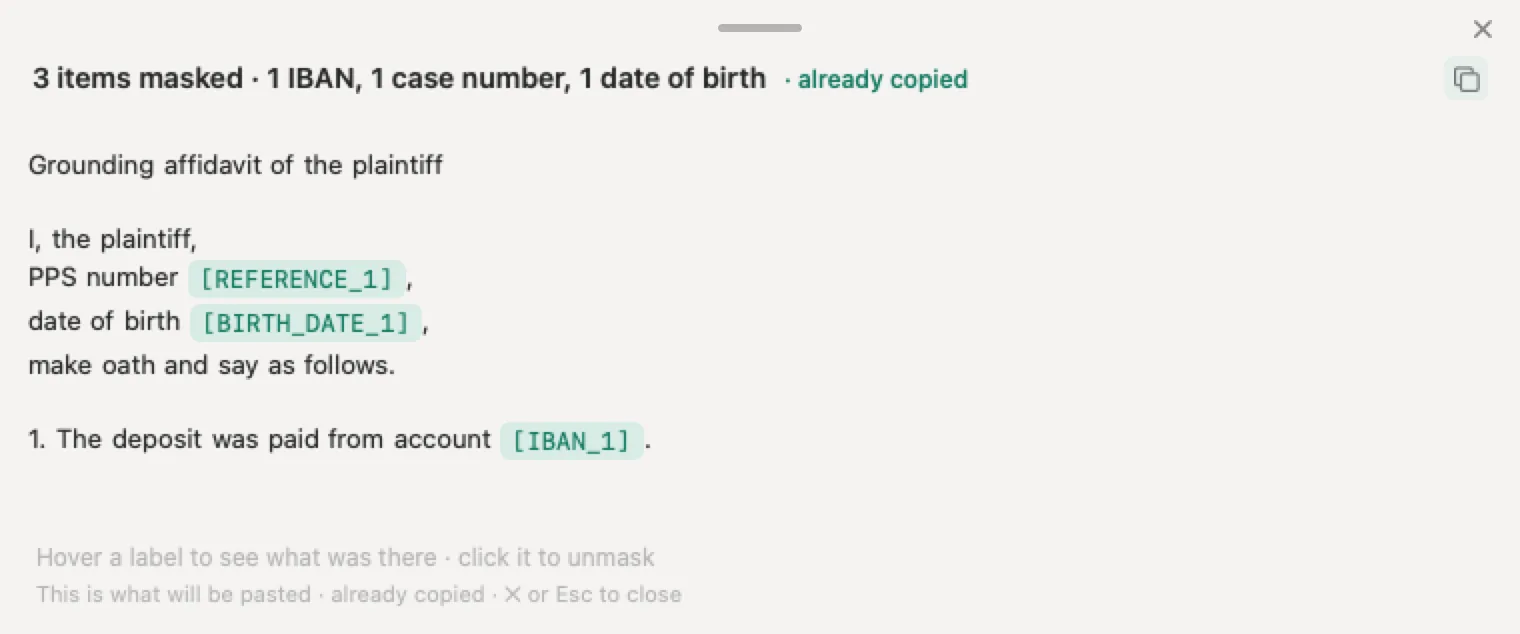
For a single document, use the tool at the top of our guide to what personal data to redact: paste the text or drop the file, and it masks the details, gives you the result to copy or download and discards the document as soon as you have it, as the tool’s privacy notice explains. For a photo of your driving licence or your passport, the photo is read and covered in your browser and never leaves your device.
Sources
- OpenAI Help Center, Deleting and archiving chats in ChatGPT, updated around 20 September 2026, read 4 October 2026. Web steps for deleting one chat; Delete all chats and Archive all chats under Settings, Data controls; Delete all chats cannot be undone and reaches chats in projects; archiving does not delete and keeps the retention period; deleted chats cannot be restored; removal from account view at once and from OpenAI’s systems within 30 days, with its exceptions; deleting a chat does not delete Library files. Source
- OpenAI Help Center, How can I delete a conversation in the ChatGPT iOS app, read 4 October 2026. The menu icon (≡), press and hold, Delete in red; deletion is permanent. Source
- OpenAI Help Center, How can I delete a chat conversation in the ChatGPT Android app, read 4 October 2026. The two lines in the top left corner, press and hold, Delete in red; deletions are irreversible. Source
- OpenAI Help Center, How is data retained in the macOS app, read 4 October 2026. Conversations, screenshots and files in the macOS app follow the same retention policies as the web version. Source
- OpenAI Help Center, How to archive and delete Codex chats in the ChatGPT app, read 4 October 2026. Codex chats must be archived before they can be deleted. Source
- OpenAI Help Center, Temporary chat in ChatGPT, updated around 20 September 2026, read 4 October 2026. Temporary, Personalized or Unpersonalized; not in history, no memories, not used to improve models; kept up to 30 days for safety; a saved temporary chat becomes a regular chat. Source
- OpenAI Help Center, ChatGPT release notes, entry of 27 August 2026. Temporary chats can be personalised and saved. Source
- OpenAI Help Center, Memory in ChatGPT, updated around 20 September 2026, read 4 October 2026. Settings, Personalization, Memory; saved memories stored separately from chat history; how to remove something completely; Delete and turn off memory; Reference chat history; logs of deleted memories kept up to 30 days. Source
- OpenAI Help Center, Privacy center in ChatGPT, read 4 October 2026. Deleting a chat does not automatically delete a memory saved from it. Source
- OpenAI Help Center, Sharing conversations and scheduled tasks in ChatGPT, updated around 20 September 2026, read 4 October 2026. Deleting a conversation removes its shared link, except scheduled task links; Manage, Delete shared link, Delete all shared links; deleting a link does not delete the conversation or copies others saved; shared pages not intended for search engine indexing. Source
- OpenAI Help Center, Using Library to manage files in ChatGPT, read 4 October 2026. Files saved until deleted manually; Delete, Recently deleted and Delete forever; deletion within 30 days; files uploaded in a temporary chat are not saved to Library. Source
- OpenAI Help Center, Projects in ChatGPT, read 4 October 2026. Delete project removes its chats, instructions and project only files; Library files remain. Source
- OpenAI Help Center, ChatGPT agent, read 4 October 2026. Agent chats and screenshots deleted from OpenAI’s systems within 90 days. Source
- OpenAI Help Center, Exporting your ChatGPT history and data, read 4 October 2026. Export data, Export, Confirm export; up to 7 days; link expires after 24 hours; plans where export is available; the Privacy Portal route; an export cannot restore deleted chats. Source
- OpenAI Help Center, Deleting your ChatGPT account, updated around 28 September 2026, read 4 October 2026. The steps and the DELETE confirmation; data deleted within 30 days with a limited legal exception; loss of API access; no reactivation; app store subscriptions; reuse of the email after 30 days; no self service deletion on business workspaces. Source
- OpenAI Help Center, Data controls in ChatGPT, and How your data is used to improve model performance, read 4 October 2026. Improve the model for everyone; opting out applies to new conversations; the feedback exception; archiving does not change training eligibility. Source and source
- OpenAI, Europe privacy policy, updated 24 August 2026. OpenAI Ireland Limited, Dublin 1, as controller for the EEA and Switzerland; deletion within 30 days and the deidentified exception; banned content, lawful subpoenas, payment records and the erasure audit record; the right to delete; privacy.openai.com and dsar@openai.com; the Irish Data Protection Commission as lead supervisory authority. Source
- OpenAI, Enterprise privacy at OpenAI, updated 8 January 2026. Workspace administrators control retention; deleted conversations removed within 30 days unless the law requires otherwise. Source
- OpenAI Privacy Portal, last updated 29 April 2026. Make a Privacy Request; Download my data; Delete my ChatGPT account; Do not train on my content; Remove my personal data from ChatGPT responses; not for business offerings. Source
- OpenAI, How we’re responding to The New York Times’ data demands, update of 22 October 2025. The preservation order ended on 26 September 2025; deleted chats again deleted within 30 days; no requirement to keep conversations from the EEA, Switzerland or the UK. Source
- Data Protection Commission, The right to erasure (Articles 17 and 19 of the GDPR), read 4 October 2026. The grounds for erasure without undue delay, and the cases where the right does not apply. Source
- Data Protection Commission, How long will it take, What will it cost and Raising a concern with the commission, read 4 October 2026. One month to act, extendable by two further months; free of charge unless manifestly unfounded or excessive; contact the organisation first, then the online form. Source, source and source
- Google, Gemini Apps Help: Manage and delete your activity, Find and manage your recent chats, Share your chats, and the Gemini Apps Privacy Hub (updated 24 September 2026), read 4 October 2026. Deleting one chat and all activity; auto delete at 18 months by default; 72 hours with Keep Activity off; human reviewed chats kept up to three years; deleting public links. Source, source, source and source
- Anthropic, Claude Help Center: Delete or rename a conversation (10 August 2026) and Use Claude’s chat search and memory, and Claude Privacy Center: How long do you store my data (1 July 2026), read 4 October 2026. Delete and Select all; removal from history at once and from the back end within 30 days; deleted chats not used for future training; memory entries not removed when a chat is deleted; up to five years where training is allowed. Source, source and source
- Microsoft Support, Microsoft Copilot: your privacy controls and choices (17 September 2026) and Manage your Copilot activity history in the privacy dashboard (21 August 2026), read 4 October 2026. The new app from 18 August 2026; deleting one chat; Delete all activity history; Saved memories; turning memory off does not delete saved memories. Source and source
Nonimo is the software that does this on your own computer: it masks client names and IDs before your text reaches ChatGPT. No account needed, and the app does it without your files leaving your machine.
Common questions
How do I delete ChatGPT history permanently?
For a single chat, select the three dots beside it, choose Delete and confirm, or on a phone press and hold its title. For the whole list, go to Settings, then Data controls, and pick Delete all chats. OpenAI's help centre, read on 4 October 2026, says deleted chats vanish from your account at once and from its systems within 30 days, apart from what it must keep for legal or security reasons.
Will ChatGPT still remember things from a chat I deleted?
It can. OpenAI keeps saved memories apart from your chats, which means a memory built from a deleted conversation can stay behind. Go to Settings, then Personalization, then Memory, and remove it there too. Nonimo helps from the other end: the details it covers never reach the chat in the first place, so there is nothing of them to remember.
What is the difference between archiving and deleting in ChatGPT?
Archiving only moves the chat out of the sidebar. OpenAI says an archived chat stays saved to your account, remains searchable, keeps the same retention period and stays just as eligible for model training as before. To get rid of an archived chat for good, go to Settings, then Data controls, then Archived chats, and choose Delete beside it.
How long does OpenAI keep a deleted ChatGPT chat?
Up to 30 days in most cases. OpenAI says a deleted chat disappears from your account view at once and is scheduled for permanent deletion from its systems within 30 days. The exceptions are content already deidentified for model improvement and data it must keep longer for security or legal obligations, such as a lawful subpoena. Chats and screenshots from ChatGPT agent run to 90 days.
Can I recover a deleted ChatGPT conversation?
No. OpenAI's help centre says a deleted chat cannot be restored in ChatGPT or through OpenAI Support, and it mentions no bin for chats. If a conversation might matter later, take an export first, under Settings, then Data controls, then Export data. The link comes by email and only works for a day, so download the file as soon as it lands.
Does deleting ChatGPT history remove my chats from training?
OpenAI's privacy policy says deleted data is removed within 30 days unless it was already deidentified and disassociated from your account when you allowed your content to be used to improve its models. Switching off Improve the model for everyone applies to new conversations. Nonimo replaces names and identifiers on your computer, so a chat used for training carries labels rather than your clients' details.
Can I ask OpenAI to erase my data under the GDPR in Ireland?
Yes. OpenAI's Europe privacy policy names OpenAI Ireland Limited, in Dublin 1, as the controller for the EEA and lists deletion among your rights. Use the account tools, or the Privacy Portal if you cannot. The Data Protection Commission says a controller has to act within one month, extendable by two further months, and OpenAI names the DPC as its lead supervisory authority.
What happens to a link I shared if I delete the chat?
It usually goes with it. OpenAI says the link is removed along with the conversation, unless that conversation has a scheduled task, whose link has to be removed on its own. Removing only the link stops new visits but leaves the copies of anyone who already continued the chat. Every link you have made is listed under Settings, then Data controls, then Shared links.