How to clear ChatGPT history, and what each button keeps
· Written and maintained by Nonimo
To clear one ChatGPT chat, open the ••• menu beside it, choose “Delete” and confirm; on a phone, press and hold it and tap “Delete”. To clear all ChatGPT history, open Settings, then “Data controls”, and choose “Delete all chats”. The chats vanish from your account at once and, according to OpenAI’s help centre, checked on 4 October 2026, leave its systems within 30 days. Memories, Library files and shared task links each need a clear of their own.
That last sentence is the part most people miss, and it is why this page exists. ChatGPT has six different buttons that sound like they clear something, and each one clears a different thing. This guide goes through where each button is on the web and on a phone, what it removes, and what it leaves behind, with the date we checked every step.
It is a procedure page. What OpenAI collects in the first place, whether it trains on your chats and where its servers are is covered in our guide to whether ChatGPT saves your data, and it is worth reading alongside this one if client files are involved.
How to clear ChatGPT history one chat at a time
Deleting a single conversation is the control most people want, and it is the same idea everywhere: find the chat, open its menu, choose “Delete”. The labels below are the ones OpenAI’s English help centre prints.
On the web
- Open your ChatGPT chat history in the sidebar.
- Hover over the chat you want to remove and select the more options menu (•••).
- Select “Delete”.
- Confirm the deletion.
The chat disappears from your sidebar straight away. OpenAI’s article on deleting and archiving chats, updated around 20 September 2026, is blunt about the next part: you cannot restore a deleted chat in ChatGPT or through OpenAI support.
On an iPhone or Android phone
- Open the ChatGPT app.
- Tap the menu icon in the top left corner to open your conversation history.
- Find the chat and press and hold its title.
- Tap “Delete” in the menu that pops up. It is shown in red.
OpenAI’s iPhone and Android articles both say the deletion is permanent. The Mac and Windows apps have no separate article for deleting a chat; OpenAI’s general steps are the ••• menu and “Delete” above, and for the macOS app it says conversations follow the same retention policies as the web version.
If what you are clearing is a conversation that held a client’s details, the deletion is worth noting in your file, with the date. The reason is Australian and comes later in this guide, under the Privacy Act. For now, the habit costs ten seconds and is easier to keep than to reconstruct. Next time, a client’s tax file number can be covered before it reaches the chat, and then there is nothing to note.
How to clear all ChatGPT history at once
The bulk control is not under General. It sits with the other data settings.
- Open “Settings” from your profile menu.
- Select “Data controls”.
- Select “Delete all chats” (or “Archive all chats”, which is a different thing, covered below).
- Read the confirmation message, then continue.
OpenAI says this action can reach every chat in your current account or workspace, including chats inside projects, and that “Delete all chats” cannot be undone. If you use ChatGPT in more than one workspace, run it in each one: the setting acts on the account you are signed into, not on every account you own.
Projects have their own delete. From a project’s ••• menu, “Delete project” removes its chats and instructions, together with files stored only in that project. Files you also saved separately in Library survive it, which is the first of several places where a file outlives the chat it arrived in.
When a whole team needs to clear its history
On a practice account, the instruction to staff is usually the hard part, because people sign in with whatever is already open. A one page rule saying who clears what, and when, belongs in your AI use policy rather than in an email nobody can find in March.
On ChatGPT Business and Enterprise, the workspace administrator sets how long chats are kept, and compliance tools the organisation has authorised may still access eligible data under its retention policy, OpenAI notes. Staff clearing their own sidebar is not the whole story there: ask whoever runs the workspace what the retention setting says.
Archive is not delete
“Archive” sits right next to “Delete” in the ••• menu, needs no confirmation and makes the chat vanish from the sidebar. That makes it an easy button to press for someone who believes they are clearing their history.
OpenAI’s help centre is unambiguous. An archived chat is taken off the regular sidebar and nothing more: it is still stored, still searchable and kept for exactly as long as before. The data controls article adds that archiving makes no difference to whether the chat can be used for model training.
To find and delete archived chats:
- Open “Settings”, then “Data controls”.
- Select “Archived chats” or “View archived chats”, depending on your device. If “Manage” appears, select it.
- Next to a chat, select “Unarchive” to bring it back or “Delete” to remove it.
A chat full of client details that was archived rather than deleted is still sitting in the account, findable by anyone who signs in. If that chat should never have existed, the useful question is not about the archive at all but about whether the original paste was a notifiable breach, which our guide to client data and ChatGPT works through.
What each button clears, and what it leaves
Put side by side, the six controls do six different jobs. This is the table to keep open while you work through the settings.
| Button | Clears | Keeps |
|---|---|---|
| Delete (one chat) | The conversation, its shared link, its images in My images | Memories drawn from it, files saved in Library |
| Delete all chats | All chats in that account or workspace, project chats too | Memories, Library files, shared task links |
| Archive | Nothing, it just hides the chat from the sidebar | All of it, searchable as before |
| Temporary Chat | Any entry in history or memory | OpenAI’s safety copy, up to 30 days |
| Delete shared link | Public access to that link | Your chat, and copies others made by continuing it |
| Delete account | Everything above, within 30 days | Limited data the law requires or permits OpenAI to keep |
OpenAI help centre articles on deleting and archiving chats, memory, sharing, Library, temporary chats and account deletion, checked 4 October 2026.
The right hand column is what the rest of this guide deals with. The same habit applies to the documents you upload, because a file carries more than its visible text, and the personal identifiers that hide in a document are the ones that end up in a Library nobody checks.
Memory, files and shared links: what outlives a deleted chat
Three things are stored apart from the conversation, so clearing ChatGPT history does not clear them. Each has its own place in settings.
Saved memories
OpenAI is explicit about this one: memories live in their own store, away from your chat history, and removing the chat a memory came from leaves the memory where it is. A client’s surname that ChatGPT decided to remember can outlive every conversation it came from.
- Open “Settings”, then “Personalization”, then “Memory”.
- Use “Manage” or “Saved memories”, depending on what your account shows, to see what is stored.
- Delete the memories you do not want, and then delete the chat where you first shared that detail.
Since 12 June 2026 the memory summary’s ••• menu also offers “Delete and turn off memory”, which deletes what the summary shows and switches Memory off without touching past chats. Logs of a deleted memory can stay with OpenAI for up to 30 days, for safety and debugging. Switching off “Reference chat history” puts what ChatGPT picked up from past chats on a 30 day path to deletion.
Files in Library and Space
Since Library arrived in March 2026, files you upload or create are saved to your account outside the chat. OpenAI’s wording is direct: a file saved separately in Library stays when its chat goes. Select the file in Library and choose “Delete” or the bin icon; if there is a “Recently deleted” section, use “Delete forever” there, and the file is removed from OpenAI’s systems within 30 days.
On eligible Pro, Business and Enterprise accounts, Space replaced Library on 29 September 2026, and a page you delete there moves to its Trash. Images you generated are different again: OpenAI says to remove one from My images you delete the conversation that created it.
If the file you uploaded was a photo of a driver licence, the cleanest fix is upstream. Our NSW and VIC licence guides cover the card number and add a watermark in your browser, so the photo never leaves your device.
Shared links
Deleting a conversation removes its shared link, OpenAI says, with one exception: deleting a chat with a scheduled task only pauses the task, and the task’s own shared link keeps working until you delete it on its own. To review every link you have created:
- Open “Settings”, then “Data controls”.
- Next to “Shared links”, select “Manage”.
- Choose “Delete shared link” for one, or “More actions” and then “Delete all shared links”.
Removing a link cuts off anyone who opens it later. Your conversation stays, and so do the copies of people who had already continued it. Shared pages are not meant for search engines, OpenAI notes, but that does not make a link private: anyone holding it can still send it on.
Temporary Chat: the history you never have to clear
The simplest way to clear ChatGPT history is not to create it. Temporary Chat keeps a conversation out of your history from the first message.
- Open a new chat.
- Select “Temporary”.
- Choose “Personalized” or “Unpersonalized” before you send the first message.
For as long as it stays temporary, OpenAI says the chat skips your history, leaves memory untouched and is not used to improve its models. It may be kept for up to 30 days for safety purposes. Files uploaded in a temporary chat are not saved to your account or Library.
Since 27 August 2026 there are two twists. A temporary chat can now be personalised, which means it can draw on your existing memories and custom instructions, and it can be saved. A saved temporary chat becomes a regular chat, with ordinary retention, memory and training rules, and you then clear it like any other.
For a conversation about someone’s health or their criminal record, which the Privacy Act treats as sensitive information with a stricter rule of its own, the 30 day safety copy still exists, so the details have still left your office.
Export before you clear, and how to delete the account
A cleared chat cannot be brought back, so if there is any chance you will need a conversation, export first. OpenAI says plainly that an export cannot restore chats that have already been deleted.
- Open “Settings”, then “Data controls”.
- Under “Export data”, select “Export”.
- Select “Confirm export”.
- When the email or text message arrives, select “Download data export” while signed in to the same account.
Allow up to 7 days for it to turn up, OpenAI says, and then move quickly: the download link dies 24 hours after it reaches you. Inside the ZIP is your chat history plus other account data.
Free, Go, Plus and Pro accounts can export, as can eligible Edu ones; Business, Enterprise and ChatGPT for Healthcare cannot. If you cannot sign in, the privacy portal at privacy.openai.com offers the same download under “Make a Privacy Request”, then “I have a consumer ChatGPT account”, then “Download my data”.
An export full of client conversations is itself a file of personal information, so store it where your practice keeps client records, not in a downloads folder. If your clients were told how AI is used on their file, the AI clause in your engagement letter is also the place to say what you keep and what you clear.
Deleting your ChatGPT account
- Open “Settings”, then “Account”.
- Next to “Delete account”, select “Delete”.
- Enter your email address or phone number and type DELETE.
- Select “Permanently delete my account”.
OpenAI says it deletes your data within 30 days, except for a limited set it may keep for longer where the law requires or permits. An App Store or Google Play subscription is not cancelled by deleting the account, so end it first. Delete any shared task links first; other shared links go with the account. The same email can open a new account after 30 days. Self service deletion is not offered on Business, Enterprise, Edu or Healthcare workspaces.
What OpenAI keeps after you delete, and for how long
Clearing your history is instant on screen and slower behind it. OpenAI describes the sequence the same way in its help centre and in the privacy policy that covers Australia, updated 6 February 2026.
The help centre puts it in one sentence. ChatGPT removes the chat from your account view immediately, and OpenAI schedules it for permanent deletion from its systems within 30 days, unless it was already de-identified and disassociated from your account, or OpenAI must keep it longer for security or legal obligations.
The exceptions, and the agent’s longer clock
The privacy policy that covers Australia words the exceptions the same way: data OpenAI must keep longer, and content that was already de-identified. ChatGPT agent is slower than the rest: its chats and screenshots are deleted from OpenAI’s systems within 90 days.
The best known legal exception has ended. OpenAI was ordered in 2025 to preserve consumer chats during the New York Times litigation, and its update of 22 October 2025 says those obligations ended on 26 September 2025 and that deleted chats and temporary chats are again deleted within 30 days.
Training is a separate switch
The exception for de-identified content deserves a careful read. The privacy policy says deleted content leaves within 30 days unless it “has already been de-identified and disassociated from your account when you allow us to use your Content to improve our models”.
OpenAI also says that once you turn off “Improve the model for everyone”, it will not use your new conversations to train its models. Read together, the order matters: switch training off in “Data controls” first, then clear what you no longer want. One more line from OpenAI is worth passing on: rating a reply with a thumbs up or thumbs down means the entire conversation may be used for training, even with training off.
De-identified is a defined word in the Privacy Act, and it means more than a name taken out. The difference between de-identified and pseudonymised data is the distinction that matters here.
Clearing ChatGPT history under the Privacy Act: APP 11.2 and the OAIC
For an Australian practice, clearing ChatGPT history is not only housekeeping. If your organisation is covered by the Privacy Act 1988, two pieces of it bear directly on a chat log full of client details.
The first is the word holds. Section 6(1) says an entity holds personal information if it has possession or control of a record that contains it. The OAIC’s guidelines read that as including a record the entity has the right or power to deal with, even when a third party stores it. A chat history your staff can open, export and delete is, on our reading, exactly that kind of record.
What APP 11.2 asks you to do
APP 11.2 then asks the organisation to take reasonable steps to destroy or de-identify personal information it holds once it is no longer needed for any purpose it may be used or disclosed for under the APPs. The OAIC’s chapter 11 guidelines, version 1.3, updated 3 October 2025, spell out what that means in practice.
| What the OAIC says | Where it bites in ChatGPT |
|---|---|
| Information is destroyed when it can no longer be retrieved | An archived chat can still be retrieved |
| All copies count, including archives and backups | Saved memories and Library files are copies |
| On a third party’s storage, verify the deletion | OpenAI states a 30 day window you can point to |
OAIC, APP Guidelines chapter 11, paragraphs 11.39, 11.49 and 11.50, updated 3 October 2025.
In practice that means deleting rather than archiving, clearing memories and files as well as chats, and keeping a dated note of what was cleared. Whether a given chat is still needed is your call, and it is the same call you make about any other client record.
What deleting cannot reach
The OAIC’s own guidance on commercially available AI products, updated 17 January 2025, describes the limit of all of this in one sentence.
Once personal information has been input into AI systems, particularly generative AI products, it will be very difficult to track or control how it is used, and potentially impossible to remove the information from the system.
The same guidance treats the paste itself as a disclosure to the owners of the chatbot. Clearing the history afterwards tidies your side of it. Which AI tools you can use under the Privacy Act starts from that moment, not from the delete button.
Clearing history in Gemini, Claude and Copilot
The other three assistants Australian offices use have their own buttons and their own clocks. Each has a guide of its own on what it collects; here is only where to press.
Delete Gemini history
In the Gemini web app, hover over a chat in the side panel, click More, then Delete. Google says deleting a chat from your recent chats also deletes it from Gemini Apps Activity, along with content created in it. On a phone, tap Menu, touch and hold the chat under Recent, and tap Delete.
To delete Gemini history in bulk, open Activity from gemini.google.com and choose Delete, then All time, Last hour, Last day or Custom range. By default Google automatically deletes activity older than 18 months, and you can change that to 3 or 36 months. Turning Keep Activity off does not make a chat vanish instantly either: Google holds it with your account for up to 72 hours.
Two points from Google’s privacy hub, updated 24 September 2026, change what a deletion means. Anything a human reviewer has already read is outside the reach of your delete: Google keeps those chats for up to three years, cut loose from your account. And for public links, delete them yourself in Settings & help, then Your public links. Our guide to what Gemini shares covers the reviewer process in full.
Delete Claude chat history
In a browser, hover over the chat in the sidebar (or in “Chats and tasks”), open the ⋮ menu, pick “Delete” and confirm. For a batch, “Chats and tasks”, then ⋮, then “Select” lets you tick chats, or “Select all”, before deleting. On iPhone, a touch and hold on the chat brings up “Delete”.
Anthropic’s help article, dated 10 August 2026, says a deleted chat leaves your history immediately and its back end within 30 days. Memory works like ChatGPT’s: deleting a chat does not remove memory entries generated from it, so clear those in Settings, then Memory. If you allowed training, Anthropic says a deleted chat will not train future models, though it stays in training already under way. Our Claude guide sets out the five year window.
Delete Copilot history
Microsoft released a new Copilot app on 18 August 2026, and its help pages now describe it separately from the older one. In the new app, select the conversation in the Chats list, choose More next to it, then Delete.
To clear everything, Microsoft’s privacy dashboard has the control: under Privacy, open Copilot, then Your Copilot app activity history, then Copilot apps, select “Delete all activity history” and confirm with “Clear”. If you want a record first, “Export all activity history” on the same page downloads a CSV file. Saved memories sit apart: Manage, next to Saved memories under Settings and Personalization, lets you remove them, and switching memory off leaves the saved ones in place.
Microsoft’s pages for the older app give 18 months of conversation history; its pages for the new app do not state a retention period. For a work account the picture is different again, as our Copilot guide explains.
The step that comes before clearing ChatGPT history
Every control above works after the text has arrived. The way to have nothing to clear is to send ChatGPT text in which the client details are already covered.
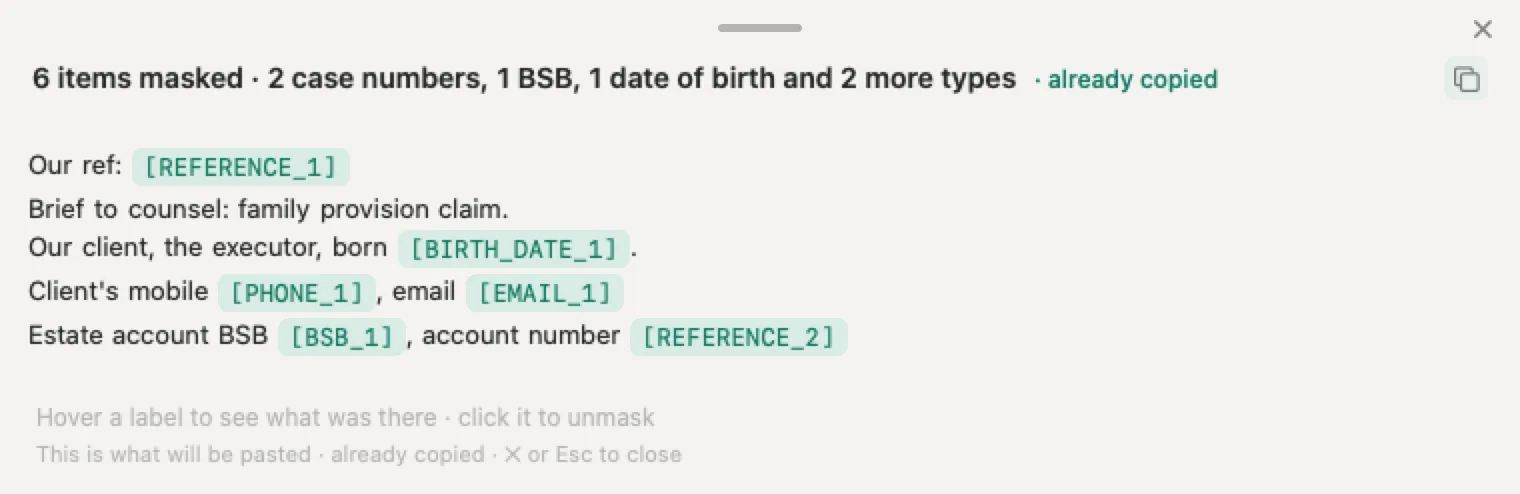
Nonimo is an app for Mac and Windows. You copy the text, press the key, and it swaps names, TFNs, Medicare numbers, BSBs, account numbers, dates of birth and file references for labels, on your computer, before you paste. ChatGPT receives the text with labels where the details were, so your client data does not leave your computer. Every label is shown on screen, and one click unmasks it.
When the answer comes back, the app puts the real details back on your screen. The map that does that is kept encrypted on your own disk, and what the app sends us is a daily usage count with no text in it. Our security page lists all of it.
For a one off document, the tool in our guide to personal identifiers to remove before AI covers the identifiers and gives you the result, and the document is discarded as soon as you get it, as the tool’s privacy notice sets out.
Sources
Every source below was checked on 4 October 2026. OpenAI’s help centre shows only relative dates; the approximate dates given are counted back from that day.
- OpenAI, “Deleting and archiving chats in ChatGPT”, updated about 20 September 2026. The steps to delete one chat and all chats under Data controls, that deleted chats cannot be restored, archive versus delete, archived chats staying searchable with the same retention, the 30 day deletion and its exceptions, and compliance tools on business workspaces.
- OpenAI, “How can I delete a conversation in the ChatGPT iOS app?” and the Android article. The menu icon, press and hold, and Delete in red; deletions are permanent.
- OpenAI, “How is data retained in the macOS app?”. Conversations in the macOS app follow the same retention policies as the web version.
- OpenAI, “Chat and file retention in ChatGPT”. Chats and archived chats kept until deleted, and the 30 day deletion window.
- OpenAI, “Data controls in ChatGPT”, updated about 29 September 2026. Archiving does not change training, the “Improve the model for everyone” setting, and the feedback rule.
- OpenAI, “How your data is used to improve model performance”. Turning training off covers new conversations, and the privacy portal option.
- OpenAI, “Memory in ChatGPT”, updated about 20 September 2026. The memory path, saved memories stored apart from chats, logs of deleted memories kept up to 30 days, Reference chat history, and Delete and turn off memory.
- OpenAI, “Using Library to manage files in ChatGPT”. Deleting a chat does not delete Library files, Recently deleted, Delete forever, and temporary chat uploads not saved.
- OpenAI, “Projects in ChatGPT” and OpenAI, “Images in ChatGPT”. Delete project, and deleting a generated image by deleting its conversation.
- OpenAI, “ChatGPT agent”. Agent chats and screenshots deleted within 90 days.
- OpenAI, “Sharing conversations and scheduled tasks in ChatGPT”. Shared links removed with the conversation, the scheduled task exception, Manage and Delete all shared links, and links not intended for search engine indexing.
- OpenAI, “Temporary Chat in ChatGPT” and the ChatGPT release notes. Temporary chat steps, the 30 day safety copy, personalised and saved temporary chats from 27 August 2026, Delete and turn off memory from 12 June 2026, and Space from 29 September 2026.
- OpenAI, “ChatGPT Space: sharing, data and controls”. Space replacing Library for eligible accounts, and deleted pages moving to Trash.
- OpenAI, “Exporting your ChatGPT history and data”. The export steps, up to seven days, the 24 hour link, plan availability, and that an export cannot restore deleted chats.
- OpenAI, “Deleting your ChatGPT account”, updated about 28 September 2026. The account deletion steps, deletion within 30 days with legal exceptions, subscriptions, email reuse, and business workspaces.
- OpenAI privacy policy, the version for users outside Europe, updated 6 February 2026. Removal within 30 days and the de-identified training copy.
- OpenAI, “How we’re responding to The New York Times’ data demands”, update of 22 October 2025. The preservation obligations ending on 26 September 2025.
- OpenAI privacy portal, last updated 29 April 2026. Download my data and Do not train on my content.
- Privacy Act 1988 (Cth). Section 6(1), the meaning of holds, and Australian Privacy Principle 11.2.
- OAIC, APP Guidelines chapter B, paragraphs B.82 to B.84. Holds includes a record the entity has the right or power to deal with, including storage outsourced to a third party.
- OAIC, APP Guidelines chapter 11, version 1.3, updated 3 October 2025. Paragraphs 11.39, 11.49 and 11.50 on copies and backups, irretrievable destruction, and verifying deletion on third party storage.
- OAIC, Guidance on privacy and the use of commercially available AI products, updated 17 January 2025. The sentence on information being potentially impossible to remove, and the paste as a disclosure.
- Google, “Find and manage your recent chats in Gemini Apps” and Google, “Manage and delete your activity in Gemini Apps”. Deleting one chat on web and mobile, bulk deletion by time range, auto delete at 18 months, and 72 hours with Keep Activity off.
- Google, Gemini Apps privacy hub, updated 24 September 2026, and Google, “Share your chats from Gemini Apps”. Reviewed chats kept up to three years, and deleting public links.
- Anthropic, “Delete or rename a conversation”, 10 August 2026. Steps on web and mobile, and deletion from the back end within 30 days.
- Anthropic, “Use Claude’s chat search and memory” and Anthropic, “How long do you store my data?”, 1 July 2026. Memory entries surviving a deleted chat, Settings then Memory, and deleted chats kept out of future training.
- Microsoft, “Microsoft Copilot: your privacy controls and choices”, September 2026, and Microsoft, “Manage your Copilot activity history in the privacy dashboard”. The new app from 18 August 2026, deleting a chat, Delete all activity history, export to CSV, and saved memories.
- Microsoft, “Conversation history in Microsoft Copilot”. The 18 months of history in the older app.
Nonimo is the software that does this on your own computer: it masks client names and IDs before your text reaches ChatGPT. No account needed, and the app does it without your files leaving your machine.
Common questions
How do I clear my ChatGPT history?
To clear one chat, open the ••• menu next to it and choose Delete, then confirm. To clear ChatGPT history in one go, open Settings, then Data controls, and choose Delete all chats. OpenAI's help centre says the chats leave your account at once and are scheduled for deletion from its systems within 30 days. Saved memories, Library files and shared task links are cleared separately.
Does deleting a ChatGPT chat delete it permanently?
From your account, yes, straight away, and OpenAI says you cannot restore it, even through support. From OpenAI's systems it goes within 30 days, unless the content was already de-identified and disassociated from your account, or OpenAI has to keep it longer for security or legal reasons. ChatGPT agent chats and their screenshots take up to 90 days.
Does archiving a chat clear it from ChatGPT?
No. An archived chat just drops out of the sidebar, with no confirmation step. OpenAI says archived chats stay searchable, keep the same retention period and are treated the same way for model training. To get rid of one, open Settings, then Data controls, then Archived chats, and choose Delete next to it.
Does clearing a chat also clear ChatGPT's memory of it?
Not necessarily. OpenAI keeps memories in a store of their own, away from chat history, so a detail ChatGPT remembered can stay after the chat it came from is gone. Clear it under Settings, then Personalization, then Memory. OpenAI may keep logs of deleted memories for up to 30 days for safety and debugging.
Can a cleared ChatGPT chat be brought back?
No. OpenAI's help centre says a deleted chat cannot be restored in ChatGPT or through OpenAI support, and an export cannot bring back chats that are already gone. If you might need a conversation later, export your data first from Settings, then Data controls, then Export data. The export can take up to seven days to arrive.
Does clearing my ChatGPT history stop OpenAI training on it?
Clearing history and switching off training are separate controls. OpenAI says turning off Improve the model for everyone stops it using your new conversations, and that its 30 day deletion does not cover content already de-identified and disassociated from your account while training was on. Turn the setting off first, then clear what you no longer want.
How do I clear ChatGPT history on an iPhone or Android phone?
Open the app and tap the menu icon in the top left corner to see your chats. Press and hold the chat you want to remove and tap Delete, shown in red. To clear everything, go to Settings, then Data controls, and choose Delete all chats. OpenAI says deletions made in the app cannot be undone.
Does the Privacy Act require us to delete ChatGPT chats with client data?
For an organisation covered by the Act, APP 11.2 asks for reasonable steps to destroy or de-identify personal information it holds once it is no longer needed. The OAIC reads holds as including records you have the right or power to deal with on a third party's storage. A chat history your staff can open and delete is, on our reading, one of those records.
What stops client details reaching ChatGPT at all?
Masking them before you paste. The OAIC warns that once personal information goes into a generative AI product it may be impossible to remove. Nonimo, an app for Mac and Windows, swaps names, TFNs, Medicare numbers, BSBs and other identifiers for labels on your computer, so ChatGPT receives labels where the details were and your history holds labels instead of client data.